Bluehost Review 2026: Best for Beginners
Bluehost Review 2026 shows that Bluehost is still among the most user-friendly platforms for beginners. WordPress.org strongly recommends Bluehost as a top-tier, user-friendly hosting solution for novices and small businesses in 2026. Easy one-click WordPress installation, a round-the-clock support staff, and free domain/SSL certificates are among its primary advantages, making it a cost-effective and effective option for creating and maintaining websites.
Bluehost Review 2026: Best for Beginners & Businesses?
Bluehost is a beginner-friendly WordPress hosting trusted by many. It offers easy setup, an intuitive dashboard, and essential features like SSL, CDN, and a free first-year domain.
Best for Beginners
Automatic WordPress installation and a simple interface make Bluehost ideal for newcomers. Users like its ease of use, though some note slower load times and higher renewal costs.
Best for Businesses
Bluehost provides scalable hosting, optimized WooCommerce plans, and strong security tools. Backup options and modern storage support growth, but shared hosting limits and renewal pricing are considerations.
Detailed Bluehost Review 2026

See the Best WordPress Hosting👉
In 2026, Bluehost is still a behemoth, juggling its illustrious reputation as a host that is recommended by WordPress with cutting-edge AI-powered solutions. Experienced customers frequently point to aggressive upselling and renewal price rises as major disadvantages, despite the fact that it excels at onboarding new users.
Core Performance & Reliability for 2026 – Bluehost Review
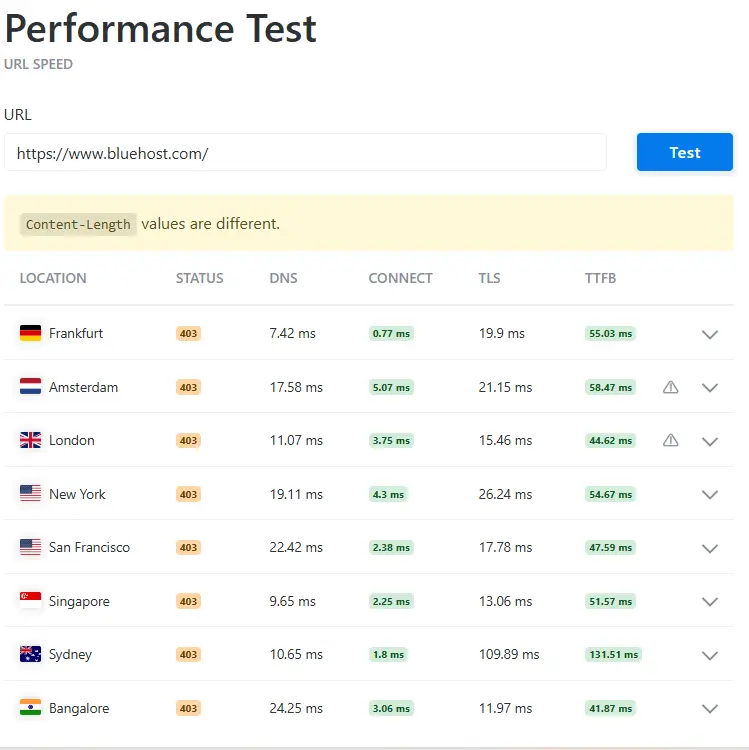
Speed: For optimized websites, average load times fall between 1.3 and 1.9 seconds. Although performance may suffer for heavily trafficked websites on shared plans, it maintains these speeds by using NVMe SSD storage and Nginx caching.
Although a formal Service Level Agreement (SLA) is typically only offered for Bluehost Cloud plans, uptime consistently reaches the 99.99% mark in tests.
Data centers: Mostly located in the United States (Utah), which offers top performance for audiences in North America, but may result in increased latency for visitors from other countries.
Important Aspects of 2026// key features
WonderSuite AI: By responding to a few easy questions, this integrated AI website builder assists you in creating a working WordPress website.
Onboarding: WordPress is one of the easiest platforms for new users to get started with, thanks to its one-click installation and simplified dashboard.
Security: Malware detection, DDoS protection, and a free SSL certificate are included in every plan. Domain privacy and automated daily backups are added in higher tiers.
Support: available by phone and live chat around-the-clock. Basic inquiries are answered promptly, but complex technical problems can occasionally take longer to resolve.
Is Bluehost Good for Beginners & Small Businesses?
In 2026, Bluehost continues to be a top-tier recommendation for beginners and small businesses, particularly those building on WordPress. It is praised for its streamlined onboarding and unique AI tools, though critics point to steep renewal costs and inconsistent support as notable downsides.
Why It’s Beneficial for Novices
Guided Onboarding: Using straightforward queries, Bluehost’s WonderSuite AI tools—WonderStart and WonderBlocks—assist users with site setup, layout design, and theme selection.
Automated WordPress Setup: New users can start editing right away from a streamlined interface because WordPress is installed automatically when an account is created.
Essentials Included: A free SSL certificate for security, a free Content Delivery Network (CDN) to increase worldwide speeds, and a free name for the first year are included with all annual subscriptions.
Ease of Use: For basic operations, it uses a customized, user-friendly Account Manager; for more experienced users, the conventional cPanel is still accessible.
Why It Benefits Small Enterprises
Scalability: Without requiring difficult migrations, businesses may begin using shared hosting for less than $3.00 per month and quickly move to VPS, Dedicated, or Bluehost Cloud as traffic increases.
E-commerce Integration: Pre-installed necessary store plugins, inventory management tools, and secure payment processing are all included with dedicated WooCommerce plans.
24/7 help: For troubleshooting, small business owners can get professional help by phone and live chat at any time of day.
Built-in Marketing Tools: To help organizations build credibility, plans include professional email trials and basic SEO tools (such as Yoast SEO integration).
Crucial Points to Remember in 2026
Pricing Increases: After the first term, renewal rates might increase by 100% to 300%. The first pricing, which is typically $1.99 to $3.99/month, is promotional.
- Support Consistency: While many find support fast, some users report “vague” answers and aggressive upselling of add-on services.
- Performance: Shared hosting provides solid uptime (99.9%–100% in tests), but performance can be inconsistent under very heavy traffic compared to premium cloud hosts.
Bluehost at a Glance — Quick Verdict & Key Specs
Quick Verdict:
Ideal For: Bloggers, small companies, and first-time WordPress users seeking a one-stop shop that includes a domain and AI-assisted design.
Avoid if you need data centers outside of the US for localized performance or if you are on a tight long-term budget (renewal rates are expensive).
All Tiers of the Standard Plan Features
- Free Domain: Part of annual plans for the first year.
- Free SSL certificates, DDoS defense, and malware detection are essential components of security.
- Free SSL certificates, DDoS defense, and malware detection are essential components of security.
- One-click WordPress installation and AI-powered “WonderSuite” are examples of onboarding.
- Support is available around-the-clock by phone and live chat (phone is not included with basic Starter subscriptions).
- 30-day money-back guarantee on hosting costs (domain fees not included).
Do you require a high-performance solution for an online store, or are you just starting a basic personal blog? This decision will decide if you should upgrade to Bluehost Cloud or continue using shared hosting.
Who Bluehost Is Best For (Beginners, WordPress, Small Businesses)
For WordPress novices looking for an automated, AI-driven setup using WonderSuite, Bluehost is the best option. Small businesses that require an all-in-one solution that includes a free domain and SSL will find it suitable. Although it’s ideal for people who value simplicity of use and round-the-clock assistance, customers on a tight budget should balance the low initial costs against high renewal costs.
When Bluehost May Not Be the Right Choice
You might not be a good fit for Bluehost if:
- Budget-Strict: Following the first year, renewal rates sharply increase.
- Global-Focused: International speeds are impacted by the majority of data centers located in the US.
- Upsell-Averse: Paid add-ons are regularly promoted on the dashboard.
- Advanced Developer: When compared to unmanaged VPS options, higher tiers may feel constrictive.
Is Bluehost Trustworthy in 2026? Ownership & Reputation Explained
Bluehost continues to have a complicated reputation in 2026. Because of its lengthy history and government endorsements, it is generally regarded as reliable for novices; however, expert users criticize it for its corporate ownership and long-term expenses.
Corporate History & Ownership
Parent Company: Endurance International Group (EIG) and Web.com merged to form Newfold Digital, a huge conglomerate that owns Bluehost.
Company Model: Newfold Digital is renowned for its “rollup” strategy, which involves purchasing well-known independent providers (such as Bluehost and HostGator) and combining their support and infrastructure in order to optimize revenue.
Infrastructure Shift: In an effort to update its hardware and boost performance worldwide, Bluehost started moving its servers to Oracle Cloud in 2025.
Current Reputation (2026)
WordPress Endorsement: Since 2005, WordPress.org has formally recommended Bluehost. For many, this remains the primary seal of trust, ensuring the platform is always optimized for the latest WordPress updates.
Diverse User Attitudes:
Positive: Bluehost has a solid 4.6/5 rating on sites like Trustpilot, where customers compliment the company’s quick, round-the-clock chat assistance and simple, AI-powered onboarding.
Negative: More scathing reviews are frequently found on community sites like Reddit. Aggressive upselling, large price increases at renewal, and help representatives who are perceived as following canned scripts rather than providing in-depth technical solutions are common grievances.
The Trust Verdict – Bluehost Review
Who Owns Bluehost & Why It Matters (EIG / Newfold Digital)
Newfold Digital, a gigantic hosting behemoth created in 2021 from the merger of Endurance International Group (EIG) and Web.com, is the owner of Bluehost.
- Why This Ownership Matters to You Consolidated Support: Bluehost has a consolidated support structure, similar to other Newfold businesses (like HostGator). Despite being accessible around the clock, this occasionally results in higher wait times or generic scripts instead of expert technical assistance.
- Emphasis on Upselling: The Newfold business strategy uses aggressive upselling of add-ons (such as SiteLock or SEO tools) within your dashboard after offering low introductory fees to bring you in.
- Infrastructure Reliability: A titan’s ownership entails enormous resources. This resulted in a collaboration with Oracle Cloud Infrastructure in 2026, offering top-tier hardware that small, independent hosts frequently cannot afford.
- The WordPress Influence: Newfold maintains a deep relationship with the WordPress core team, ensuring Bluehost stays officially recommended despite the corporate shift.
The Verdict: You aren’t buying from a boutique “mom-and-pop” host. You’re joining a corporate ecosystem optimized for beginner convenience and high-volume efficiency.
Real Truth About Bluehost Reviews (Bias vs Real-World Use)
The truth underlying Bluehost evaluations is a combination of grassroots criticism and high-level endorsements:
- Affiliate Bias: Because Bluehost offers some of the largest affiliate commissions in the business, several Top 10 lists rank them #1, which may distort expert reviews.
- Official Trust: Because Bluehost engineers directly contribute to the core code of WordPress, their official WordPress.org recommendation is a valid technical credential.
- User Divide: Novices who are satisfied with simple settings tend to give Trustpilot ratings of 4.2+. Reddit and developer forums, on the other hand, are harsher, pointing out upselling and renewal price increases as deal-breakers.
- Performance Reality: It works well for light to medium traffic, but its shared servers can be constraining for heavy users.
Bluehost Hosting Plans & Pricing — WordPress Focused
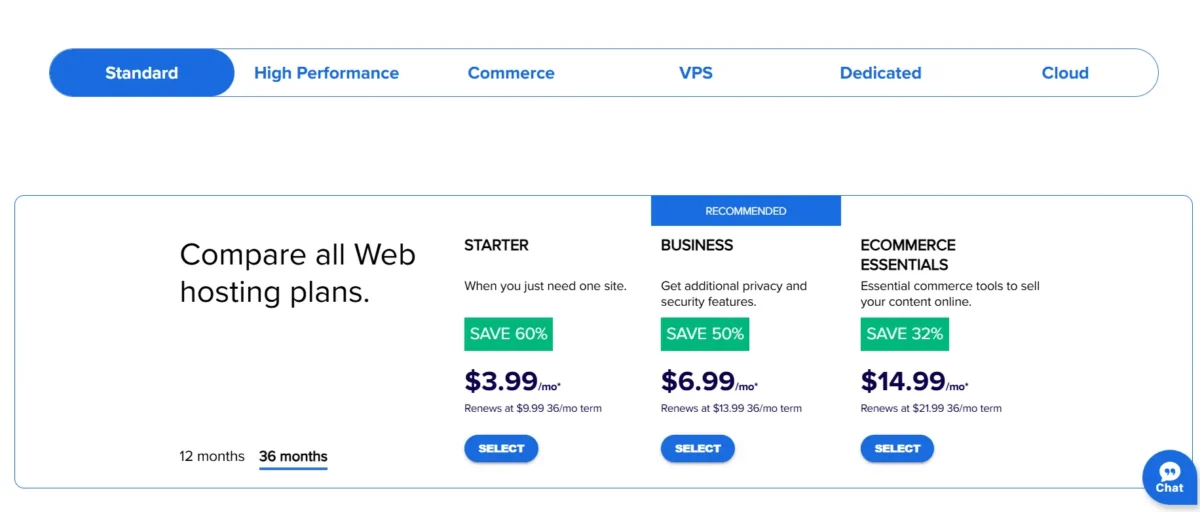
Bluehost’s 2026 pricing structure is primarily targeted at WordPress users, with steep new sign-up discounts that give way to substantially higher standard rates at renewal.
WordPress Hosting Tiers (Predicted Prices for 2026)
Every package comes with a 30-day money-back guarantee, a free domain for the first year, and the WonderSuite AI builder.
|
Plan |
Promo Price (12mo) |
Renewal Price |
Best For |
|
Basic |
$1.99 – $2.95/mo |
~$11.99/mo |
Single blogs or portfolios. |
|
Choice Plus |
$4.45 – $5.45/mo |
~$21.99/mo |
Privacy-conscious small businesses. |
|
Online Store |
$14.99 – $21.99/mo |
$26.99/mo |
E-commerce with WooCommerce. |
|
Pro |
$12.95 – $13.95/mo |
~$31.99/mo |
High-traffic sites needing optimized CPU. |
Bluehost WordPress Pricing (Shared, VPS, Dedicated)
Bluehost’s price structure in 2026 is still tier-based by resource exclusivity, with Shared Hosting serving as the entry-level option and VPS and Dedicated plans offering the strength and control required for resource-intensive or high-traffic applications.
Bluehost 2026 Price Comparison
|
Hosting Type |
Intro Price (12-36mo) |
Renewal Price (Monthly) |
Key Specs |
|
Shared (Starter) |
$1.99 – $3.99/mo |
$9.99/mo |
1 Site, 10GB NVMe Storage |
|
Shared (Business) |
$5.99 – $6.99/mo |
$13.99/mo |
50 Sites, 50GB NVMe, Daily Backups |
|
VPS (Standard) |
$4.99 – $18.99/mo |
$53.99 – $59.99/mo |
2 Cores, 2-4GB RAM, 30-100GB NVMe |
|
Dedicated (Standard) |
$141.19/mo |
$180.32/mo |
4-8 Cores, 16GB RAM, 1TB Storage |
Renewal Rates Explained (What You Pay After Year 1)
In 2026, Bluehost keeps up its strategy of providing steep initial discounts that end when a plan is renewed. Upon the expiration of your original term (12 or 36 months), you should anticipate that your bill may double or triple. Lifetime “locked-in” promotional rates are not available from Bluehost.
Average Price Increases for Renewals (Estimated)
|
Type of Plan |
Intro Rate |
Renewal Rate |
|
Basic Shared |
$2.95 to $11.99 |
per month |
|
Selection Plus |
$5.45/month ~$21.99 |
per month |
|
Internet Shop |
$9.95/month ~$26.99 |
per month |
|
Standard VPS |
$18.99/month ~$59.99 |
per month |
Unexpected Renewal Fees to Consider When
- Registering a Domain: Your free domain is only valid for the first year. Renewals for.com addresses usually cost between $19.99 and $21.99. Domain privacy costs extra per year unless it’s part of a higher-tier plan.
- Add-on Services: Unless you specifically disable them, your free trial of CodeGuard or SiteLock will automatically renew at full price, which is often $35 to $50 each year.
- Taxes: Your final renewal invoice will include any applicable local taxes; prices quoted are typically pre-tax.
How to Handle the Trek
- Turn Off Auto-Renew: To prevent unexpected fees, you can turn off auto-renew in the Bluehost Control Panel.
- Invest More Time Up Front: By committing to a 36-month term, you postpone the jump and lock in the low introductory rate for three years.
- Negotiate: Contacting Bluehost Support a month before renewal sometimes results in a loyalty discount, though this is not guaranteed.
Money-Back Guarantee & Refund Policy (30-Day Reality Check)
A 30-day money-back guarantee is provided by Bluehost, although it is not a total return. According to Bluehost’s policy, only hosting fees are covered.
- Non-Refundable: Most add-on services, setup costs, and domain registrations (often around $20) are subtracted from your reimbursement.
- Domain Ownership: You retain the domain after cancellation, but you are not allowed to move it to another host for 60 days.
- Time Limit: No refund, not even a prorated one, will be granted for requests submitted after 30 days.
Bluehost Features That Really Matter in 2026
Bluehost changed its strategy from being “just a host” to an AI-integrated platform in 2026. These four features are the real game-changers for users this year, even if they provide the usual set of tools:
1. Onboarding with WonderSuiteTM AI
This is the most notable 2026 feature offered by Bluehost. Instead of staring at a blank WordPress dashboard, WonderStart asks about your goals and automatically generates a custom site structure, relevant images, and conversion-focused copy. For non-techies, it greatly reduces the barrier.
2. Cloud Infrastructure by Bluehost
Their new Cloud options (powered by Oracle Cloud) are designed for 100% uptime for companies that outgrow shared hosting. Unlike traditional shared servers, your site is mirrored across multiple locations, meaning if one server blips, your site stays live.
3. Integrated Backups & Security
In response to more automated cyberthreats in 2026, Bluehost has incorporated additional measures into its basic plans:
- Even mid-tier plans include automatic malware scanning to identify weaknesses early.
- Daily Backups: On Choice Plus and Pro plans, Jetpack offers daily backups that guarantee you can undo a malfunctioning site update with a single click.
4. Features Ready for Commerce
The relationship between Bluehost and WooCommerce has grown. Specialized WonderBlocks, which are pre-made store sections (such as featured products or high-converting checkout layouts) that you can drag-and-drop without knowing any code, are now included in their Online Store plans.
- The Bare Essentials (a must for every plan)
- Free SSL: Unavoidable for security and SEO reasons.
- Staging Environment: A sandbox where site modifications can be tested before they are made public.
Core Hosting Features (Storage, Bandwidth, Domains)

Although Bluehost’s entry-level rates still have stringent resource constraints, their key specifications for 2026 are made to be “set and forget” for novices.
1. SSD Storage NVMe
- All of Bluehost’s storage plans now use NVMe, which is far quicker than conventional SSDs.
- 10 GB is the starting point (enough for about 5,000 high-resolution photographs).
- 40 GB is Choice Plus.
- Pro/Cloud: Unmetered (subject to Acceptable Use Policies) or 100 GB or more.
2. Traffic Bandwidth
- Bluehost provides shared plans with unlimited bandwidth.
- The truth is that even though they don’t charge for data transfer, they will restrict your website if it uses excessive amounts of CPU or RAM, which is often the case during periods of viral traffic.
- You would require a VPS or Bluehost Cloud for resources that are assured.
- Domains and Subdomains 3.
- All annual subscriptions include a free domain for the first year (registration only; renewals cost about $20/year).
- Domain Limits: While Choice Plus and above plans provide numerous or infinite websites and subdomains, the Starter plan only permits one website.
- All tiers support parked domains, which are used to reroute secondary URLs to your primary website.
4. Hosting for Email
- Starter/simple: Usually comes with a simple POP3/IMAP account or a free trial of Google Workspace.
- Business Plans: Often bundle Professional Email for the first year to match your domain (e.g., info@yourbrand.com).
Built-In SEO & Marketing Tools Review
The WonderSuite Marketing Edge
- WonderStart AI: During setup, the AI generates SEO-friendly site descriptions and metadata based on your business category, giving you a head start on search rankings.
- WonderBlocks: These are pre-optimized design templates that prioritize Core Web Vitals (speed and mobile-friendliness), which are major Google ranking factors.
Integrated SEO Tools
- Yoast SEO Integration: Bluehost pre-installs and optimizes Yoast SEO, the industry standard for on-page optimization.
- Bluehost SEO Tools (Powered by Yoast): Higher-tier plans include a Start or Grow version of their proprietary SEO tool. It provides a personalized action plan, keyword tracking, and weekly status reports to show how you’re trending against competitors.
Marketing & Lead Gen Features
- Google My Business: You can manage your local business profile directly from the Bluehost dashboard to appear in local Map Pack results.
- Google Ads Credits: New accounts often receive $150–$500 in matching ad credits to jumpstart traffic (requires an initial spend).
- Email Marketing: Most plans include a trial or integration with Professional Email and lead-capture tools to build your subscriber list from day one.
The Verdict
While these tools are excellent for beginners who don’t want to hire an agency, they are mostly automated “checklists.” Professional marketers may still prefer manual control using advanced tools like Semrush or Ahrefs.
Additional Tools & Add-Ons (Email, CDN, Staging, AI Site Tools)

In 2026, Bluehost bundles these key extras:
- WonderSuite AI: An automated WordPress site builder that generates layouts and content via AI prompts.
- Email: Offers a trial of Google Workspace or basic professional email linked to your domain.
- CDN: Built-in Cloudflare integration to speed up global loading times.
- Staging: A sandbox to test site changes safely before pushing them live.
- Backups: Jetpack backups are included on Choice Plus and Pro tiers.
Bluehost Ease of Use & Setup — Beginner-Friendly?
In 2026, Bluehost is incredibly user-friendly for beginners, catering to individuals who prefer to stay away from technical jargon.
After you respond to a few easy questions, WonderSuite AI, an automatic builder, creates the copy and style of your website.
- Click WordPress: WordPress is already configured at registration, so no manual installation is required.
- Simple Dashboard: Offers a clear interface for managing domains and emails instead of the convoluted cPanel.
- Staging Tool: A sandbox that allows you to test changes without affecting your live site with only one click.
Account Setup & Dashboard Walkthrough
WonderSuite, a guided AI experience that does away with manual configuration, is at the heart of the Bluehost setup procedure in 2026.
1. Establishing an Account
On the Bluehost Pricing Page, you will register your free domain after choosing a plan. You don’t need to adjust technical settings because Bluehost takes care of the DNS mapping automatically.
2. Onboarding for WonderStart
- An AI wizard appears in place of a blank WordPress screen:
- Choosing a Goal: You indicate whether you’re creating a portfolio, blog, or store.
- Content Generation: The AI generates themes and layouts based on your keywords and adds draft material to your About and Contact pages.
- Site Identity: You select a globally applicable color scheme and upload your logo.
4. Accessing Advanced Tools
For those who need it, the traditional cPanel is still available under the Advanced tab. This is where you’ll find:
- File Manager: For manual uploads via the Bluehost Control Panel.
- phpMyAdmin: For database management.
- Staging: A dedicated button to create a sandbox version of your site to test updates safely.
Quick Tip: The Login to WordPress Button
Bluehost uses SSO (Single Sign-On). You never have to remember a separate WordPress password; you can jump directly into the WordPress admin area with one click from the Bluehost Dashboard.
WordPress Installation & Management
In 2026, Bluehost makes WordPress management nearly hands-off for beginners:
- Automatic Installation: WordPress is pre-installed during the checkout process; there is no need for manual downloads or database scripts. Bluehost WordPress Hosting.
- WonderStart AI: A guided wizard that automatically generates your site’s layout, images, and copy based on your industry. Bluehost WonderSuite.
- Seamless Login: Features Single Sign-On (SSO), allowing you to jump from the Bluehost Portal into your WordPress dashboard without a separate password.
- Automatic Updates: Bluehost handles core WordPress updates and security patches automatically to keep your site safe from vulnerabilities.
- Staging Environment: Create a sandbox clone of your site with one click to test new themes or plugins before pushing them live. Bluehost Staging Guide.
- Centralized Management: Manage all plugins, themes, and site performance settings directly from the simplified Bluehost Dashboard.
Daily Tasks: Backups, Emails, Domains
In 2026, Bluehost uses a single dashboard to simplify regular site maintenance:
- Backups: Jetpack is used to automatically create daily backups for higher-tier plans (Choice Plus and Pro). If an update disrupts your layout, you can easily restore specific files or your entire site with a single click.
- Email Management: The dashboard allows you to create and manage business-related email accounts, such as hello@yourdomain.com. It offers free basic POP3/IMAP or integrates with Google Workspace for a recognizable Gmail experience.
- Domain Controls: You can manage DNS settings, subdomains, and renewals all in one location with the Bluehost Domain Center. To hide your private contact information from public WHOIS databases, you can also turn off Domain Privacy.
- Security Scans: As part of the dashboard’s daily “health check,” Bluehost Security Features automatically search for malware and vulnerabilities.
- Site Staging: For design tweaks, you can create a sandbox copy of your site to test changes safely before pushing them to your live domain, Bluehost Staging.
Bluehost Performance & Speed Tests — Real Results 2026
In 2026, Bluehost’s performance is reliable for small-to-medium sites, largely thanks to its Oracle Cloud infrastructure and NVMe storage.
- Load Speeds: Average Largest Contentful Paint (LCP) clocks in between 1.3s and 1.9s, well within Google’s Good range.
- Uptime: Consistently stays at 99.99%, though the 100% Uptime SLA is exclusive to Cloud plans.
- TTFB (Time to First Byte): Ranges from 200ms to 600ms depending on the visitor’s proximity to their US-based data centers.
- Performance Tech: All plans include Cloudflare CDN integration and server-level caching to handle minor traffic spikes.
Bluehost Speed Test Results
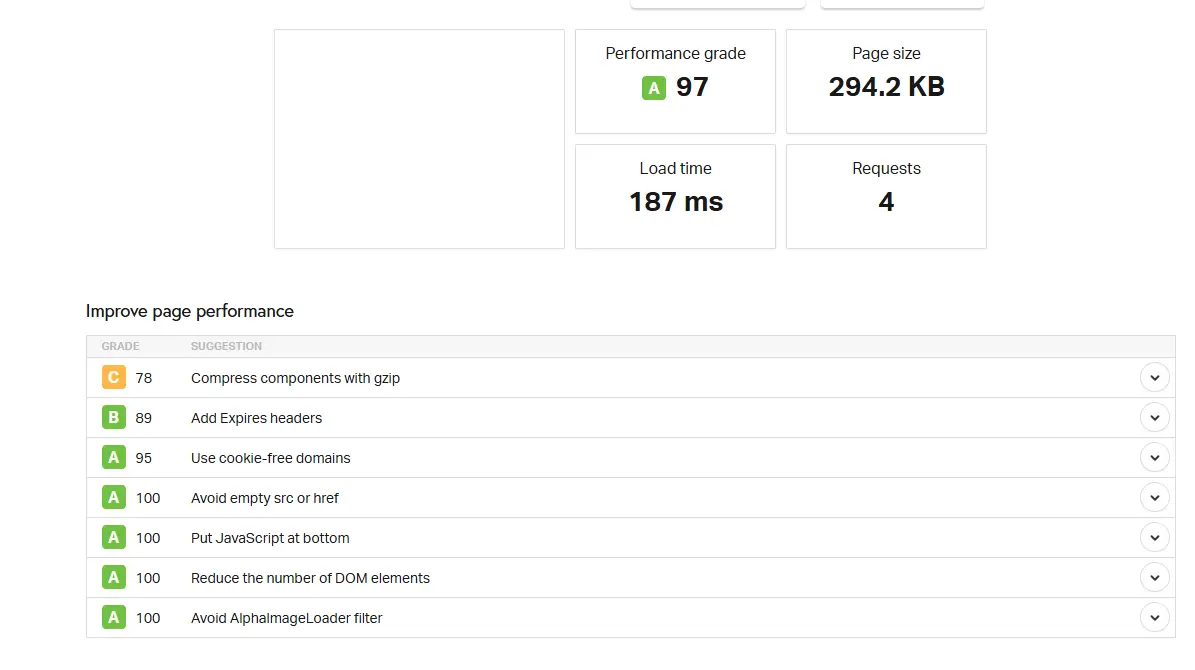
Bluehost delivers solid 2026 performance, averaging 1.0s to 1.6s LCP and 99.99% uptime on shared plans. Its transition to NVMe storage and Oracle Cloud infrastructure ensures snappy speeds for US audiences. However, international latency can occur, and shared servers may throttle under heavy traffic spikes, making Bluehost Cloud the better pick for high-growth businesses.
Server Response Time & Core Web Vitals
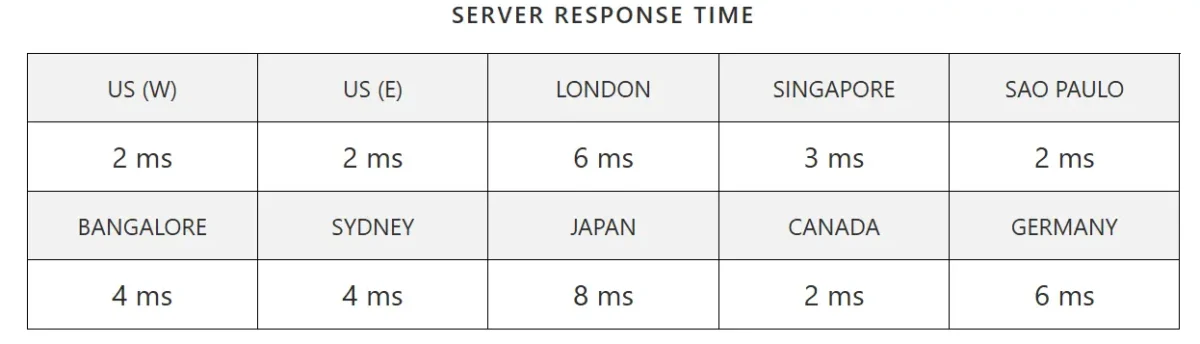
Bluehost delivers consistently low latency worldwide, with response times as fast as 2 ms in multiple regions. This ensures faster website loading and better user experience globally.
Bluehost’s NVMe-backed servers deliver a TTFB (Time to First Byte) of 200ms–600ms. Most optimized WordPress sites hit an LCP (Largest Contentful Paint) under 1.8s, comfortably meeting Google’s Core Web Vitals standards. While excellent for North American traffic, global users should activate the included Cloudflare CDN to maintain these speeds and avoid latency-driven ranking drops.
Uptime Reliability & Stress Test

Bluehost demonstrates strong uptime reliability, with monitoring tools confirming the website is fully operational. Consistent uptime ensures better website performance and user trust.
In 2026, Bluehost maintains a robust 99.99% uptime average for its shared plans. While the Bluehost Uptime Guarantee covers standard server availability, mission-critical sites should look to their Cloud Hosting, which features an SLA-backed 100% uptime via real-time data mirroring.
Bluehost Security & Backups — Is Your Site Safe?
In 2026, Bluehost provides reliable baseline security, including Free SSL, DDoS protection via Cloudflare, and isolated resource environments to prevent noisy neighbor risks. All plans benefit from automated malware scanning to detect WordPress vulnerabilities early.
However, backup policies vary by tier. The Starter plan lacks automated backups, requiring manual intervention or third-party plugins. Higher tiers like Choice Plus include daily Jetpack backups with one-click restoration.
For mission-critical security, Bluehost Cloud offers real-time data mirroring. While safe for beginners, you must watch for SiteLock upsells and ensure your plan includes backups to avoid data loss.
SSL, Malware Protection & Firewall
A strong, multi-layered protection mechanism that is already set up for WordPress security is offered by Bluehost in 2026:
- Free SSL Certificates: Let’s Encrypt SSL is installed by default on all websites. This guarantees HTTPS encryption, safeguarding visitor information and meeting Google’s search engine optimization standards.
- Malware Protection: Bluehost incorporates automated scanning to find vulnerabilities unique to WordPress. Comprehensive one-click removal is typically only available to users who have added SiteLock to their package, even though it recognizes threats.
- Web Application Firewall (WAF): Bluehost offers a simple firewall through its relationship with Cloudflare that blocks DDoS attempts, bot attacks, and malicious traffic before it reaches your server.
- Plugin Security: Your WordPress core and plugins are monitored by the WonderSuite dashboard, which notifies you of any out-of-date software that might act as a hacker’s backdoor.
Backups Explained (Free vs Paid)
Bluehost’s backup options depend heavily on your plan. It is vital to know that Basic/Starter plans do not include automated backups.
- Free (Manual): All users can create manual backups through the cPanel File Manager or by using free WordPress plugins like UpdraftPlus.
- Included (Choice Plus & Pro): These tiers include Daily Website Backups via Jetpack for the first year. They offer one-click restoration if your site crashes.
- Paid Add-on: CodeGuard Basic (approx. $3/mo) provides automated daily backups, monitoring, and point-in-time recovery for plans that don’t include it.
- Cloud Hosting: Includes real-time data mirroring, meaning your site is instantly recovered from a secondary server if the primary one fails.
Bluehost Customer Support — Fast & Reliable?

Bluehost support is fast for basic questions, but sometimes slow on technical depth.
- Availability: 24/7 Support via live chat and phone.
- Speed: Chat typically connects in under 2 minutes.
- Quality: Great for WordPress onboarding; however, complex issues may face scripted responses or upselling.
- Self-Service: Excellent Knowledge Base for DIY troubleshooting
Bluehost Pros & Cons — Straightforward Breakdown
Pros of Bluehost
- Official WordPress Recommendation: One of only three hosts officially approved by WordPress.org for perfect compatibility.
- WonderSuite™ AI: AI-powered site builder that creates layouts and copy quickly—ideal for non-designers.
- High Uptime: Guarantees 100% uptime SLA on cloud plans; overall reliability is around 99.99%.
- All-in-One Value: First-year setup is cheap, including a free domain, SSL, and CDN.
- Great Onboarding: Streamlined dashboard makes it easier for beginners compared to standard hosting panels.
Cons of Bluehost
- Sharp Renewal Hikes: Intro pricing rises significantly after the first year.
- Aggressive Upselling: Frequent prompts to buy extra services.
- US-Centric Performance: Slower speeds for users outside the US without a CDN.
Bluehost vs Competitors — Honest Comparison 2026
In 2026, Bluehost faces stiff competition. While it wins on WordPress integration, others beat it on renewal transparency and global speed.
Bluehost vs. The Big Three
|
Feature |
Bluehost |
SiteGround |
Hostinger |
|
Best For |
WordPress Beginners |
High Performance |
Absolute Lowest Price |
|
Intro Price |
$2.95/mo |
$2.99/mo |
$2.49/mo |
|
Renewal Price |
High ($11.99+) |
Very High ($17.99+) |
Low ($7.99+) |
|
Customer Support |
24/7 Phone & Chat |
Premium Experts |
Chat Only (Fast) |
|
Data Centers |
Mostly US |
Global (6+ Const) |
Global (8+ Const) |
The Key Differences
- vs. SiteGround: SiteGround offers superior speed and white-glove support, but they lack Bluehost’s WonderSuite AI and charge significantly more for renewals.
- vs. Hostinger: Hostinger is cheaper and faster for international users due to more data centers. However, Bluehost’s official WordPress endorsement provides a more seamless setup for first-timers.
- vs. DreamHost: DreamHost is a top choice for those who hate price hikes, as they offer locked-in renewal rates, whereas Bluehost’s prices spike after year one.
Quick Verdict
- Choose Bluehost if: You want the easiest AI-guided WordPress setup and value 24/7 phone support.
- Choose a Competitor if: You have a global audience (Hostinger) or want the highest possible server speeds (SiteGround).
Who Should Use Bluehost? Use-Case Based Decision
The decision to utilize Bluehost is based on your long-term growth goals and degree of technical comfort. The breakdown is as follows.
1. The Novice to WordPress
Make use of Bluehost if you want a guided experience because you have never created a website before.
Why: By creating your layout and composing your initial text, the WonderSuite AI functions as a virtual assistant. It’s the closest thing to installing WordPress in a set it and forget it fashion.
2. Local Small Businesses
If you are a consultant, florist, or contractor aiming to reach a local (US) audience, choose Bluehost.
Why: You get Google My Business connectivity, a free domain, and business-grade email all in one dashboard. It’s a quick and effective technique to build credibility.
3. Content Creators & Bloggers
Use Bluehost if: You are starting a blog and want the safety of an officially recommended WordPress host.
Why: You get high uptime and essential security like Free SSL without needing to hire a developer.
4. Scaling E-commerce Stores
Use Bluehost if: You are launching a shop via WooCommerce.
Why: Their Online Store plans include pre-installed payment processing and specialized store-design “WonderBlocks” that help boost conversions.
Is Bluehost Good for Beginners?
Why It’s Good for Beginners
- AI Site Creation: Bluehost WonderSuite uses AI to build a customized WordPress site in minutes by simply asking you a few questions about your business or blog goals.
- Simplified Dashboard: A custom Account Manager interface provides a clean alternative to the technical cPanel, making it easy to manage domains and emails.
- Automatic Setup: WordPress is automatically installed and updated for you from the moment you sign up, removing the need for manual configuration.
- Bundled Essentials: All starter plans include a free domain for the first year, free SSL for security, and a free CDN for improved global speeds.
- 24/7 Support: Beginners can access live chat and phone support at any time. While expert users sometimes find it scripted, it is highly rated for helping new users through initial setups.
Best Use Cases (Blogs, Affiliate Sites, Small Businesses)
In 2026, Bluehost is a strategic choice for some low-to-medium traffic projects due to its WonderSuite AI and NVMe-powered infrastructure.
1. Individual and Business Blogs
Bluehost’s official WordPress recommendation makes it the gold standard for bloggers.
Why: Your initial layout and About Me pages are created by WonderStart AI, and integrated SEO technologies help your content rank on Google right away.
Best Plan: One high-traffic blog can get by with Basic/Starter.
2. Specialized Affiliate Websites
Bluehost provides an inexpensive starting point for marketers creating passive income websites.
Why: The one-click WordPress installer allows you to swiftly launch multiple sites. Because it includes Domain Privacy, which hides your personal information from competitors and spammers, the Choice Plus plan is essential in this case.
Choice Plus is the best plan because it offers free backups and many sites.
3. Local Small Businesses
Ideal for cafes, attorneys, and plumbers that require a digital business card.
Why: It includes Google My Business integration, a professional email trial, and a free domain. Without employing a designer, you may drag and drop the Services and Testimonials sections using the WonderBlocks system.
The best plan is Choice Plus, which offers daily backups for increased security.
4. E-commerce at the entry level
Perfect for business owners opening their very first WooCommerce store.
Why: To help you start selling right away, the Online site package includes pre-installed plugins worth over $450, secure payment processing, and AI templates tailored to your site.
Online stores are the best option.
When You Should Choose a Different Host
Bluehost is a strong choice for beginners, but it’s not ideal for every project.
- Higher Renewal Costs: After the initial term, pricing can increase by 100–300%. For stable pricing, DreamHost or InterServer are better options.
- Global Audience: Bluehost’s data centers are mainly in the US. For better international speed, SiteGround (Google Cloud) or Hostinger performs better.
- High Traffic Needs: Shared hosting cannot handle sudden traffic spikes. Cloudways or WP Engine are more reliable for growing sites.
- Developer Control: If advanced server-level access is required, A2 Hosting or DigitalOcean offers more flexibility.
- Support Quality: Bluehost support is available, but for deep technical help, SiteGround and FastComet are often preferred.
- Eco-Friendly Hosting: GreenGeeks offers hosting powered by renewable energy.
Does WordPress Recommend Bluehost? Official Relationship Explained
Indeed, WordPress.org only recommends three hosting companies, and Bluehost is one of them. Dating back to 2005, this alliance is among the oldest in the industry.
The Character of the Partnership
Official Endorsement: Based on their contributions to the WordPress ecosystem and technical infrastructure, Bluehost, DreamHost, and SiteGround are on WordPress.org’s extremely exclusive list of suggested hosts. As a participant in “Five for the Future,” Bluehost commits a large portion of its resources, including hundreds of engineering hours, to creating and maintaining the core WordPress platform.
Community & Sponsorship: WordCamps and other open-source community events are heavily sponsored by them worldwide.
What This Means for You
- Seamless Integration: You get a specialized dashboard designed specifically for WordPress management.
- Expert Support: Their 24/7 support staff includes WordPress-certified experts trained to handle platform-specific issues.
- Security Defaults: Installations come with pre-configured security settings, such as brute force protection for logins.
Bluehost Review – FAQs
Can I Trust Bluehost for Long-Term Projects?
Yes, Bluehost is dependable for long-term projects due to its strong stability and scalable hosting options. However, renewal prices rise significantly after the initial term, so budgeting ahead is essential. Overall, it’s a reliable choice if you plan for future costs.
Is Bluehost Having Issues Right Now?
As of February 12, 2026, Bluehost appears to be operating normally, with no major outages affecting hosting, email, or domain services. If your website is inaccessible, the issue is likely local. You can verify this by checking Bluehost’s status page or using an independent monitoring service like StatusGator.
Final Verdict — Should You Use Bluehost in 2026?
Bluehost is an excellent choice for beginners, offering an easy WordPress setup with WonderSuite AI, while bloggers and content creators benefit from WordPress.org support and automatic updates.
Small businesses also get a convenient all-in-one package with a free domain, SSL, and professional email. However, those on a tight budget may find renewal prices high, global audiences may experience slower speeds, and rapidly growing websites might need more specialized hosting.
For the best value, consider the Choice Plus 36-month plan, which includes daily backups for long-term security.
One-Sentence Recommendation – Bluehost Review
If they are prepared to pay hefty renewal fees following the initial term, Bluehost is the greatest option for 2026 WordPress novices who desire an AI-guided setup and official WordPress endorsement.
Best Bluehost Deals 2026
The 12- and 36-month Shared Hosting plans offer the most value in 2026, starting from just $1.99–$2.95/month. The Choice Plus Plan ($4.45/month) is notable for including extras like Free Domain Privacy and Daily Backups for the first year, usually worth $30–$50 elsewhere.
Tip: Choosing the 36-month term locks in the lowest rate and avoids higher renewal prices.
What’s Included:
- Free Domain Registration (first year)
- Free SSL Certificate
- Full access to WonderSuite AI for building your site
- $150+ Google Ads Credit to boost traffic