Monday.com Review 2026: Features, Pros And Cons
Monday.com is a versatile Work OS that centralizes project planning, workflow management, and task tracking in a single visual dashboard. This Monday.com review for 2026 highlights its core features, pricing structure, advantages, disadvantages, and top alternatives. It helps teams make an informed choice about whether the platform meets their needs.
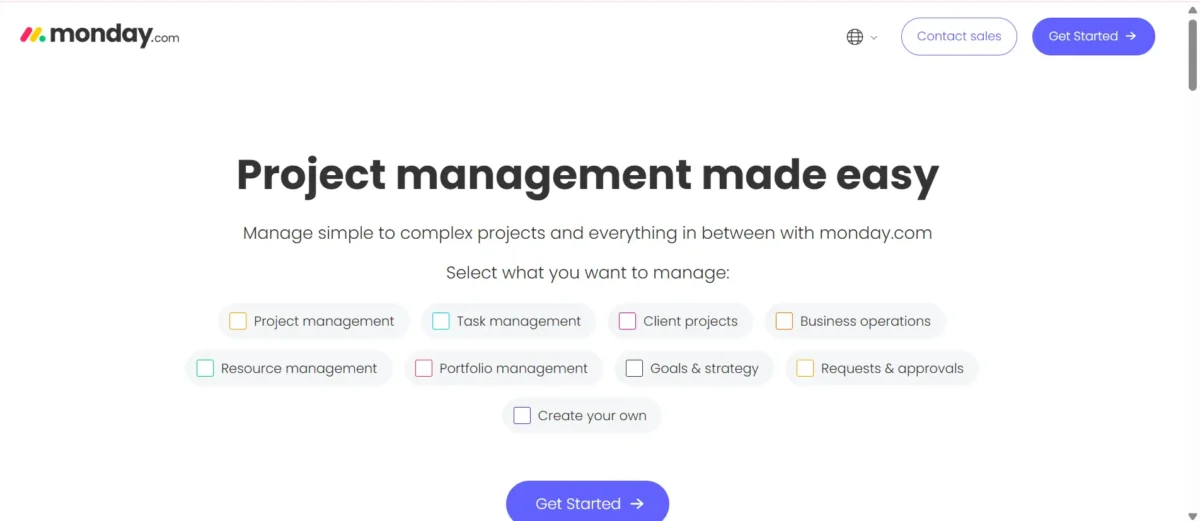
Quick Verdict – Is Monday.com Worth It in 2026?
- Overall Rating: ⭐ 4.6/5
- Best For: Growing teams, agencies, marketing departments, and remote-first companies
- Starting Price: $9/user/month (billed annually)
- Free Plan: Yes (limited features for small teams)
- Standout Feature: A flexible and powerful Work OS that adapts to different team needs with strong automation and customization.
- Ease of Use: Intuitive interface, moderate learning curve for advanced workflows
- Top Alternatives: Asana, ClickUp, Trello
Our Verdict
In this Monday.com review, Monday.com proves to be a strong choice for managing different types of projects across industries like education, healthcare, construction, and marketing. It stands out for its simple interface, teamwork features, automation options, and useful integrations that make task management smoother.
Although the free and basic plans offer limited features and advanced security tools are only available in higher-tier packages, the mid-level plans deliver solid value. Overall, it’s a reliable platform, especially suited for small and medium-sized businesses looking for efficient project management.
Pros
- Easy interface
- Strong features
- Real-time collaboration
Cons
- Weak free/basic plans
- Limited admin tools
- Three-user minimum on paid plans
Key Takeaways
Monday.com offers a simple and powerful project management interface with strong automation features. It is easy to use and helps teams save time. However, pricing can increase quickly for small teams.
Key Points:
- ✅ Easy-to-use visual dashboard for project tracking
- ✅ Strong no-code automation saves time
- ⚠️ Pricing increases due to seat requirements and pricing model
- ✔ Best for teams needing powerful but simple project management tools
Final Note: Overall, it is a powerful project management tool with strong features, but teams should carefully manage costs before choosing it.
Who Should Use Monday.com?

Monday.com is ideal for teams that need structured workflows, centralized communication, and real-time visibility into projects. It works best for organizations that want to replace scattered spreadsheets and disconnected tools with a unified work management system.
Marketing and creative teams benefit from visual boards, timeline views, and content planning tools. Campaign tracking, asset approvals, and deadline management become more organized and transparent.
Operations and project management teams use it to standardize processes across departments. Custom dashboards and automated workflows improve efficiency while giving leadership clear performance insights.
Sales teams can leverage their built-in CRM capabilities to manage leads, track pipelines, and align revenue goals with broader business operations.
Development teams use it as a flexible agile workspace for sprint planning, bug tracking, and roadmap visibility without the complexity of highly technical platforms.
Mid-sized businesses gain the most value because the platform scales with growth while remaining simple to manage. It balances advanced features with ease of use, making it suitable for teams that want productivity without operational complexity.
Who Should Avoid It
Monday.com is not suitable for teams that need simple systems with minimal setup. It can feel complex for users looking for basic task management software or quick deployment.
Freelancers on tight budgets may outgrow the free plan fast because of user and board limits. Tools like Trello or ClickUp offer better value as a budget project management tool for solo professionals.
Agencies needing detailed time tracking and invoicing may find its built-in features limited. Platforms focused on client billing software handle payroll and billable hours more efficiently.
Organizations requiring advanced security at lower pricing tiers often face upgrade costs. Enterprise-grade protections are typically included only in premium secure collaboration platforms.
Teams that want instant setup without customization may feel overwhelmed. Simpler tools designed as an out-of-the-box productivity solution save time and reduce complexity.
What Is Monday.com? (Platform Overview)
Monday.com is a flexible cloud-based platform designed to help teams manage tasks, projects, and daily workflows in one centralized system. It uses visual boards, automation features, and real-time updates to improve organization and team collaboration.
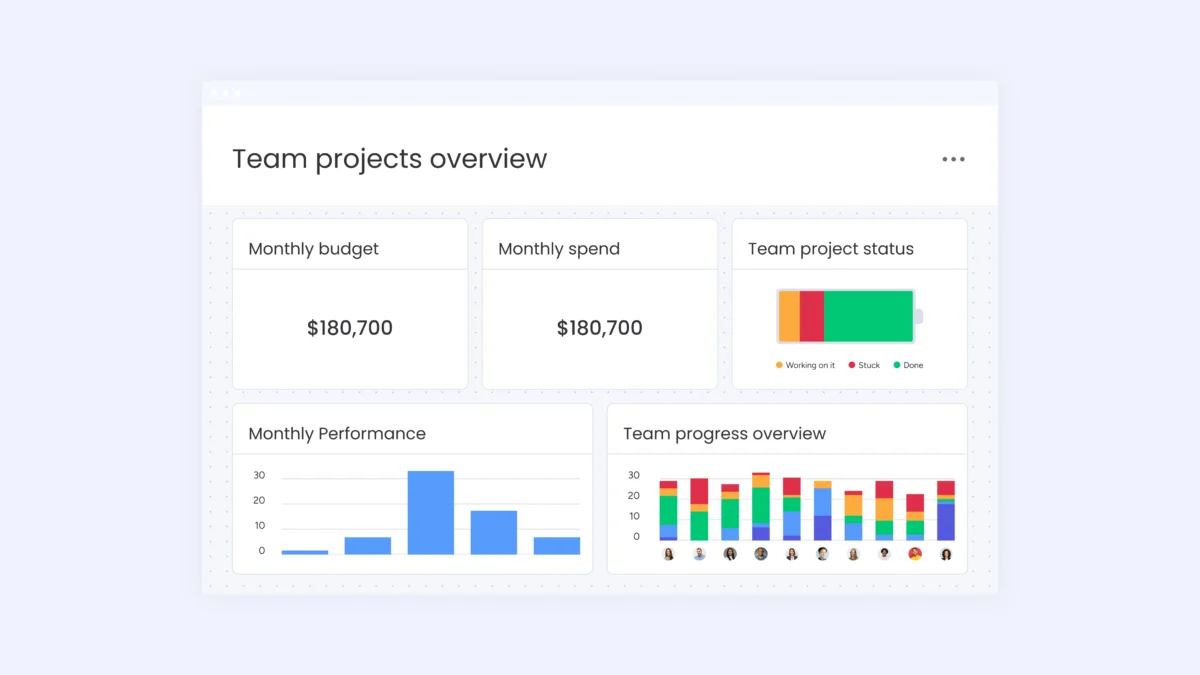
In my experience, the platform feels simple to use yet powerful for handling multiple projects at once. The dashboard is clear, task tracking is easy, and automation saves time by reducing manual work. It works smoothly for managing team assignments and keeping everything organized in one place.
Created as a task-tracking tool, it has grown into a strong work-management solution used worldwide. Businesses depend on it for project planning, CRM management, marketing operations, HR processes, IT support, and more. It provides tools like reporting, integrations, time tracking, and customizable workflows to match different business needs.
Today, Monday.com supports small teams, growing companies, and large enterprises by offering better visibility into progress and task ownership. Its main goal is to improve productivity and simplify collaboration through a centralized digital workspace.
The Work OS Concept Explained
Work OS is a flexible system in which teams build their own workflows rather than using fixed templates. It provides customizable tools such as boards, views, and automation to meet different business needs. This approach gives freedom but requires proper planning to use effectively.
Unlike traditional project tools with ready-made structures, this platform offers building blocks to design your own setup. Organizations can shape it around their processes instead of adjusting to software limits.
Its biggest strength is customization, while its main challenge is complexity for teams without clear workflow definitions.
New Features & Updates in Work OS 2026
Work OS 2026 brings powerful improvements focused on AI automation, smarter tracking, and better team collaboration. The platform now delivers stronger project visibility and more efficient workflow management for modern teams.
Key Updates:
- Advanced AI tools for formula generation, project summaries, and timeline prediction
- Real-time project monitoring to detect delays and bottlenecks early
- Threaded board discussions for clearer team communication
- Improved form builder for better client and internal data collection
- Automated meeting summary integration into activity logs
- Centralized dashboard to track tasks across boards and workspaces
These updates make project management more automated and organized. Teams can manage tasks faster, reduce manual work, and improve collaboration with smarter tools and better system integration.
Core Features at a Glance
Monday.com uses a structured system built around workspaces, boards, groups, and items to manage tasks and projects. Its flexible column-based design lets teams customize data fields based on their specific needs.
Core Structure
- Workspaces – Containers for related boards
- Boards – Project or process views
- Groups – Sections inside boards
- Items – Individual tasks or records
Custom Data Fields
- Status with color options
- Team member assignment
- Date, timeline, numbers, text, and formulas
- File uploads and links
- Dependencies and subitems
Each item can include unlimited custom columns, allowing teams to track exactly what matters for their workflow. For example, marketing teams monitor budgets and content types, while developers track sprints and technical details.
Ready-Made Templates
The platform offers over 200 templates for common workflows like content planning, hiring processes, product tracking, and events. Teams often use these as starting points but adjust them to fit their operations.
How We Tested Monday.com (Methodology & Transparency)
We reviewed monday.com using our standard SaaS CRM evaluation framework. The platform was tested through a structured and consistent assessment process.
Real-World Testing Approach
The platform was tested in a live business environment rather than a simple demo setup. We used a paid Pro plan for over a month with an active team to evaluate real performance, collaboration, and workflow efficiency.
Testing Setup:
- Pro plan account
- 8 active team members
- 6-week testing period (45+ hours)
Workflows Tested:
- Marketing campaign management
- Agile sprint and bug tracking
- Client onboarding process
- CRM pipeline using monday Sales CRM
Evaluation Criteria
We used a weighted scoring model to evaluate the platform based on real usage and business impact. Each category was rated according to its importance in daily operations.
|
Category |
Weight |
Focus Area |
|
Ease of Use |
25% |
Set up flow, user friendliness, navigation clarity |
|
Features & Functionality |
25% |
Main tools, automation strength, AI tools, and integrations |
|
Pricing & Value |
20% |
Overall affordability, plan fairness, feature balance |
|
Performance & Reliability |
15% |
Speed, stability, cross-device experience |
|
Support & Documentation |
15% |
Help quality, guides, and community availability |
Data Sources
We combined hands-on testing with external research to ensure accurate and balanced results. Multiple trusted sources and real user feedback were analyzed.
- In-depth internal product testing by the editorial team
- Review study of 500+ authenticated user ratings across major platforms
- Examination of official product guides and update records
- Insights from professionals specializing in monday.com setup and deployment
- Side-by-side testing against seven alternative tools
Scoring Framework
We evaluated the platform using a 10-point rating system based on performance, features, and real-world usability.
- 9–10 indicates top-tier performance within its segment.
- 7–8 represents solid capability with small drawbacks.
- 5–6 reflects moderate effectiveness for limited needs
- Anything under 5 signals noticeable weaknesses.
8.5/10 — Strong automation and visual workflow tools, with minor concerns around pricing and mobile experience.
Insights from G2 & Glassdoor Reviews
|
Platform |
Overall Rating |
Total Reviews |
Key Insight |
|
G2 |
4.7/5 |
12,000+ |
Highly rated by verified users with strong satisfaction levels. |
|
Glassdoor |
4.3/5 |
2,000+ |
Generally positive employee feedback with some mixed workplace opinions. |
Monday.com Features – Detailed Breakdown
Task & Project Management
Monday.com supports multiple project management methodologies, making it suitable for diverse teams and industries. The platform combines visual workflow planning, automation, and real-time collaboration to streamline project execution from start to finish.
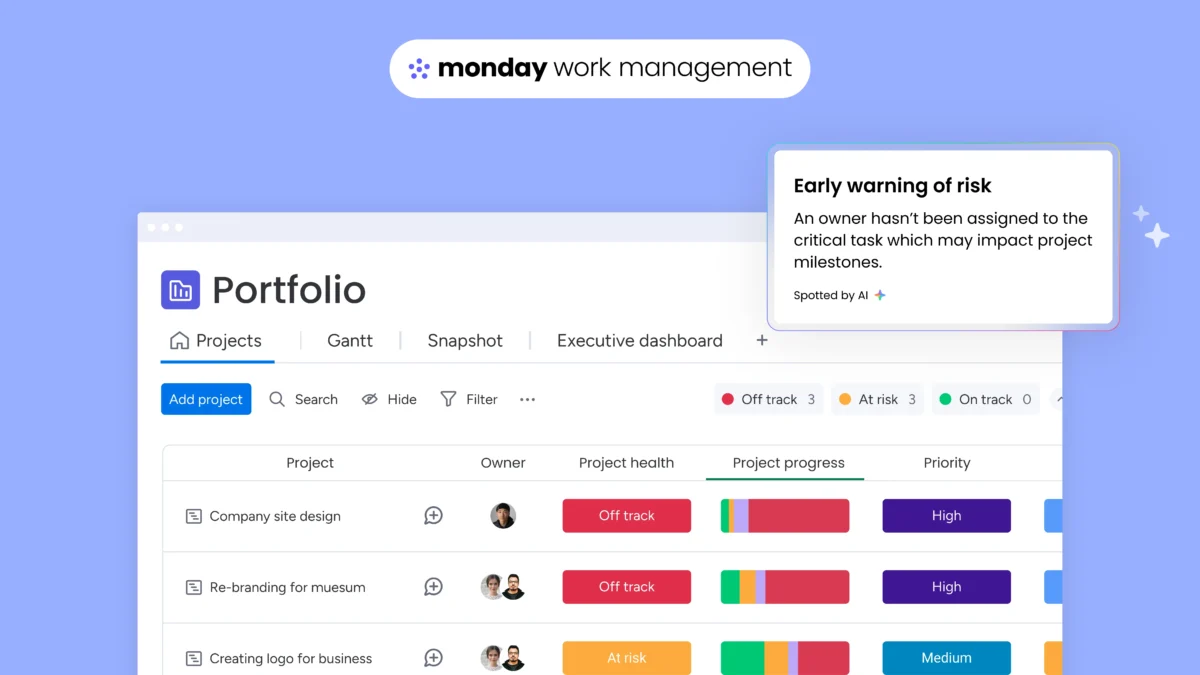
Advanced project planning & tracking tools enable teams to manage Agile, Scrum, Kanban, and Waterfall frameworks within a single workspace. Users can switch between Timeline, Gantt chart, Kanban board, Calendar, Dashboard, Table, and Map views depending on project needs. Workload tracking helps managers balance resources efficiently, while milestone tracking ensures deadlines are met.
For example, a marketing team can use Kanban boards to manage campaign tasks, while a software development team can track sprints using Scrum-style boards with automation for status updates.
Team collaboration & task control features improve coordination and accountability. Users can assign tasks, set priorities, define due dates, attach files, tag teammates in comments, and create custom fields tailored to specific workflows. Built-in automation reduces repetitive work, such as auto-assigning tasks or updating status when deadlines change. The drag-and-drop interface ensures updates are fast and intuitive.
Additionally, integrations with popular tools like Slack, Google Drive, and CRM systems enhance workflow continuity and data synchronization.
Overall, Monday.com functions as a comprehensive project management software that improves visibility, enhances cross-team collaboration, and increases operational efficiency. It scales effectively from small teams to enterprise-level organizations seeking structured and transparent workflow management.
Dashboards and Reports
Monday.com offers customizable dashboards that give teams instant visibility into progress and results. With built-in project performance tracking and real-time KPI monitoring, managers can quickly measure success without digging through multiple boards. Everything updates automatically, making it easier to spot delays or workload gaps early.
Users can choose from multiple widgets to build detailed visual reports. Tools like Gantt chart reporting and workload management dashboards help teams understand timelines, budgets, and employee capacity at a glance. Interactive graphs, calendars, and time tracking views make complex data simple to interpret.
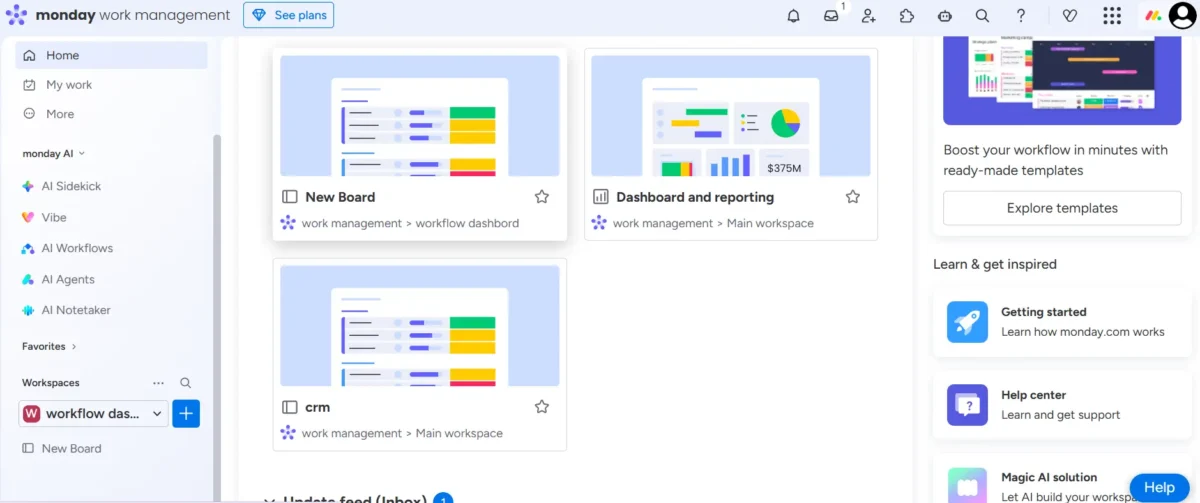
The free plan limits dashboards to one board, which works for small setups. Paid plans unlock cross-project reporting tools and multi-board analytics, allowing businesses to combine insights across departments. This flexibility makes it suitable for growing teams that need deeper operational visibility.
Automation & AI Tools
Automation
Monday.com makes workflow automation simple for everyone. You can set triggers that perform actions automatically, saving time and reducing manual work.
Key Examples:
- Notify a project manager when a task is done
- Create subtasks when dates arrive
- Mirror items across boards
- Update parent status when subitems finish
Complex workflows can chain multiple steps, like creating a project, assigning a manager, sending Slack notifications, and scheduling follow-ups.
Plan Limits:
- Standard: 250 actions/month
- Pro: 25,000 actions/month
- Enterprise: 250,000 actions/month
Even small teams can hit the Standard plan limit quickly, so Pro or higher is usually needed for serious automation.
AI Tools
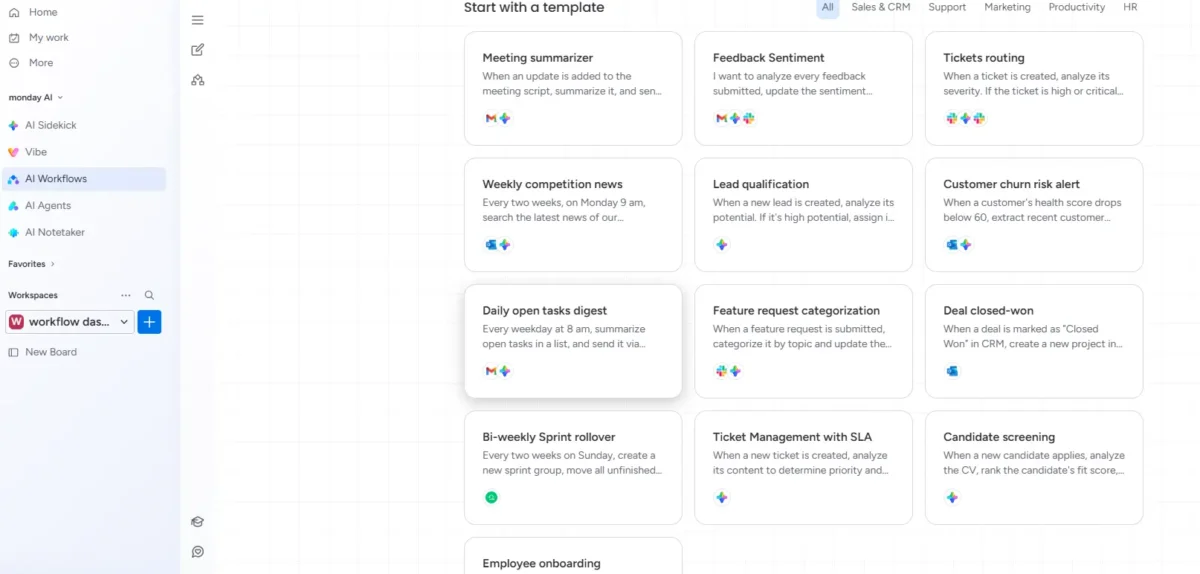
Monday.com’s 2026 AI tools streamline project work and reduce repetitive tasks. The AI Assistant and AI Blocks handle routine updates, data extraction, and multi-language support, while the Project Analyzer helps spot risks and bottlenecks.
Key Capabilities:
- Generate emails, updates, and project templates from plain language
- Summarize comments and histories
- Create formulas by describing calculations
- Extract structured data from contracts or invoices
- Analyze sentiment and categorize items automatically
- Translate content for global teams
Project Monitoring:
- Detect timeline risks early
- Identify resource bottlenecks
- Predict outcomes based on past patterns
Structured tasks like formula creation and document extraction save real time, but creative recommendations still need human oversight.
Integration Capabilities
Monday.com links smoothly with major business tools across communication, storage, development, sales, and finance. It supports dozens of built-in connections and many more through automation platforms. Higher plans offer fewer limits, and the marketplace expands functionality even further.
Key Integration Categories:
- Team Communication: Slack, Microsoft Teams, Zoom, Gmail, Outlook
- Cloud Storage: Google Drive, Dropbox, OneDrive, Box
- Development Tools: GitHub, GitLab, Jira
- CRM & Sales Platforms: Salesforce, HubSpot CRM, Pipedrive
- Marketing Channels: Mailchimp, Facebook Ads, LinkedIn
- Accounting Software: QuickBooks, Xero
- Automation Platforms: Zapier, Make, Power Automate
Standard and Pro tiers have monthly automation caps, while Enterprise offers broader flexibility. The Apps Marketplace adds extra tools like advanced analytics, approval workflows, and industry-specific project templates.
Mobile App Features for Seamless Team Collaboration and Project Management
The mobile app supports core task management but has key limitations. It works best for quick updates, not heavy project control.
Key Features
- View and update boards
- Create and edit tasks
- Upload files and capture photos
- Push notifications for updates
- Offline viewing with auto-sync
Limitations
- Timeline and Gantt views are hard to use on small screens
- Large boards feel cluttered and hard to manage
- Automation creation is not supported
- Sync delays may happen during heavy use
The app is great for quick checks and updates. For full project management and advanced features, desktop use is recommended.
Security & Compliance Features in monday.com
monday.com ensures robust security for all users, combining encryption, compliance certifications, and reliable uptime. Enterprise customers get additional tools to meet strict regulatory requirements.
Security & Compliance Highlights:
- Data encrypted in transit (SSL/TLS) and at rest (AES-256)
- SOC 2 Type II certified
- GDPR compliant
- 99.9% uptime guarantee for Enterprise plans
- HIPAA compliance via BAA (Enterprise)
- SCIM user provisioning (Enterprise)
- Detailed audit logs (Enterprise)
- Content directory synchronization (Enterprise)
- Single sign-on (SSO) control (Enterprise)
- IP restrictions and session management (Enterprise)
High-level compliance features are reserved for Enterprise plans, so organizations in healthcare, finance, or government sectors must choose this tier. Complete security info is available on Monday.com’s security page.
Pricing & Plans – Is It Good Value?
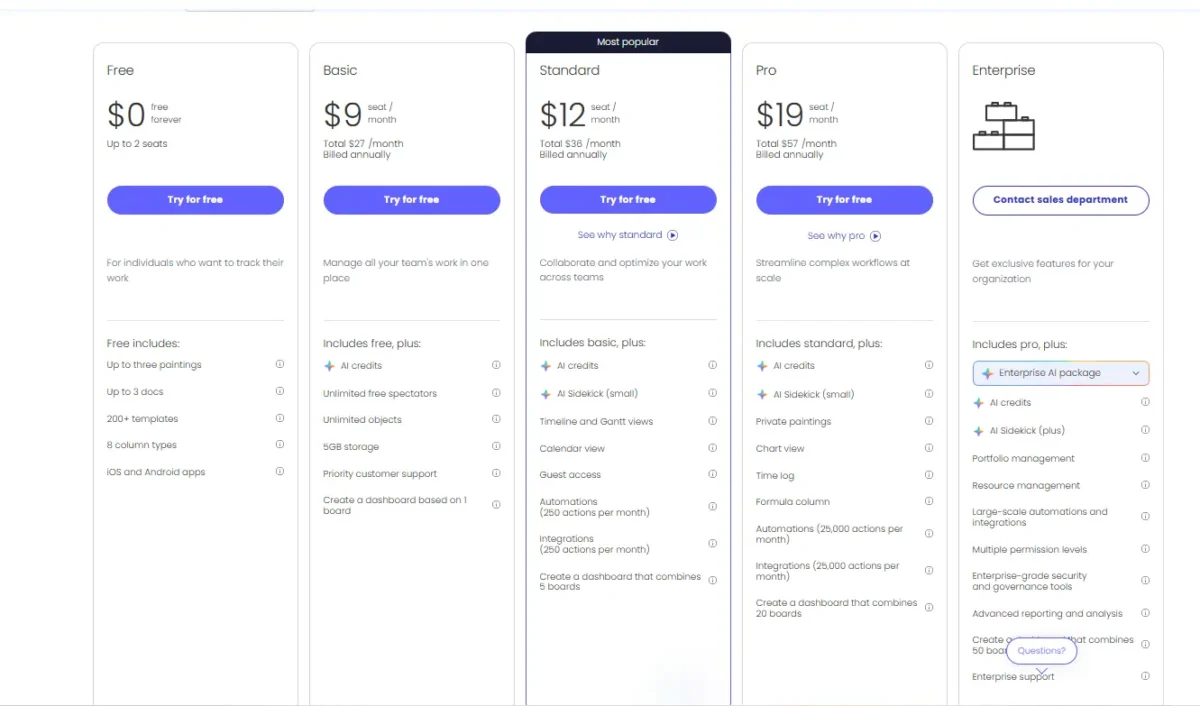
Monday.com uses a per-user pricing model with monthly or annual billing options. Paid plans require at least three users. Higher plans unlock advanced features with higher costs.
|
Plan |
Price/User/Month (Annual) |
Price/User/Month (Monthly) |
|
Free |
$0 |
$0 |
|
Basic |
$9 |
$12 |
|
Standard |
$12 |
$14 |
|
Pro |
$19 |
$24 |
|
Enterprise |
Custom |
Custom |
Monday.com Free Plan features and benefits
Includes
- Access for up to 2 users
- Maximum 3 active boards
- 3 document limits
- Unlimited document viewing
- 200+ ready-made templates
- 500MB storage capacity
Expert Opinion: The free plan works well for individuals or users testing the platform. It provides basic project setup tools but lacks proper team collaboration features. Businesses or growing teams will quickly need an upgraded plan for better scalability and control.
Basic Plan – Features & Benefits
Basic Plan ($9/user/month) gives more power than the free version but still feels limited for growing teams. It adds extra storage and unlimited viewing access, yet misses advanced project tools.
What You Get
- Unlimited read-only users
- Unlimited task items
- 5GB storage
- Priority support
- 1-week activity tracking
What’s Missing
- No timeline or Gantt view
- No calendar view
- No automation features
- No app integrations
- No guest access
This plan suits small teams with basic needs. However, without automation and integrations, it doesn’t unlock the platform’s full potential. Most businesses may need the Standard plan for better functionality.
Standard Plan – Pricing and Key Features
The Standard Plan costs $12 per user per month and adds more powerful tools for growing teams. It is designed for better project tracking and automation control.
Key Features
- Timeline & Gantt views for better planning
- Calendar view for task visibility
- Guest access for up to 4 users
- 250 automation actions per month
- 250 integration actions per month
- Advanced board search
This plan works well for teams that need more control than the basic plan. Automation limits are manageable but require smart usage.
Pro Plan – Benefits and User Options
The Pro Plan costs $19 per user per month and is designed for growing teams. It adds advanced automation, better tracking, and stronger control over projects. Most mid-size teams prefer it for scalability and flexibility.
Key Benefits:
- Private boards for better data control
- Chart view for clear visual reporting
- Time tracking column
- Formula column for advanced calculations
- 25,000 automation actions per month
- 25,000 integration actions per month
- Dependency column to link related tasks
Ideal for teams with 10–50 users. It delivers powerful workflow tools and automation at a reasonable price.
Enterprise Plan – Compliance and Advanced Tools
The Enterprise Plan is built for large organizations that need strong security and advanced management features. It includes enterprise-level automation, reporting, and compliance tools. Pricing is custom and depends on business needs.
Enterprise Plan (Custom Pricing)
- Everything is included in the Pro Plan
- Multi-level permission control
- Up to 250,000 automation actions
- Advanced enterprise reporting and analytics
- Security features like SCIM, audit logs, and SSO enforcement
- 99.9% SLA uptime guarantee
- Premium customer support
- Work performance insights
Best suited for regulated industries and large teams with strict compliance needs. Pricing usually ranges around $25–$35 per user per month, based on negotiation.
Hidden Costs and Upgrade Scenarios Explained
|
Team Size |
Standard Plan (Annual) |
Pro Plan (Annual) |
|
5 Users |
$720 |
$1,140 |
|
10 Users |
$1,440 |
$2,280 |
|
25 Users |
$3,600 |
$5,700 |
|
50 Users |
$7,200 |
$11,400 |
|
100 Users |
$14,400 |
$22,800 |
Pricing isn’t always limited to the listed plan price. The platform charges users in predefined seat buckets, meaning you may pay for more users than you actually have. For example, a small team might be billed for five seats even if only four are active, and similar rounding applies at higher levels, raising overall costs beyond simple per-user calculations.
Viewer access may appear unlimited on paid plans, but viewers can only see projects without making edits. If a viewer needs editing access and is upgraded to a full member, the subscription cost increases immediately.
Automation limits can create additional expenses. When usage exceeds the allowed threshold, teams often need to upgrade to a higher plan, which significantly raises the yearly cost per user.
Extra features such as advanced reporting, resource planning, or improved time tracking are sometimes available only through paid marketplace apps. These add-ons typically charge extra per user each month, increasing the total investment.
Monday.com vs Competitors (Comparison)
Monday.com vs Asana
|
Factor |
monday.com |
Asana |
|
Ideal Use Case |
Best suited for teams that rely on visual process design |
Better for teams focused on structured task organization |
|
Interface Style |
Bright layout with board-style views and charts |
Minimal design with list and timeline views |
|
Flexibility |
Highly adaptable with customizable columns and fields |
Custom fields are available, but the overall structure is more predefined |
|
Automation |
Advanced rule-based automation with visual builder |
Powerful automation, though the setup may feel slightly less fluid |
|
Free Version |
Limited to small teams with restricted functionality |
Supports larger teams with broader access on the free tier |
|
Entry-Level Pricing |
Lower starting point per user |
Slightly higher per-user cost |
|
Mobile Experience |
Functional but not as optimized |
More polished and responsive on mobile devices |
Monday.com excels in visual workflows and customizable boards, perfect for teams needing flexible dashboards and dynamic process control.
Asana is ideal for teams focused on clear task organization, offering structured tracking, solid mobile performance, and a generous free plan.
Monday.com vs ClickUp
|
Factor |
monday.com |
ClickUp |
|
Best For |
Teams seeking accessible yet powerful tools |
Teams needing the most feature-rich platform |
|
Learning Curve |
Quick to get started, usually within a few days |
Longer adjustment period, can take weeks |
|
Features |
Core tools in lower-tier plans |
Broad functionality available even in the free tier |
|
Customization |
High flexibility for boards and workflows |
Extremely adaptable with deep configuration options |
|
Paid Pricing |
$9 per user |
$10 per user |
|
AI Tools |
Effective, user-friendly AI features |
Advanced AI with ClickUp Brain |
|
Performance |
Stable and dependable |
May experience occasional slowdowns or bugs |
Monday.com suits teams that want strong capabilities without long onboarding, combining reliable performance with adaptable boards.
ClickUp is perfect for teams ready to explore extensive features and deep customization, though it may require more time to master.
Monday.com vs Trello
|
Factor |
monday.com |
Trello |
|
Best For |
Teams needing full-featured project management |
Teams managing simple Kanban-style tasks |
|
Complexity |
Offers advanced tools and multiple views |
Lightweight and easy to use |
|
Views |
10 different types for detailed tracking |
5 main views, extendable via Power-Ups |
|
Automations |
Built-in, extensive, no-code |
Butler automation is limited on free plan |
|
Paid Pricing |
Higher starting point |
Lower, around $5 per user for Standard |
|
Free Plan |
Very limited |
Generous and usable for small teams |
Monday.com works best for teams needing timelines, reporting, and complex automations beyond simple boards.
Trello is ideal for teams that want straightforward Kanban boards with a low-cost or free option.
Monday.com vs Jira
|
Factor |
monday.com |
Jira |
|
Best For |
Broad work management across teams |
Agile-focused software development |
|
Target Users |
Business and operational teams |
Developers managing projects and sprints |
|
Agile Tools |
Basic support |
Full suite for Scrum, Kanban, and reporting |
|
Bug Tracking |
Possible but not optimized |
Built-in, robust bug tracking |
|
Paid Pricing |
$9 per user |
$7.75 per user |
|
Ease of Use |
User-friendly and intuitive |
Steeper learning curve |
Monday.com is suited for teams centralizing multiple departments, providing accessible workflows and straightforward task management.
Jira is tailored for development teams handling sprints, issue tracking, and software releases with specialized agile tools.
Comparison Summary Table
|
Platform |
Best For |
Starting Price |
Free Plan |
Rating |
|
monday.com |
Teams needing visual and flexible workflows |
$9/user |
Limited |
8.5/10 |
|
Asana |
Clear task organization |
$10.99/user |
Generous |
8.3/10 |
|
ClickUp |
Users seeking maximum features |
$10/user |
Generous |
8.4/10 |
|
Trello |
Lightweight Kanban task tracking |
$5/user |
Generous |
7.8/10 |
|
Jira |
Agile software development |
$7.75/user |
Limited |
8.0/10 |
|
Wrike |
Enterprise marketing management |
$9.80/user |
Limited |
8.1/10 |
|
Basecamp |
Simple team communication |
$15/user |
None |
7.5/10 |
|
Teamwork |
Agencies managing time and billing |
$10.99/user |
Limited |
8.2/10 |
Pros and Cons
What Monday.com Does Best
- Intuitive, colorful interface makes project status clear at a glance.
- Users can navigate the platform confidently within hours.
- Column-based architecture and no-code automation allow teams to create workflows independently.
- The platform serves multiple departments without forcing workflow conformity.
- Visual automation builder enables non-technical users to set up complex processes.
- Responsive and knowledgeable support, with resources like a community and a knowledge base.
- High reliability and consistent performance, even on complex boards.
Where It Falls Short
- Mobile app struggles with complex boards and lacks key features like Gantt views.
- Pricing increases sharply for larger teams, including add-ons and automation tiers.
- Free and Basic plans lack essential integrations and automation features.
- Time tracking does not compile timesheets or support payroll exports.
- Advanced security features are only available at Enterprise pricing.
- Unlimited customization can lead to disorganized boards without proper governance.
Best monday.com Alternatives in 2026
Asana — Best alternative for structured task management
Un teams ke liye jo tasks ko organize aur track karna simple aur clear chahte hain, saath hi mobile experience behtar ho
Asana — Best alternative for structured task management
Ideal for teams that want a simple and clear way to organize and track tasks, along with a strong mobile experience.
ClickUp — Best alternative for a feature-rich, customizable workspace
Suitable for users who need advanced tools and deep customization, even if the learning curve is slightly steep.
Teamwork — Best alternative for client-focused agencies
Perfect for service-based teams that require billable hours tracking, resource planning, and client invoicing.
Trello — Best alternative for simple Kanban boards
Great for teams that prefer visual boards and easy task movement without complex features.
Notion — Best alternative for docs + project tracking
Best for managing documentation, internal knowledge, and project tasks in one place.
Wrike — Best alternative for enterprise-grade marketing teams
Designed for large teams that need advanced reporting and resource management.
Airtable — Best alternative for database-style project management
Suitable for teams that want flexible relational databases combined with app-building capabilities.
Real-World Performance & ROI
Monday.com boosts team efficiency across sales, marketing, and project management. AI features automate tasks and generate insights. Companies save time, track finances, and improve customer retention. Custom apps and performance analytics help align daily work with strategic goals, increasing long-term value.
Scalability
Monday.com is highly scalable, fitting teams of all sizes from startups to large enterprises. It allows custom workflows, automates complex tasks, and handles massive data through mondayDB. This ensures smooth management of thousands of projects without slowing down.
Productivity Impact of Monday.com
Monday.com boosts productivity by automating repetitive tasks and centralizing workflows. Teams save time, communicate efficiently, and gain clear visibility into projects. AI features and customizable templates further streamline work and improve resource management.
Key Benefits & Features:
- Automation & Time Savings: Automate repetitive tasks to reduce manual administrative work.
- Centralized Workflows: Manage projects, timelines, and Kanban views in a single platform.
- Enhanced Collaboration: Use @tagging, comments, and file sharing to minimize unnecessary meetings.
- Visibility & Tracking: Real-time dashboards provide clear insights into project status and resource allocation.
- Customization: Flexible, no-code templates for HR, Sales, Marketing, and other industries.
- AI Integration: Monday AI generates ideas and automates board management tasks.
- Reduced Administrative Burden: Automations free teams from mundane tasks.
- Improved Team Focus: Clear roles and deadlines allow focus on high-impact work.
- Better Resource Management: Time tracking helps measure, optimize, and enhance efficiency.
Customer Results
Monday.com saw strong customer growth in 2025, serving over 250,000 clients worldwide. Its enterprise segment showed notable retention and expansion.
Net dollar retention reached 110%, and 114% for customers with more than 10 users. High-value clients (ARR > $50,000) grew 34% to 4,281. Large enterprise customers with ARR > $100,000 rose 45% to 1,756, and those over $500,000 increased 74% to 87. Customers contributing over $100,000 now make up 28% of total ARR. Its AI tool, monday vibe, hit $1 million ARR in just 2.5 months.
Users reported saving 6,970 hours monthly on average. ROI reached 615% for retail/CPG clients and 300% for advertising. Deezer boosted engagement 483%, while a tech client increased weekly campaigns by 142%. EAG grew leads 400% at trade shows and saved over 700 hours annually. Customer satisfaction is high, with a 9/10 rating and 93% positive sentiment.
Key segments include large enterprises for cross-functional workflows, creative agencies for campaign scaling, and tech companies for reducing post-release bugs.
Setup, Onboarding & Support
Getting Started Experience
Getting started is simple and organized. New users are guided step by step through setup. The platform makes early configuration smooth and fast.
- Access to a large library of ready-made workflow layouts for different industries
- Step-by-step interactive guidance for creating and customizing boards
- Easy team onboarding through bulk or individual email invitations
- Simple connection process for popular third-party tools
- Smart suggestions for setting up workflow rules and triggers
- Dedicated success support with personalized setup help for enterprise customers
Overall, the onboarding journey is designed to reduce confusion and save time. Businesses can move from account creation to full workflow setup without technical complexity.
Learning Curve
For Basic Functionality: 2–4 hours. Team members can quickly learn to navigate boards, update statuses, and complete routine tasks after a short training session.
For Power Use: 2–3 weeks. Users gradually build skills in creating custom workflows, setting up automations, and designing dashboards. Most teams reach proficiency within a month of consistent use.
For Administration: 1–2 months. Establishing governance, permission structures, and organizational standards takes longer. Assigning a monday.com champion helps ensure smooth management and adoption.
Customer Support Quality
Support improves with higher plans. Lower tiers rely on self-service, while premium plans offer faster and more direct help.
|
Plan |
Available Support Options |
Typical Response Window |
|
Free |
Help center articles, user discussions |
No direct response |
|
Basic |
Direct email communication |
1–2 business days |
|
Standard |
Email with faster handling |
Within 1 business day |
|
Pro |
Email plus real-time chat |
Same-day support |
|
Enterprise |
Assigned account manager and phone access |
A few hours |
The help center answers the most common questions, and community discussions cover unique issues. Teams with heavy support needs may benefit from adding a dedicated help desk tool.
Frequently Asked Questions
Is Monday.com worth the money?
Yes, Monday.com is worth it for teams that need flexible, visual project management with strong automation and integrations.
It can feel expensive for small teams, but growing businesses often gain enough productivity to justify the cost.
Who is Monday.com’s biggest competitor?
Asana is widely seen as the strongest rival to Monday.com, offering a structured and scalable project management platform. Close competitors include ClickUp and Smartsheet, both known for flexible and visual workflow systems.
Other notable challengers are Airtable for database-style coordination, Notion for content-driven collaboration, and Wrike for advanced enterprise controls.
What is the weakness of Monday.com?
Monday.com is expensive, and many essential features are locked behind higher-tier plans. Complex workflows can feel confusing, and the interface may become crowded as projects grow. The free version is limited, built-in communication is minimal, and pricing based on bundled seats increases overall costs.
Is Monday.com good to use?
If you’re looking for a tool that keeps your team organized and projects on track, Monday.com is a solid option. It’s highly visual, flexible, and supports automation plus hundreds of integrations. Just be aware that it can take time to set up and may feel pricey for smaller teams.
What exactly does Monday.com do?
Monday.com is a cloud-based platform that helps teams organize and manage projects, workflows, and daily tasks. It provides a visual, customizable workspace for collaboration. It replaces multiple tools like spreadsheets, emails, and chat apps with a single hub.
Does Monday.com Use AI?
Yes, Monday.com integrates AI across all plans starting from Basic. It helps with tasks like email drafting, ticket management, sales predictions, and document summarization. These features aim to boost efficiency and support smarter decision-making.
How Does Monday.com Compare to Trello or Asana?
Monday.com provides stronger customization and advanced features than Trello. It outperforms Asana in visual dashboards, automation, and integrations. Users who prefer simple, structured task management may still favor Asana.
Can SMBs benefit from using Monday.com?
Yes, SMBs can gain value from Monday.com. It helps organize both traditional and agile projects, track HR activities, and manage customer and marketing workflows efficiently. Its user-friendly design makes adoption simple for smaller teams.
What is the difference between Monday.com Work Management and Monday Sales CRM?
Monday.com Work Management focuses on managing projects and tasks across teams. Monday Sales CRM adds tools for sales, like lead tracking, pipelines, and email automation. Both use the same platform, letting organizations link sales and operations workflows seamlessly.
What companies use Monday.com?
Monday.com is used by over 200,000 organizations worldwide. Its clients include Canva, Coca-Cola, Universal Music, and NBC. The platform supports companies of all sizes across technology, marketing, construction, healthcare, and professional services.
Is Monday Work Management suitable for remote teams?
Yes, Monday Work Management is ideal for remote teams. It provides clear project visibility and supports asynchronous collaboration. Visual boards, dashboards, and automation help keep everyone aligned efficiently.
Final Verdict – Should You Choose Monday.com?
Yes, Monday.com remains a strong choice in 2026 for teams needing centralized, streamlined workflows. It offers specialized products for work management, sales, development, and service. Its modern interface, customization options, automation, and AI features make it a versatile platform for businesses.
Key Benefits Recap
Monday.com’s top advantage is its visually intuitive interface, which simplifies onboarding. It also offers flexible project views, a wide range of templates, and numerous integrations. Built-in automations and AI tools further boost productivity and decision-making.
Main Drawbacks
Monday.com’s main drawbacks include a very limited free plan that restricts access to essential tools, while many advanced features like time tracking, Gantt charts, and automation are locked behind higher-tier paid plans.
The trial period may be too short for larger teams to fully evaluate the platform’s capabilities, and its pricing structure can be confusing and expensive for small businesses trying to scale their workflows efficiently.
Our Recommendation
For mid-sized teams handling projects in marketing, operations, or general business, this platform offers strong value and flexibility. A 14-day Pro trial helps assess advanced features before choosing the right plan. Smaller teams should weigh total costs carefully, as it is not the cheapest option.
Overall, it scores 8.5/10.