Asana Review 2026: Pros, Cons, Pricing & Verdict
Managing projects sounds simple until your team starts missing deadlines, losing files, and asking the same questions in five different places. That’s usually when people start searching for a reliable project management software that can actually keep work organized without creating even more chaos. If you’ve been wondering whether Asana is still worth using in 2026, you’re not alone.
This detailed Asana Review breaks down everything that matters before you commit to the platform. We’ll cover real workflow usability, automation, AI tools, pricing, strengths, weaknesses, and how it compares to competitors like monday.com, ClickUp, Jira, Trello, and Notion. Whether you run a startup, marketing agency, remote team, or growing business, this guide will help you decide if Asana fits your workflow.

My Summary On Asana Work Management Review
Asana remains one of the most polished work management platforms available today. It combines task management, team collaboration software, workflow automation, and project planning into a clean system that works well for both small teams and enterprise organizations. Unlike many productivity tools that feel overloaded with features, Asana focuses heavily on clarity and usability.
What makes Asana stand out is its balance between simplicity and structure. Beginners can start organizing projects quickly, while advanced teams can build automated workflows, track OKRs, manage workloads, and coordinate large-scale projects. However, it isn’t perfect. Pricing climbs quickly for larger teams, and customization still feels limited compared to some competitors.
What is Asana, and Who It’s Best For Today?
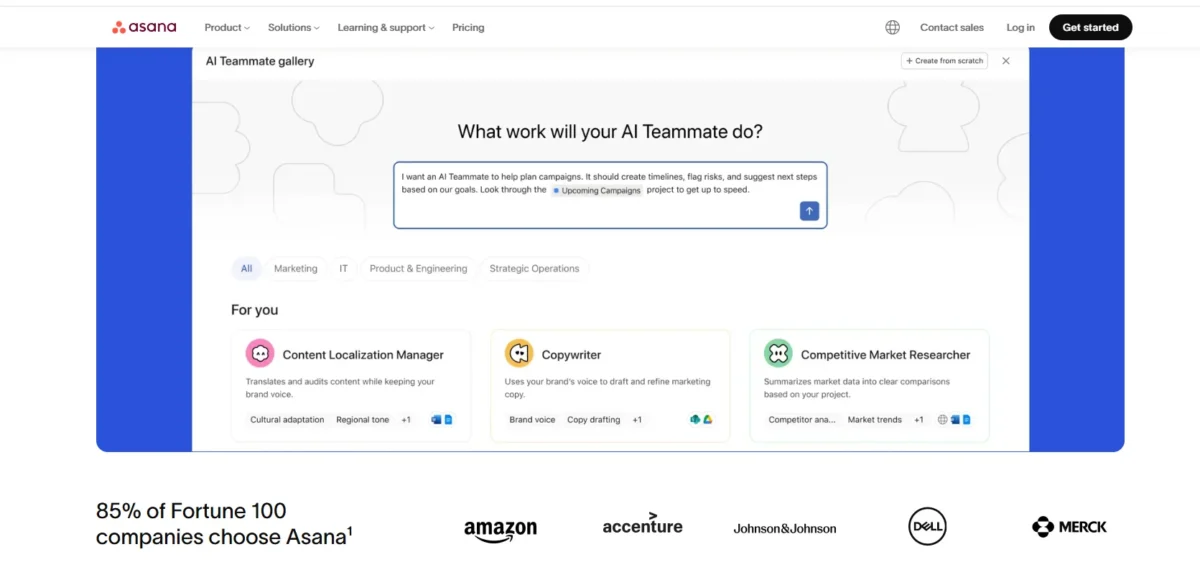
Asana is a cloud-based project management and team productivity platform designed to help teams organize work, track projects, and improve collaboration. You can manage tasks, assign responsibilities, automate repetitive work, create project timelines, and monitor team progress from a single dashboard.
Today, Asana works especially well for marketing teams, startups, remote teams, creative agencies, operations departments, and mid-sized businesses. It’s ideal for teams that want structure without the technical complexity of tools like Jira. If your workflow depends heavily on visual organization, deadlines, approvals, and collaboration, Asana can feel like a well-organized digital workspace instead of just another task manager.
How Asana Works in Real-World Team Workflows
In real business environments, Asana acts like a central operating system for work. Teams create projects, divide work into tasks, assign owners, add deadlines, attach files, and track progress in real time. Instead of managing work through endless emails and spreadsheets, everyone works from one collaborative workspace.
For example, a marketing agency can manage blog calendars, design approvals, social campaigns, and client onboarding inside one workflow management platform. Product teams can track sprint planning while HR departments can automate employee onboarding processes. That flexibility is one reason Asana remains one of the best project management software options for growing companies.
How tasks, projects, and dependencies are structured in Asana
Asana uses a hierarchy system that keeps projects organized without feeling overwhelming. Projects contain sections, sections contain tasks, and tasks can include subtasks, comments, files, custom fields, dependencies, and timelines. This structure works surprisingly well for complex workflows.
Dependencies are especially useful because they prevent workflow bottlenecks. If one task must finish before another starts, Asana automatically maps that relationship. Combined with timeline view, workload management, and project tracking tools, teams get much better visibility into deadlines and responsibilities.
Core Features Breakdown in This Asana Review
Asana packs a surprisingly deep feature set into a clean interface. Some tools focus only on task tracking, while others become bloated enterprise systems. Asana sits somewhere in the middle, which is why so many businesses adopt it for long-term project coordination.
Here are the most important features that define the platform in 2026:
- Task creation with assignees and due dates
- Recurring task automation
- Custom workflow builder
- Multiple project views
- Kanban boards for agile workflows
- Timeline view similar to Gantt charts
- Calendar scheduling tools
- Project templates for faster setup
- Forms for request collection
- Team messaging and collaboration
- Real-time progress tracking
- Portfolio management dashboards
- Workload management tools
- Goal and OKR tracking
- Automation rules for repetitive tasks
- Approval workflows for marketing and design teams
- Advanced reporting dashboards
- Mobile app for remote work management
- Integrations with Slack, Teams, Zoom, and Google Workspace
- AI-powered workflow suggestions and summaries
The biggest advantage is how these features connect naturally. Many tools force you to jump between menus constantly. Asana keeps workflows visually connected, which reduces confusion and improves team productivity.
Task creation, assignments, due dates, and priorities
Task management is still the foundation of Asana’s system. Creating tasks takes seconds, and the interface stays clean even when projects become large. You can assign owners, add due dates, create subtasks, set priorities, upload files, and tag teammates without cluttering the screen.
This sounds basic until you compare it with messy spreadsheet workflows or overloaded enterprise tools. Asana’s task management system works because it reduces friction. Teams spend less time organizing work and more time actually completing it.
Automation rules and workflow customization
Automation is one of Asana’s strongest areas in 2026. Teams can automatically assign tasks, update statuses, trigger notifications, move projects between stages, and create recurring workflows using rule-based automation.
For example, when a design request gets approved, Asana can instantly notify the development team and move the task into production. These automation rules reduce repetitive admin work and improve workflow consistency across departments.
Collaboration, Communication, and Visibility
Asana works well as a business collaboration tool because conversations stay attached to actual work. Instead of searching through Slack messages or email threads, teams discuss projects directly inside tasks and project boards.
Visibility is another major strength. Managers can instantly see who owns what, which projects are delayed, and where bottlenecks exist. For remote team collaboration, transparency matters a lot because distributed teams need stronger visibility than office-based teams.
Reporting, Tracking, and Team Accountability
Reporting tools have improved significantly over the last few years. Teams can now build project reporting dashboards that track deadlines, completion rates, workload balance, and productivity trends without needing third-party analytics software.
Accountability also improves because ownership becomes clear. Every task has a responsible person, deadlines are visible, and managers can identify stalled work quickly. That structure helps teams avoid the classic “I thought someone else was handling it” problem.
User Interface (UI)
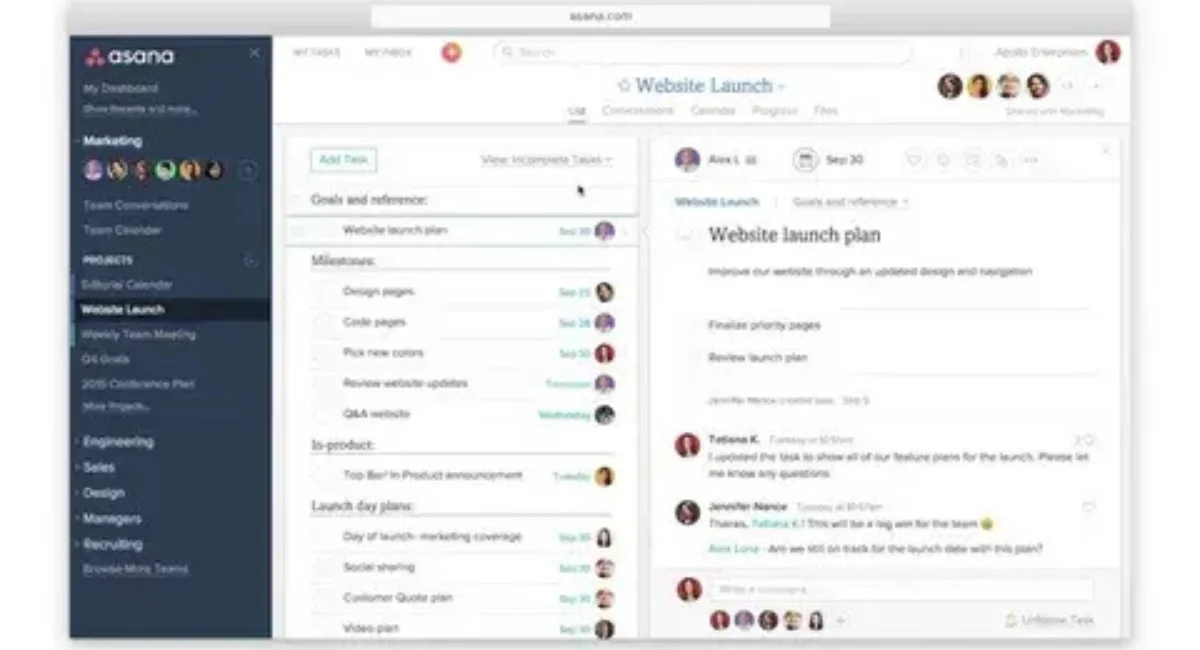
Asana’s interface remains one of the cleanest among project management platforms. The layout feels modern, lightweight, and easy to navigate, even for non-technical users. Unlike Jira, which can feel intimidating, Asana prioritizes clarity and usability.
Menus stay organized, and project views switch smoothly between lists, boards, calendars, and timelines. That flexibility helps different teams work the way they prefer without learning a completely new system.
User Experience (UX)
The overall user experience is excellent for beginners and intermediate users. Most people can learn the basics within a day without formal training. That matters because complicated software often fails due to poor adoption, not lack of features.
However, power users may eventually notice limitations in deep customization. Compared to ClickUp or Notion, Asana still feels more opinionated in how workflows should function.
Mobile App
The Asana mobile app is surprisingly strong. Many productivity apps become frustrating on smaller screens, but Asana keeps core functionality accessible and responsive across devices.
Remote teams can update tasks, check deadlines, respond to comments, upload files, and monitor projects while traveling or working remotely. The app supports both Android and iOS and performs reliably for day-to-day project coordination.
API & Integrations
Asana integrates with hundreds of business tools, including Slack, Microsoft Teams, Zoom, Google Drive, Dropbox, Salesforce, HubSpot, and Zapier. These integrations help companies connect workflows instead of isolating data across platforms.
The Asana API also allows developers to build custom automations and integrations for enterprise work management environments. That flexibility makes the platform scalable for growing organizations.
Competition
Competition in the productivity software market is intense right now. Tools like ClickUp, monday.com, Jira, Trello, Motion, and Notion continue adding advanced AI features and automation systems at a rapid pace.
Still, Asana stays competitive because it focuses heavily on usability and workflow clarity. Many competing platforms offer more features on paper, but feel overwhelming during daily use. Asana’s balance between simplicity and functionality remains one of its biggest advantages.
Asana Pros: What It Does Exceptionally Well
One reason this Asana Review remains positive overall is that the platform consistently delivers strong usability across different industries and team sizes. It doesn’t try to become an all-in-one operating system for everything. Instead, it focuses on organizing work clearly and efficiently.
Here are the biggest strengths Asana delivers in real-world use:
Detailed Pros
1. Extremely Easy to Learn
New users can understand the system quickly without technical training. That reduces onboarding time and improves team adoption rates.
2. Excellent Workflow Visibility
Managers and team leads get clear insight into project progress, deadlines, blockers, and ownership.
3. Strong Automation Features
Asana workflow automation saves time by handling repetitive actions automatically.
4. Great for Remote Teams
The platform supports distributed collaboration very well through comments, notifications, and shared visibility.
5. Multiple Project Views
List view, kanban boards, timeline view, and calendar view support different work styles.
6. High-Quality Mobile Experience
Unlike many business tools, the mobile app actually feels usable.
7. Clean and Modern Interface
The UI reduces clutter and helps users stay focused.
8. Strong Integration Ecosystem
It works smoothly with communication tools, CRMs, cloud storage apps, and marketing software.
9. Effective Goal Tracking
Goals and OKRs connect daily work to broader business objectives.
10. Scales Well for Mid-Sized Businesses
Asana handles growing teams better than simpler tools like Trello.
11. Strong Template Library
Project templates speed up onboarding and workflow setup.
12. Reliable Performance
The platform stays stable even with large projects and multiple users.
13. Good Reporting Dashboards
Managers can monitor productivity and project health easily.
14. Helpful for Marketing Teams
Content calendars, campaign approvals, and creative workflows fit naturally inside Asana.
15. Balanced Feature Set
It offers enough depth without becoming overwhelmingly complicated.
The Standout Strength: Goals
The goals feature deserves special attention because it connects strategy with execution better than many competitors. Teams can track company objectives, monitor key results, and link tasks directly to measurable business goals.
This creates alignment across departments. Instead of employees working on disconnected tasks, everyone sees how their work contributes to larger outcomes. For fast-growing businesses, that visibility becomes extremely valuable.
Asana Cons: Where It Falls Short
Asana is strong overall, but there are still some weaknesses that buyers should understand before committing. The platform occasionally sacrifices flexibility in favor of simplicity, which can frustrate advanced users and highly technical teams.
Pricing is another issue. Small teams may start comfortably on lower-tier plans, but costs increase rapidly as more advanced features become necessary.
Detailed Cons
1. Expensive for Large Teams
Advanced plans become costly when scaling across departments.
2. Limited Deep Customization
Compared to ClickUp or Notion, workflow flexibility still feels somewhat restricted.
3. Free Plan Has Important Restrictions
Features like timeline view and advanced reporting are limited.
4. Can Feel Too Structured
Some creative teams prefer looser systems with more flexibility.
5. Advanced Automation Requires Higher Plans
Many automation tools sit behind premium pricing tiers.
6. Reporting Still Isn’t Best-in-Class
Power BI-style analytics remain limited.
7. Enterprise Features Require Significant Budget
Large organizations may face high implementation costs.
8. Notification Overload Can Happen
Busy projects can generate excessive alerts without careful settings management.
9. Limited Offline Functionality
The platform works best with stable internet access.
10. Less Ideal for Highly Technical Development Teams
Jira still handles complex agile software development better.
The Big Limitation: Customization
Customization remains Asana’s biggest long-term weakness. While the platform supports custom fields and automation rules, it still operates within fairly controlled workflow structures.
That simplicity helps beginners but can frustrate advanced operations teams wanting highly customized dashboards, databases, or process logic. Companies needing deep workflow engineering may eventually outgrow Asana.
Asana Pricing Plans and Value Analysis
Asana offers multiple pricing tiers ranging from free plans for small teams to enterprise-level solutions for large organizations. The free version works surprisingly well for lightweight project coordination, especially for freelancers or startups managing simple workflows.
However, serious teams will likely need paid plans to unlock timeline view, workflow automation, reporting dashboards, workload management, and portfolio management features. The Business plan is usually the sweet spot for growing organizations because it balances advanced functionality with reasonable scalability.
From a value perspective, Asana justifies its pricing better than many enterprise work management tools because the software is easy to adopt. Businesses often lose money on complicated software that employees never fully use. Asana avoids much of that friction through strong UX design.
That said, companies comparing Asana pricing plans against ClickUp or monday.com may notice those competitors sometimes offer more features at lower pricing tiers. The tradeoff usually comes down to usability versus feature density.
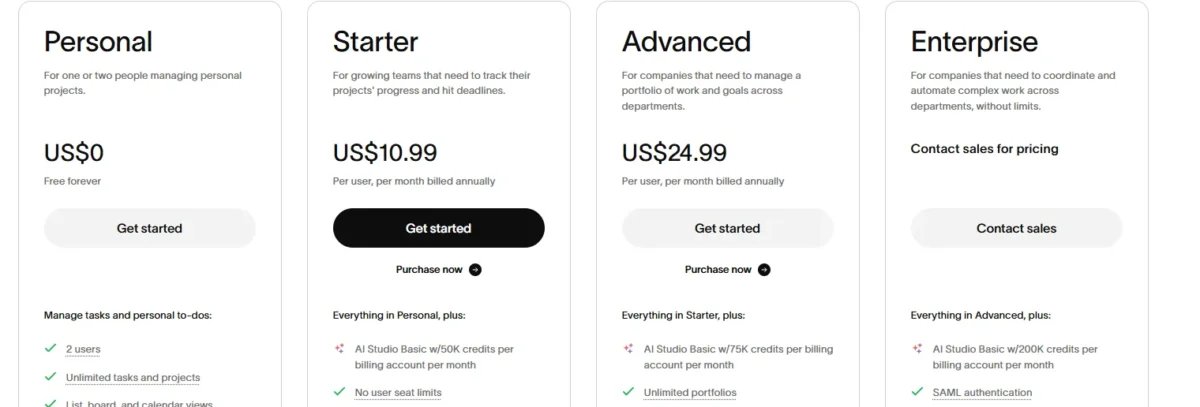
| Plan | Pricing | Best For |
| Personal | Free forever | Individuals and very small teams |
| Starter | $10.99/user/month (annual) or $13.49/user/month (monthly) | Small teams needing automation and custom fields |
| Advanced | $24.99/user/month (annual) or $30.49/user/month (monthly) | Growing teams need reporting, goals, and time tracking |
| Enterprise | Custom pricing | Large businesses need advanced admin and security controls |
| Enterprise+ | Custom pricing | Enterprises needing high-level compliance and audit features |
Note: Prices are typically billed annually. Monthly billing is usually ~20% more expensive.
- Personal Plan (Free)
- Best for: Individuals or very small teams just starting.
- Features: Unlimited tasks, projects, messages, activity log, file storage (100MB/file), list/board/calendar views, basic search, mobile apps.
- Limitations: No Timeline, no custom fields, no advanced search, no rules/automation, limited collaborators per project.
- Starter Plan (~$10.99 – $13.49 per user/month)
- Best for: Small teams needing more structure.
- Features: Everything in Personal, plus Timeline view, advanced search, custom fields, rules (automation), milestones, guest access, and increased file storage (1GB/file).
- Limitations: Limited workflow builder, basic reporting only.
- Advanced Plan (~$24.99 – $30.49 per user/month)
- Best for: Growing teams and departments needing deeper insights.
- Features: Everything in Starter, plus Portfolios, Goals, Workload management, custom dashboard, advanced integrations (Salesforce, Adobe, etc.), approval workflows, and forms with branching logic.
- Limitations: Higher cost per user.
- Enterprise Plan (Custom Pricing)
- Best for: Large organizations requiring security, control, and support.
- Features: Everything in Advanced, plus SAML/SSO, advanced security controls, data export, dedicated customer success manager, priority support, and unlimited custom roles.
Asana AI: Intelligence or Gimmick?
AI features are everywhere right now, and many productivity companies are rushing to add artificial intelligence, whether it genuinely helps users or not. Asana has taken a more practical approach compared to some competitors.
Instead of turning the platform into a chatbot experiment, Asana AI focuses mainly on workflow efficiency, summaries, automation, prioritization, and project insights.
Smart Features That Work
Some AI tools genuinely improve productivity. Automated summaries help managers understand project status quickly, while smart recommendations reduce repetitive planning work.
AI-generated workflow suggestions can also help less experienced teams structure projects more effectively. For businesses managing large amounts of repetitive coordination work, these features save noticeable time.
AI Studio (Additional Credits Required)
AI Studio expands automation capabilities further, but comes with additional usage costs. Teams can create advanced workflow logic, automate decisions, and build intelligent project actions based on custom triggers.
The feature feels promising for enterprise work management, although smaller teams may not need that level of sophistication.
The AI Reality Check
Despite the marketing hype, Asana AI still works best as a productivity assistant rather than a revolutionary system. It improves efficiency but won’t magically fix poor management or broken workflows.
In practical terms, the AI tools are helpful additions rather than game-changing reasons to buy the platform. That’s probably the most honest way to evaluate them in 2026.
Asana vs. The Competition
Asana competes in one of the most crowded software categories today, and platforms like G2 show just how closely users compare tools based on usability, automation, and team collaboration features. Choosing the right platform often depends less on features and more on how your team actually prefers to work.
Asana vs. monday.com
Monday.com offers more visual customization and colorful dashboards, while Asana focuses more on workflow simplicity and usability. Monday.com can feel more flexible, but Asana usually feels cleaner and easier to manage long-term.
Asana vs. ClickUp
ClickUp delivers incredible feature depth and customization. However, many users still find it overwhelming. Asana wins on clarity and ease of use, while ClickUp wins on flexibility and power.
Asana vs. Trello
Trello is simpler and easier for lightweight workflows, but it lacks advanced reporting, workload management, and enterprise project coordination features. Asana scales much better for growing businesses.
Asana vs. Jira
Jira dominates software development and agile engineering environments. However, non-technical teams often struggle with its complexity. Asana works better for marketing, operations, HR, and general business workflows.
Asana vs. Notion
Notion excels as a flexible knowledge and documentation system, but project tracking still feels less structured compared to Asana. Businesses wanting clearer project organization usually prefer Asana.
Final Verdict
Asana continues to earn its reputation as one of the best project management software platforms available. It combines strong workflow organization, collaboration features, automation, reporting, and usability into a system that feels approachable instead of overwhelming. That balance is difficult to achieve, and it’s one reason so many businesses continue adopting the platform.
Still, Asana isn’t perfect for everyone. Teams needing extreme customization or highly technical agile development workflows may prefer alternatives like ClickUp or Jira. But for startups, agencies, remote teams, operations departments, and growing businesses that want clarity and structure, Asana remains one of the strongest all-around choices on the market today.
Asana is an excellent choice for most teams looking for a balanced, powerful, and visually appealing project management tool.
- Choose Asana if: You value a clean UI, need multiple ways to visualize work (especially Gantt/Timeline), want strong automation capabilities, and have a team that collaborates heavily on tasks. It is particularly strong for marketing, operations, product, and cross-functional teams.
- Look elsewhere if: You need native time tracking (consider ClickUp or Monday.com), have a very tight budget for a large team (consider Trello or Notion), or prefer a highly database-centric approach (consider Airtable or Notion).
FAQs
Is Asana free to use?
Yes, Asana offers a free plan for individuals and small teams with basic task management features.
Is Asana good for small businesses?
Yes, it works very well for startups and growing teams that need organized project tracking without technical complexity.
Does Asana support workflow automation?
Yes, Asana includes automation rules that can assign tasks, update statuses, and trigger actions automatically.
Is Asana better than Trello?
For advanced project management and team scaling, Asana is generally stronger than Trello.
Can Asana replace spreadsheets?
For many project workflows, yes. It organizes tasks, deadlines, ownership, and reporting more effectively than spreadsheets.
Does Asana work for remote teams?
Yes, Asana is one of the better platforms for remote collaboration because it improves visibility and communication.
Is Asana worth paying for in 2026?
For teams managing complex workflows, deadlines, and collaboration, the paid plans usually provide strong value.

Nitin Alin is the founder of SaaShostly.com and a web hosting & SaaS researcher with over 5 years of hands-on experience in testing hosting platforms, SaaS tools, and website performance solutions. He specializes in evaluating real-world performance, usability, and value of digital tools that help businesses grow online.
Through SaaShostly.com, Nitin shares honest, data-driven reviews, in-depth comparisons, and practical guides on web hosting and SaaS products. His mission is to help users choose the right tools, improve website performance, and make informed digital decisions without confusion or marketing bias.