Wrike Review 2026: Features, Pros, Cons & Is It Worth It?
Are you wondering if Wrike is the right project management software for your business? The short answer is that Wrike is a powerful tool built for structured teamwork, but it can feel complex for beginners or small teams.
In this Wrike review, I’ll break down its features, usability, security, integrations, and support in a clear and balanced way. The goal is to help you understand whether it truly fits your workflow before you decide.
TL;DR
- Range of features: 8/10 — Strong and wide feature set, but users sometimes notice unexpected changes when features are added or removed.
- User interface & usability: 7/10 — Powerful but not very beginner-friendly, with a learning curve despite customizable dashboards.
- Security measures: 9/10 — Strong enterprise-level security, with extra paid options for advanced protection.
- Integrations: 9/10 — Over 400+ integrations, making it easy to connect with most productivity tools.
- Customer support: 9/10 — Reliable support with account management and onboarding help for users.
- Pricing model: 8/10 — Offers multiple plans, including a free option, but enterprise tiers can be expensive.
- Average rating: 8.3/10 — Overall, a strong, enterprise-ready platform.
Overall, Wrike is best suited for teams that want advanced project management capabilities and can handle a slightly complex setup.
Wrike Overview (At a Glance)
Wrike is a project management tool that helps teams organize tasks, track projects, and improve collaboration. If you are wondering what Wrike is or how Wrike works, it uses task-based workflows and dashboards to keep work clear and structured.
This Wrike project management software acts as a simple task management tool, helping teams assign work, track progress, and manage projects in one place.
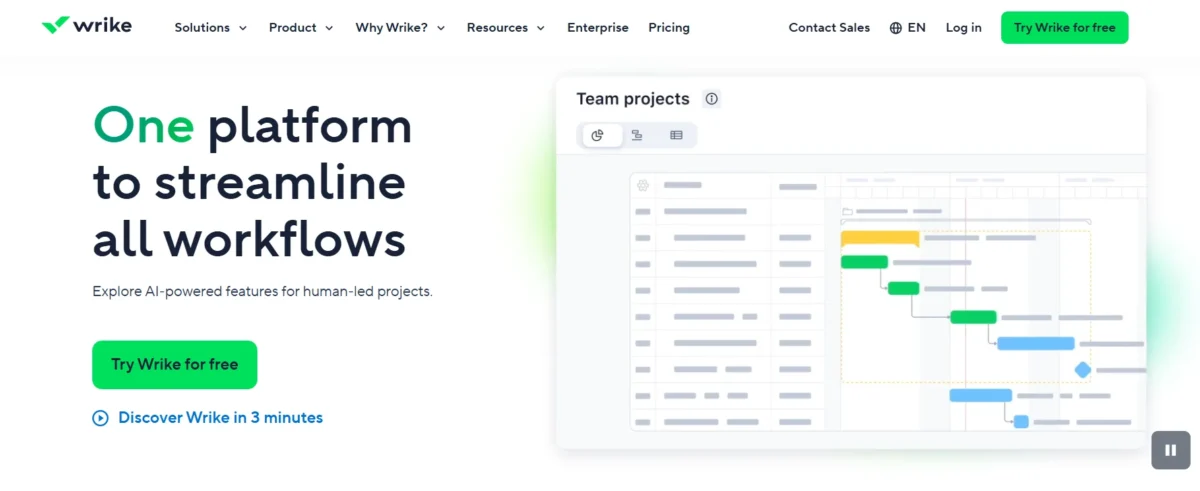
Wrike Key Features (Detailed Breakdown)
Custom workflows and automation
Wrike helps teams save time by using smart automation to reduce repetitive work. It works as a Wrike automation system that allows users to streamline everyday project tasks and improve efficiency.
- Automates tasks and approvals
- Uses AI for faster workflows
- Reduces manual effort
- Some users report feature changes without notice
As a workflow automation software, it uses AI-powered tools to automate actions like status updates, task creation, approvals, and comments. Its AI workflow builder makes it easier to design and customize automated processes without complex setup.
Overall, this task automation system is designed to help teams manage work faster, reduce manual effort, and keep projects moving smoothly.
Resource management and workload tracking
Wrike includes built-in features that work as a workload management tool to help teams balance tasks more effectively. It allows managers to assign work, monitor progress, and ensure no team member is overworked or underused.
As a resource planning software, it supports better scheduling by giving a clear view of team availability and project demands. This also improves team workload tracking, making it easier to see who is doing what at any time.
Overall, it acts as a capacity management tool that helps businesses forecast workloads, optimize resources, and keep projects on track without delays.
Team collaboration tools
Wrike works as a team collaboration platform that helps teams communicate and manage work in one shared space. It functions as real-time collaboration software, allowing users to share updates, files, and progress instantly across projects.
It also includes strong task communication tools like comments, @mentions, and notifications to keep discussions clear and organized. These project collaboration features ensure everyone stays aligned and can work together efficiently on the same tasks and deadlines.
Reporting and dashboards
Wrike includes powerful project reporting tools that help teams track progress, resources, and budgets in a clear and structured way. It allows users to create custom dashboards that Wrike offers, so they can view important project data in one place.
These features work as analytics for project management, giving teams better visibility into performance and helping them make informed decisions. Overall, it acts as performance tracking software that improves transparency and helps businesses monitor results more effectively.
AI Features: Broad Capabilities With Uncertain Practical Value
Wrike includes a wide set of Wrike AI features designed to improve planning, automation, and overall project efficiency. These tools position it among modern AI project management tools that help teams handle tasks like summarization, risk prediction, and content generation.
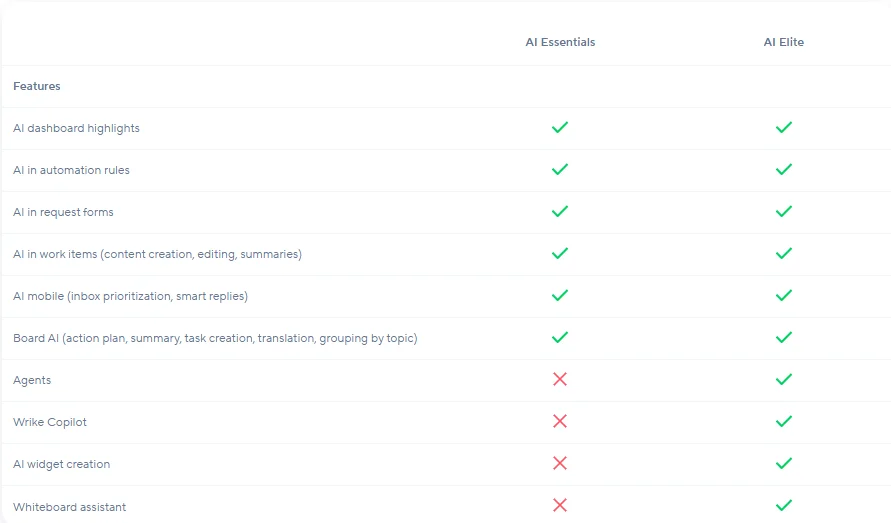
It also supports smart automation in SaaS tools, allowing users to reduce manual effort and streamline workflows through AI-assisted actions. Overall, it works as AI productivity software, but its real value depends on how much a team relies on automation in their daily workflow.
Wrike’s Pricing Model: Does It Provide Good Value For Money?
Wrike offers a free forever plan that includes basic features like email integration and enterprise-grade security. This makes it useful for individuals or small teams who want to try the platform before upgrading.
For advanced features, users need one of its paid plans, which start with the Team plan at $9.80 per user/month and scale up to Business, Enterprise, and Pinnacle tiers. Higher plans unlock features like AI risk prediction, portfolio management, advanced reporting, budgeting tools, and deeper integrations.
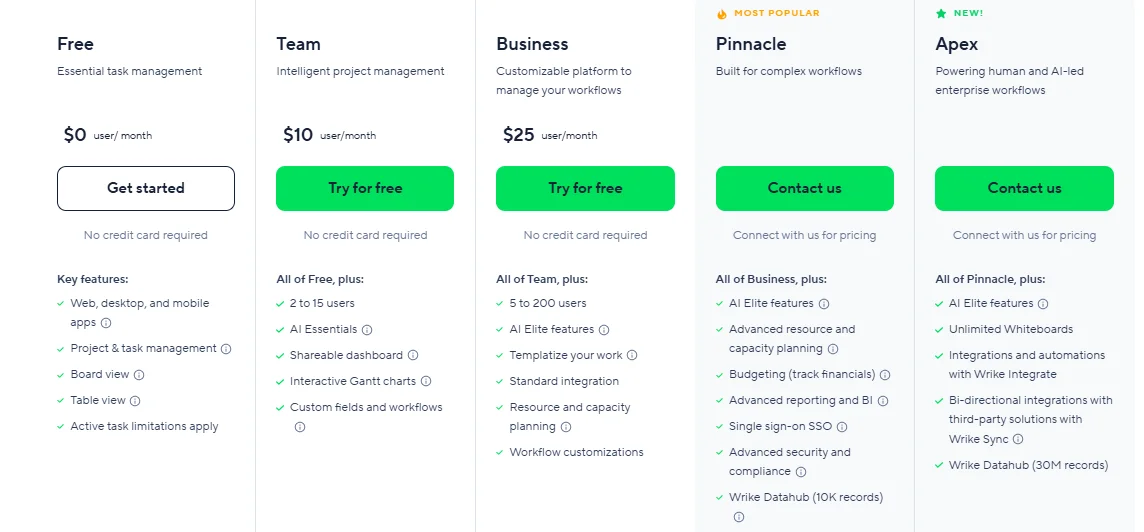
The platform also provides add-ons such as Wrike Integrate, Two-Way Sync, Wrike Lock, and Datahub, which expand automation, security, and data capabilities. However, pricing for these add-ons is not publicly listed and usually requires contacting sales.
Overall, Wrike’s pricing is flexible and supports different business sizes, but it can become expensive as teams scale or need advanced features. Some users also feel the per-user cost is high compared to the features included in lower tiers.
| Plan | Price | User Limit | Key Features |
| Free | $0 | Unlimited (basic use) | Email integration, basic task management, basic security |
| Team | $10/user/month | Up to 25 users | Custom fields, workflows, unlimited request forms, and dynamic Gantt charts |
| Business | $25/user/month | Up to 200 users | Portfolio management, AI risk prediction, nested projects, real-time reports |
| Enterprise | Custom pricing | Unlimited users | Advanced admin controls, security, reporting, and integrations |
| Pinnacle | Custom pricing | Unlimited users | Budgeting tools, Power BI integration, locked spaces, and advanced analytics |
Wrike offers scalable pricing plans designed for different team sizes, from small teams to large enterprises.
What does Wrike cost?
Wrike offers flexible Wrike subscription plans starting with a free option and paid tiers for growing teams.
- Free plan: Basic use for small teams
- Team (~$10/user/month): Entry-level Wrike cost per user
- Business (~$25/user/month): Advanced features and automation
- Enterprise: Custom enterprise pricing for large companies
- Pinnacle: Premium plan with full analytics and controls
Overall, the pricing breakdown of SaaS tools shows costs increase based on features and team size.
Is the free plan enough?
Wrike’s free plan is suitable for individuals, freelancers, and very small teams who need basic task management. It includes simple tools that help you organize work and test the platform easily.
When comparing free vs paid Wrike, the free version is quite limited and lacks advanced features like automation, reporting, and resource management. So, while the Wrike free plan features are useful for starters, they may not be enough for growing teams.
Overall, whether Wrike is free or worth it depends on your needs. For basic use, yes—but the limitations of the free plan make paid plans a better choice for serious project management.
Which plan offers the best value?
Wrike Business plan is usually the best Wrike plan for most growing teams. It offers a good balance between features and cost.
When comparing Wrike Business vs Enterprise, Business gives better value for money SaaS tools for everyday use, while Enterprise is for larger, complex needs. Overall, it is the best pricing tier Wrike offers for most users.
Wrike Pros and Cons (Honest Analysis)
Wrike is a project management tool for tasks, workflow, and team collaboration. This honest Wrike review shows it has both pros and cons, so its value depends on your needs.
Pros Of Wrike
- Wrike benefits include better task organization and tracking
- Advantages of Wrike support smoother team collaboration benefits
- Productivity improvements help teams work faster and stay focused
Cons Of Wrike
- Wrike’s disadvantages include difficulty for new users
- Wrike problems include a steep learning curve for beginners
- Wrike pricing issues may be high for small teams
Is Wrike easy to use?
It is not the easiest tool for beginners, and its usability can feel complex at first. There is a clear learning curve because of its advanced features and customization options.
However, with regular use, it becomes easier to manage tasks and workflows. Compared to other user-friendly project management tools, it may feel a bit heavy initially, but its ease of use improves as users get familiar with it.
Wrike vs Competitors (Alternatives)
Wrike vs competitors shows it’s a powerful option, but not always the easiest to use. Many users look for Wrike alternatives among the best project management tools with simpler setups. In SaaS comparison tools, Wrike stands out for features but may lag in ease of use.
Wrike vs Asana, ClickUp, Monday.com
| Feature | Wrike | Asana | ClickUp | Monday.com |
| Best For | Enterprise & complex projects | Task-based teamwork | Customization & value | Simple, flexible workflows |
| Ease of Use | Moderate (learning curve) | High | Moderate | Very High |
| Views | Gantt, Table | List, Board | List, Board, Mindmap | Board, Table |
| Automation | Advanced rules | Strong automation | Built-in automation | Very intuitive automation |
| Integrations | 400+ tools | 200+ tools | 1000+ tools | 200+ tools |
| Pricing | Higher (enterprise focus) | Mid-range | Budget-friendly value | Mid-range |
| Strength | Cross-project visibility | Simple collaboration | Feature-rich platform | Easy UI & flexibility |
- Wrike → Best for large teams handling complex, multi-layered projects.
- Asana → Best for teams that want clean, simple task tracking.
- ClickUp → Best overall value with the most features in one tool.
- Monday.com → Best for users who want an easy, visual work system.
Which One Should You Choose?
- Choose Wrike if you manage enterprise-level or complex cross-team projects.
- Choose Asana if you want simple, fast, and clean task management.
- Choose ClickUp if you need maximum features at a lower cost.
- Choose Monday.com if you want an easy, visual, and flexible work platform.
Best tool for small teams vs enterprises
- Small teams: Asana, ClickUp, Monday.com (best project management tool for small businesses)
- Enterprises: Wrike (enterprise vs small team software, scalable SaaS tools, team size comparison software)
When should you choose Wrike?
Choose Wrike when you need complex, enterprise-level project management with advanced workflows and cross-team coordination (when to use Wrike, Wrike use cases, best use cases project management, enterprise project management tool).
Integrations, Security & Support
Wrike integrations are one of its strongest features, along with solid SaaS security features and reliable customer support software tools.
It connects easily with hundreds of apps, protects data with enterprise-level standards, and offers flexible support options. Overall, it works well for both small teams and large businesses.
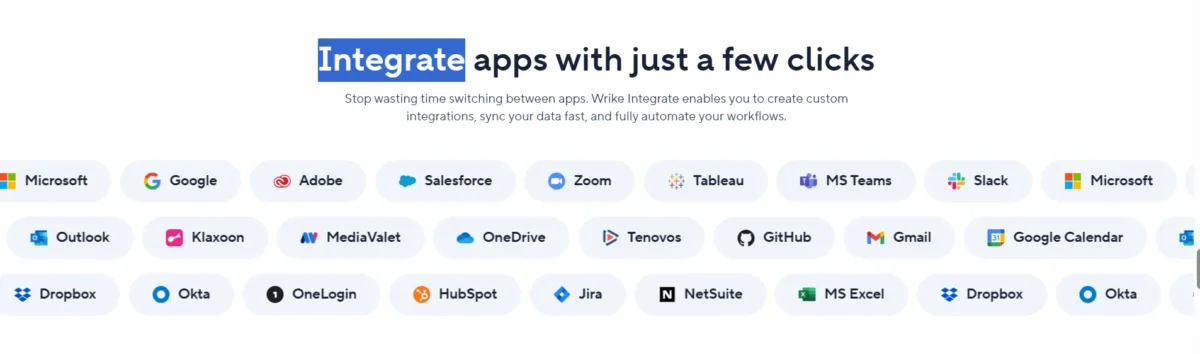
Wrike supports 400+ native and third-party integrations, including tools like Salesforce, Microsoft Teams, Adobe Creative Cloud, and Google Workspace. This makes it a powerful enterprise integrations platform for managing workflows across different systems.
It also offers Wrike Integrate, which allows custom integrations, automation, and two-way syncing with tools like Google Sheets, plus API access for developers.
Some standout integrations include MediaValet, Actionable Meetings for Zoom, and reporting tools like Tableau and Power BI. These integrations improve team collaboration, reporting, and overall productivity.
In terms of SaaS security features, Wrike provides strong protection, such as data encryption, access control, and compliance with industry standards. This makes it a safe option for businesses handling sensitive information.
For support, Wrike includes help centers, live chat, and ticket-based assistance. These customer support software tools become more advanced in higher plans, offering faster responses and dedicated help for enterprise users.
Rating: 9/10 – A strong mix of Wrike integrations, security, and support, though some advanced features are only available in premium plans.
Popular integrations
Offers a powerful Wrike integrations list with 400+ apps, helping teams stay connected and productive. It supports Google Workspace integration, Microsoft Teams integration, and Salesforce integration tools for smooth workflow management.
Also includes tools like Slack, Zoom, and Dropbox, plus an open API and Zapier for custom automation and flexible connectivity.
Security and compliance
Offers strong Wrike security features with reliable enterprise security SaaS protection. It helps keep data safe with advanced data protection tools and secure access control.
Includes SSO and encryption software, controlled sharing, and global security standards for better compliance and safety.
Customer support quality
Offers reliable Wrike customer support with strong SaaS support quality for quick issue resolution. It provides flexible help options to keep teams running smoothly.
Includes 24/7 assistance, expert help, and useful account management tools, making it a solid choice for enterprise support services.
Real User Reviews & Insights
Real users share mixed but mostly positive feedback about Wrike. Wrike user reviews often highlight its strong project tracking and collaboration features for teams handling complex work.
In customer feedback, Wrike and G2 reviews, users praise its flexibility, while also noting a learning curve and higher pricing. Overall, real SaaS user experience shows it works best for mid-to-large teams that need advanced project management tools.
What users like most
Users like Wrike for its flexibility and strong project management tools. Key Wrike strengths include customization and teamwork features. In the best Wrike features according to users, collaboration stands out for improving coordination. Overall, users report clear productivity benefits in managing complex projects.
What Users Struggle With in Wrike?
Users often mention a few key Wrike complaints and Wrike limitations. The most common user issues with Wrike include a steep learning curve and high pricing for advanced features. Some also highlight SaaS pain points around reporting and difficulty connecting projects and tasks in one view.
Performance and reliability
The platform offers strong performance with generally stable and reliable functionality for large teams. It is widely used as one of the SaaS reliability tools for managing complex projects. Some users report minor lag, but overall, system stability and project management remain solid. In most cases, its cloud software performance is dependable for enterprise workloads.
Best Use Cases for Wrike
It is best for teams that need organized workflows, clear communication, and efficient project tracking. The best Wrike use cases include marketing teams, creative agencies, IT departments, and growing businesses that rely on strong project management for teams and productivity tools for businesses.
Wrike is ideal for users who need scalable solutions and want better control over complex, multi-step projects while improving collaboration.
Best for marketing and creative teams
Marketing Teams
Wrike helps marketing teams manage campaigns in one place as a strong marketing project management tool. Its proofing and approval features make feedback faster and easier to handle.
Creative Agencies
Creative agencies use Wrike as a creative team collaboration software to manage designs, files, and revisions. It also works as an agency workflow tool that keeps client projects organized and on track.
IT Departments
IT teams use Wrike to manage complex tasks and improve coordination across teams. It helps simplify workflows and increase visibility.
Product Development
Product teams use Wrike to plan releases and track progress efficiently. It supports better organization and smoother execution of product work.
Event Management
Event managers use Wrike to plan schedules and track tasks step by step. It helps ensure everything runs on time and stays well organized.
Construction Projects
Construction teams use Wrike to track timelines, budgets, and progress. It improves project control and helps reduce delays.
Best for remote teams
Wrike is useful for teams working from different locations who need clear communication and real-time project tracking. It helps remote teams stay aligned and manage tasks without confusion.
It supports remote team collaboration tools and works well as distributed team software for handling shared work. With features like task boards, automation, and integrations, it also fits well as an online project management tool and work-from-home productivity tool.
How it improves productivity
Wrike helps teams stay organized by keeping tasks, files, and communication in one place. This reduces confusion and improves overall focus.
It uses automation productivity SaaS features to handle routine work and improve workflow efficiency. This leads to better team productivity improvement and highlights key productivity software benefits like saving time and faster project delivery.
Is Wrike Right for You?
It is best for mid-to-large teams that need structured project tracking and advanced workflows. This helps decide if Wrike is worth it and supports a simple Wrike decision guide. It is a strong best project management software choice for complex needs, but its Wrike suitability may be limited for small, simple teams.
When Wrike is the best choice
- It is not suitable for small teams that need basic task management, making Wrike not suitable for small teams a key concern.
- Teams looking for simple project management tools alternatives may find it too complex and heavy.
- It is not ideal for users who prefer easy PM tools with quick setup and minimal learning time.
- It may also be less suitable for those searching for budget-friendly SaaS tools with lower costs and simpler features.
When to avoid Wrike
- It is not ideal for teams that want a quick setup and simple task tracking.
- Wrike not suitable for small teams due to its complexity and learning curve.
- Better options are simple project management tools, alternatives for basic needs.
- Many users prefer easy PM tools for faster adoption and ease of use.
- It may not fit those looking for budget-friendly SaaS tools with low cost and minimal setup.
Final Verdict
Based on a Wrike review, whether Wrike is worth buying depends on your team size and workflow needs, but it is often considered a strong option for the best project management tool for large and complex organizations.
A Wrike recommendation usually applies to enterprise users because Wrike offers advanced reporting, customization, and portfolio management features.
However, for small teams, simpler tools may be more practical even though their overall capabilities are strong.
Is Wrike worth it?
It is worth it for medium to large teams that need strong structure, detailed reporting, and flexible project management tools. It works best in complex environments where multiple projects, teams, and workflows must be managed in one system.
However, it may not be ideal for smaller teams. The platform can feel complex to learn, and setup often takes time before teams can use it smoothly. Higher pricing also makes it less suitable for simple task tracking or basic project needs.
Get Started with Wrike Today
Getting started with Wrike is quick and simple through its Wrike free trial, which lets you explore features before committing. You can start a Wrike trial in minutes using the SaaS signup process, with no credit card required.
During the trial, you can also get Wrike pricing details based on your team size and choose a plan that fits your needs.
FAQs
Is Wrike good for beginners?
It is beginner-friendly, but it may not feel like one of the easiest project management tools at the start. The learning curve is noticeable because of advanced features, though the interface and onboarding help new users adjust.
As a SaaS for beginners, it works well if you’re willing to learn and need a tool that can grow with your projects.
Does Wrike offer a free trial?
Yes, it offers a Wrike free trial for 14 days, and you don’t need a credit card to start. This Wrike pricing trial gives full access to premium features, making it easier to evaluate before upgrading.
You can also try Wrike free with its forever-free plan, which is useful in a SaaS free plan comparison for small teams with basic needs.
Can it handle multiple projects?
Yes, it can handle multiple projects very efficiently. It lets you manage tasks, timelines, and teams across different projects from one place.
You also get tools for resource planning, cross-project tracking, and real-time dashboards, which help you stay organized and monitor progress easily.
Is Wrike secure?
Yes, Wrike is secure and built for business use. Its Wrike security features include strong encryption and compliance with standards like SOC 2, ISO 27001, GDPR, and HIPAA, making it part of trusted enterprise SaaS security solutions.
It is also considered one of the safe project management tools, offering role-based access and two-factor authentication to support strong data protection that Wrike users can rely on.

Nitin Alin is the founder of SaaShostly.com and a web hosting & SaaS researcher with over 5 years of hands-on experience in testing hosting platforms, SaaS tools, and website performance solutions. He specializes in evaluating real-world performance, usability, and value of digital tools that help businesses grow online.
Through SaaShostly.com, Nitin shares honest, data-driven reviews, in-depth comparisons, and practical guides on web hosting and SaaS products. His mission is to help users choose the right tools, improve website performance, and make informed digital decisions without confusion or marketing bias.