
Juggling ten different apps just to keep a project on track gets exhausting fast. Between chasing invoices, tracking time, and trying to remember which task belongs to which client, it’s easy to feel like you’re drowning in tabs instead of getting real work done. If you’ve landed here searching for a Paymo review, chances are you’re tired of the chaos and hoping this one tool can actually simplify things.
Good news: that’s exactly what we’re diving into today. In this Paymo review, we’ll break down what the platform does well, where it falls short, and whether it’s really worth adding to your workflow. By the end, you’ll have a clear picture of whether Paymo is the right fit for you or your team.
We spent several weeks testing Paymo firsthand — creating projects, tracking hours, sending invoices, and poking at every corner of the dashboard — so this isn’t a rehash of marketing copy. It’s a hands-on, honest Paymo Review built from real use.
Paymo Review: A Quick Overview
Before we get into the weeds, here’s a snapshot of what Paymo is and who it’s built for. We’ve laid it out in a table so you can scan it in a few seconds and decide whether it’s worth reading further.
| Category | Details |
| What it is | Project management software with built-in time tracking and invoicing |
| Best for | Freelancers, small businesses, agencies, and remote teams |
| Owned by | CAKE.com (also owner of Clockify) |
| Free plan | Yes, limited to 1 user |
| Paid plans start at | $5.9/user/month (billed annually) |
| Standout features | Time tracking, Gantt charts, Kanban boards, invoicing |
| Mobile app | iOS and Android |
| Main competitors | Clockify, Harvest, Teamwork, Zoho Projects |
What Is Paymo?
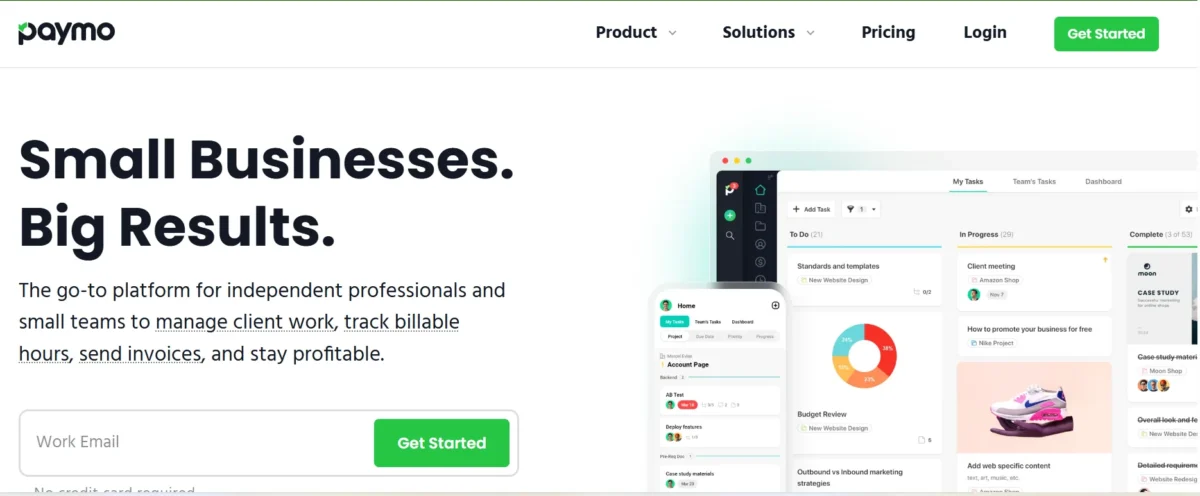
Paymo is a work management platform that bundles project management, time tracking, and client invoicing into one place. Instead of juggling a separate tool for each task, you get task management, a Kanban board, a Gantt chart, and billing software under one login.
It’s designed with the full project lifecycle in mind, from planning to getting paid. For service-based businesses that bill clients by the hour, that combination is a big part of the appeal.
Who Should Use Paymo?
Paymo tends to work best for freelancers, solopreneurs, creative studios, and small agencies that need to track billable hours and invoice clients without switching apps. Consultancies and micro-agencies managing multiple client projects at once will likely appreciate having task management and billing in a single dashboard.
However, larger enterprises with complex resource allocation needs may find it a little light on advanced reporting. If you’re a small or mid-sized service business, though, it’s worth a serious look.
Paymo Pros and Cons
No project management tool is perfect, and Paymo is no exception. We’ve broken down what stood out as genuinely useful during testing and what left us wanting more.
Overall, the pros outweigh the cons for its target audience — freelancers and small teams — but larger organizations may hit friction points sooner.
Paymo Pros
- Intuitive interface that’s easy to learn, even for non-technical users
- Combines time tracking, invoicing, and task management in one app
- Accurate, reliable time tracking with both automatic and manual options
- Transparent pricing with no hidden fees
- Fast setup and simple onboarding
- Responsive customer support during trials and active subscriptions
- Solid Gantt chart and Kanban board views for visual planning
- Generous free plan for solo users
Paymo Cons
- The mobile app feels basic compared to the desktop experience
- Reporting and analytics are somewhat limited for larger teams
- Gantt charts can’t be exported directly to Excel
- Limited customization on lower-tier plans
- Lacks some enterprise-level forecasting and advanced resource planning tools
Paymo Key Features
Paymo packs in a wide range of features aimed at service businesses. Here’s a rundown of what you get across the platform, based on what we tested directly.
Whether you’re managing one client or fifteen, most of these tools work together rather than in isolation, which is really the point of an all-in-one solution.
- Task management with list, board, and table views
- Kanban board for visual workflow management
- Gantt chart for project timeline planning
- Task dependencies and milestones
- Automatic and manual time tracking
- Timesheets for billable and non-billable hours
- Team scheduling and workload management
- Employee leave and approval workflows
- Online invoicing and recurring invoices
- Expense tracking
- Project budgeting and estimates
- Client management and portals
- File proofing and document sharing
- Project templates
- Calendar view and Pomodoro timer
- Online payments via Stripe and PayPal
- Custom workflows and project statuses
- Resource allocation and scheduling
- Detailed reporting on project profitability
- Third-party integrations and REST API
Project Management
Paymo’s project management core covers everything from task creation to full project timelines. You can switch between list, board, and Gantt views depending on how you like to visualize work.
Task dependencies help you map out what needs to happen before the next step can start, which is genuinely useful for multi-phase client projects. It’s not as deep as dedicated enterprise tools, but for small to mid-sized teams, it covers the essentials well.
Time Tracking
This is where Paymo really shines. You can track time manually, use the automatic time tracking widget, or log hours retroactively if you forget to start the timer. Every entry can be tagged as billable or non-billable, which flows straight into invoicing later. During testing, the accuracy and simplicity of this feature stood out as one of Paymo’s strongest selling points.
Task Management
Task management in Paymo is straightforward without feeling stripped down. You can assign tasks, set priorities, add due dates, and attach files directly to each task. The board view makes it easy to see workload management at a glance, and switching between projects doesn’t feel clunky. For freelancers managing multiple clients, this keeps things from slipping through the cracks.
Team Scheduling
Team scheduling lets managers see who’s working on what and when, across active projects. It pairs well with the leave planner, so approvals for employee leave don’t create scheduling conflicts. This feature is more useful for small teams and agencies than solo freelancers, but it adds real value once you have people to coordinate.
Invoicing and Billing
Paymo’s invoicing pulls billable hours directly from your timesheets, so you’re not manually re-entering numbers. You can send recurring invoices, accept online payments through Stripe or PayPal, and even sync with QuickBooks or Xero for accounting. For client billing, this is one of the smoothest workflows we tested across any project management app in this category.
Paymo Pricing
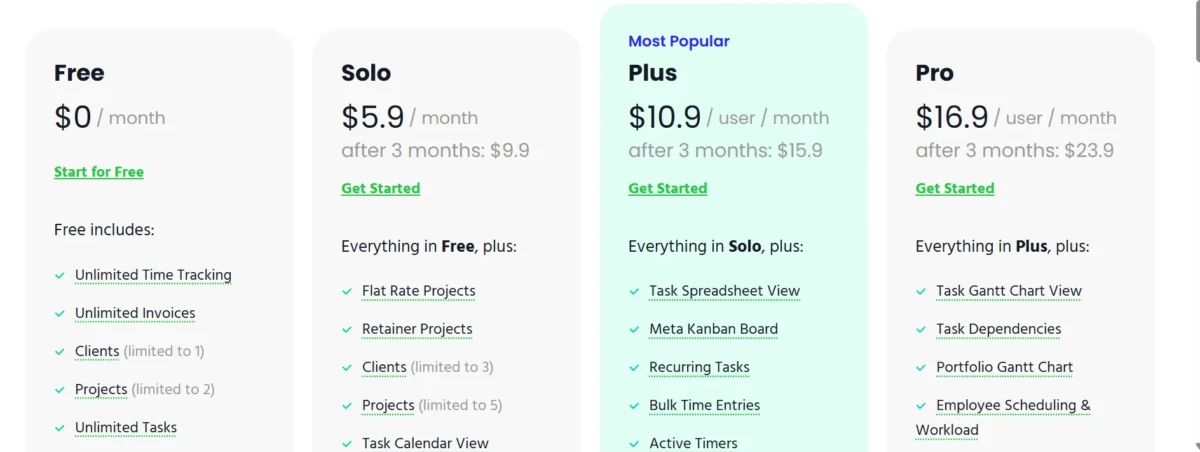
Paymo’s pricing structure includes a free plan and three paid tiers, with a discount for annual subscriptions. Below is a breakdown based on current, up-to-date pricing as of mid-2026.
Pricing is genuinely one of Paymo’s competitive advantages — it undercuts several rivals while still offering a full feature set at every tier above the free plan.
How Much Paymo Pricing Plans?
- Free – $0/month, limited to 1 user, basic task management and time tracking
- Starter – $5.9/user/month billed annually (or $9.9/user/month billed monthly) — built for freelancers, includes unlimited invoices and time tracking
- Small Office – $10.9/user/month billed annually (or $15.9/user/month billed monthly) — adds Gantt charts, resource scheduling, and advanced task management
- Business – $16.9/user/month billed annually (or $23.9F/user/month billed monthly) — includes employee scheduling, leave management, and priority support
Annual billing saves you roughly 40%, equivalent to two free months, compared to paying monthly. There’s also a 15-day free trial on any paid plan, no credit card required.
Our Pricing Experience
During our trial, upgrading and downgrading between plans was painless, and the billing page was refreshingly transparent — no surprise charges, no confusing add-ons buried in fine print.
We appreciated that the Starter plan alone covers most freelancer needs without forcing an upgrade just to invoice clients. Compared to Asana, Teamwork, or Monday.com, Paymo’s per-user cost is noticeably lower for equivalent functionality.
Is Paymo Worth the Price?
For freelancers and small agencies, yes — the value for money here is hard to beat. You’re getting time tracking, invoicing, and task management for less than the cost of three separate subscriptions. Larger businesses with more complex resource management needs might feel the Business plan’s ceiling sooner, but for its core audience, the pricing feels fair and honest.
Ease of Use and User Experience
A tool is only as good as how quickly your team can actually use it. This is where firsthand testing matters most, so we walked through setup exactly as a new user would.
Our overall experience was positive: Paymo doesn’t require a steep learning curve, and most core workflows made sense within the first sitting.
Interface and Setup
The dashboard is clean, with a logical layout that doesn’t bury key features behind menus. Setup took us under fifteen minutes from signup to creating our first project and inviting a teammate. New users won’t need a lengthy onboarding process to get productive, which is a real advantage over more complex platforms like Wrike or Smartsheet.
Mobile App Experience
The mobile app covers the basics — time tracking, task updates, and notifications — but it doesn’t carry over the full desktop experience. During testing, we found it reliable for quick check-ins and clocking hours on the go, but not something you’d want to rely on for detailed project planning. If mobile-first work is a priority for your team, this is worth keeping in mind.
Paymo Integrations and Customer Support
No project management app works in a vacuum, so integrations and support quality matter as much as the core features.
Paymo covers the essentials well, though it’s not as integration-heavy as larger platforms like Asana or Wrike.
Available Integrations
Paymo connects with Slack, Google Calendar, Google Drive, QuickBooks, Xero, Zapier, Stripe, PayPal, and Adobe Creative Cloud, among others. The Zapier integration in particular opens the door to hundreds of additional third-party integrations through its API. For accounting workflows especially, syncing invoices to QuickBooks or Xero saved us a noticeable amount of manual data entry.
Customer Support
Support response times during our trial were fast, typically within a few hours on chat. Documentation is thorough, and live onboarding sessions are available on higher-tier plans. Some independent reviews on G2 and Capterra mention slower responses for free-plan users, so paid subscribers seem to get priority.
Security and Privacy
Paymo runs on infrastructure secured with SSL/TLS encryption and offers two-factor authentication (2FA) for account protection. The company states it complies with GDPR, and data is handled under a designated DPO for EU users. It hasn’t published SOC 2 certification the way some enterprise competitors have, which may matter if you’re evaluating it for a larger, compliance-heavy organization.
How Should I Use Paymo
Paymo works best when treated as your single source of truth for client work — logging time as you go, keeping tasks updated in real time, and generating invoices directly from tracked hours rather than reconstructing them later.
Teams that adopt this habit early tend to get the most accurate billing and the clearest picture of project profitability. Using the Gantt chart for planning alongside the Kanban board for daily execution also keeps both big-picture and day-to-day work aligned.
How Not to Use Paymo
Paymo isn’t the right fit if you need deep enterprise-level forecasting, complex multi-department resource allocation, or heavy customization across hundreds of users. It also shouldn’t be treated as a full payroll or HR system — it tracks hours and leave requests, but it doesn’t process payroll itself. Trying to force it into a role built for tools like Smartsheet or LiquidPlanner will likely lead to frustration rather than better results.
How Does Paymo Match Up to the Competition?
Compared to Clockify, Paymo offers more built-in project management depth, while Clockify leans harder into pure time tracking at a lower cost. Against Harvest, Paymo pulls ahead with task management and Gantt charts, though Harvest’s reporting is slightly more polished.
Asana and Wrike both offer stronger customization and scalability for larger teams, but neither matches Paymo’s native invoicing. If billing clients directly from tracked hours is a priority, Paymo holds a clear edge over most of these alternatives.
Paymo Alternatives
If Paymo doesn’t check every box for your business, a few solid alternatives are worth considering depending on what you value most.
Best Paymo Alternatives
- Clockify – Better for pure time tracking at a lower price point, especially for larger teams
- Harvest – Strong reporting and simple invoicing, good for agencies focused on billing
- Teamwork – More robust for agencies managing complex client deliverables
- Zoho Projects – Good budget option with broader software ecosystem integration
- Asana – Better suited for larger teams needing advanced task customization
Is Paymo Worth It?
Yes, for its core audience. Freelancers, small agencies, and remote teams looking for an affordable, all-in-one project management and billing tool will likely find Paymo worth the investment. Larger enterprises with complex compliance or forecasting needs may want to look elsewhere, but for everyone else, it delivers solid value in 2026.
Conclusion
After weeks of hands-on testing, our take is straightforward: Paymo does what it promises without overcomplicating things. It won’t replace enterprise-grade software for large organizations, but for freelancers, consultancies, and small agencies who need project management, time tracking, and invoicing without a stack of separate subscriptions, it’s a genuinely strong contender.
If you’re still deciding, the free trial is a low-risk way to test it against your actual workflow before committing. Based on what we saw, most small service businesses will find it earns its place quickly.
FAQs
Is Paymo free to use?
Yes, Paymo offers a free plan for solo users with basic time tracking and task management, though it’s limited compared to paid tiers.
Who owns Paymo?
Paymo is owned and operated by CAKE.com, the same company behind Clockify.
What are Paymo’s main competitors?
Its closest rivals include Clockify, Harvest, Zoho Projects, Teamwork, and Wrike, depending on whether you prioritize invoicing or task management.
Can Paymo handle employee payroll?
Not directly — Paymo tracks billable hours and timesheets but doesn’t run payroll itself; you’d need to export data to a payroll system.
Does Paymo integrate with QuickBooks?
Yes, Paymo connects with QuickBooks and Xero, making it easier to sync invoices and expenses with your accounting software.
Is Paymo good for agencies?
Yes, especially small to mid-sized agencies that need project tracking, client invoicing, and team scheduling in one place.
Does Paymo have a mobile app?
Yes, Paymo offers apps for iOS and Android, though the mobile experience is more basic than the desktop version.
Nitin Alin is the founder of SaaShostly.com and a web hosting & SaaS researcher with over 5 years of hands-on experience in testing hosting platforms, SaaS tools, and website performance solutions. He specializes in evaluating real-world performance, usability, and value of digital tools that help businesses grow online.
Through SaaShostly.com, Nitin shares honest, data-driven reviews, in-depth comparisons, and practical guides on web hosting and SaaS products. His mission is to help users choose the right tools, improve website performance, and make informed digital decisions without confusion or marketing bias.