

If you’ve ever spent an hour bouncing between five different tabs trying to plan a project with your team, you know the struggle. Sticky notes, whiteboards, brainstorming sessions that never quite come together online — it’s exhausting when your tools don’t match how your brain actually works. So if you’re searching for a Miro review right now, chances are you’re wondering whether this whiteboard tool can finally bring some order to the chaos.
Good news — that’s exactly what this post is here for. We’ll walk through what Miro actually does, where it shines, where it falls short, and whether it’s worth your time (and money). By the end, you’ll know if this platform is the missing piece your team’s workflow has been waiting for.
Miro Review: A Quick Overview
Miro started life as a simple online whiteboard and has grown into a full visual collaboration platform used by design agencies, agile project groups, and enterprise teams alike. It combines an infinite canvas, real-time collaboration, and a growing set of AI-powered tools into one workspace.
Companies like Under Armour, IKEA, and PepsiCo use it, and it regularly shows up on G2’s Best Software Products list. Here’s the quick-glance rundown before we dig into the details.
| Category | Details |
| Best for | Remote teams, agile groups, product managers, design agencies |
| Starting price | Free plan available; paid plans from around $8–$20/user/month |
| Standout feature | Infinite canvas with real-time co-editing |
| AI tools | AI Sidekicks, AI Flows, AI-powered search |
| Integrations | Slack, Jira, Microsoft Teams, Zoom, Asana, Trello, GitHub |
| Platforms | Web, desktop app, mobile app |
| Security | SSO, enterprise-grade security controls |
| Learning curve | Moderate — lots of features to explore |
What Are the Pros and Cons of Miro?
No tool is perfect, and honestly, that’s fine. What matters is whether the strengths outweigh the friction for your specific team. Here’s what stood out, both good and not-so-good, after spending real time inside the platform.
Pros:
- Genuinely intuitive infinite canvas that scales with big ideas
- Real-time collaboration feels smooth, even with large teams
- Huge templates library for almost any use case
- Strong integrations with Jira, Slack, Teams, and more
- AI features that actually save time instead of just being a gimmick
- Presentation mode makes sharing boards painless
- Works well across web, desktop, and mobile
Cons:
- Pricing climbs quickly once you add enterprise features
- The sheer number of tools can overwhelm new users at first
- Free plan limits how many editable boards you can keep
- Some advanced AI features are still rolling out gradually
- Offline functionality is limited compared to desktop-first tools
What Are Miro’s Key Specifications?
Before comparing plans or features in depth, it helps to know the baseline specs. Miro is a cloud-based collaboration tool, which means most of its power depends on your internet connection and browser or app performance.
It supports single sign-on (SSO) for enterprise security, offers API access for custom integrations, and syncs boards in real time across every connected device. The platform also keeps version history, so you can roll back changes if a board gets messy during a brainstorm.
Pricing: Consistent and Reasonable
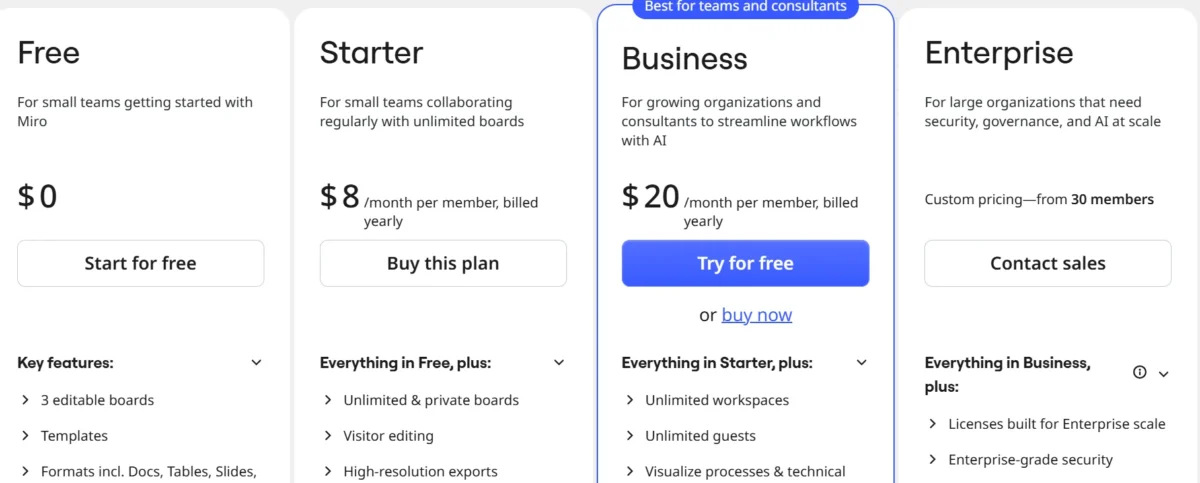
Miro’s pricing has stayed fairly predictable over the past couple of years, which is refreshing in a market where SaaS prices creep up constantly. There’s a genuinely usable free plan, followed by paid tiers that scale with team size and feature needs. As of the most recent price update, here’s how the tiers break down.
| Plan | Price | Best For |
| Free | $0 | Individuals, small trial teams |
| Starter | ~$8/user/month | Small teams needing more boards |
| Business | ~$20/user/month | Growing teams needing integrations and AI tools |
| Enterprise | Custom pricing | Large orgs needing SSO, advanced security, admin controls |
Our Experience: After testing the Business plan across a mid-sized team, the value felt genuinely justified. The AI features and integration depth at that tier make it easy to recommend for teams past the “just getting started” phase — though smaller teams may find the Starter plan does the job just fine without overpaying.
Getting Started: Easily Accessible

Signing up takes just a couple of minutes, and you don’t need a credit card to try the free plan. Miro walks new users through a short onboarding flow that introduces the canvas, sticky notes, and a few starter templates. It’s genuinely one of the smoother “zero to first board” experiences among collaboration software tools right now.
Once you’re in, joining an existing team board is as simple as clicking a shared link. There’s no clunky account-linking process, and guest access makes it easy to bring in outside collaborators, like clients or freelancers, without giving them full account access. This low-friction entry point is one reason Miro sees such wide adoption across remote teams.
Interface and Ease of Use: So Many Capabilities
The interface leans heavily into the “infinite canvas” idea, and it mostly works. Zooming in and out feels natural, frames help organize chaotic boards into sections, and the drag-and-drop interface keeps most actions just a click away. That said, first-time users might feel a little lost given how many tools sit in the sidebar.
Once you get past the initial learning curve, though, the interface starts to feel less like a whiteboard and more like a full visual workspace. Templates help a lot here, since you rarely have to start from a blank canvas. For teams doing agile collaboration or sprint planning, this structure genuinely speeds things up.
Core Features
Miro packs in a wide range of tools, and most of them go far beyond a basic digital whiteboard. Here’s a broader list of the core and supporting features you’ll run into:
- Infinite canvas
- Real-time co-editing
- Digital sticky notes
- Mind mapping tools
- Flowchart and diagramming tools
- Kanban board support
- Templates library
- Drawing tools
- Presentation mode
- Talktrack (async video walkthroughs)
- Frames for board organization
- Timeline and roadmap tools
- Wireframe library
- Comments and feedback threads
- Version history
- Guest access and board sharing
- Team spaces
- API access
- Single sign-on (SSO)
- AI-powered search and workflows
The next few sections break down the features that matter most day-to-day.
Infinite Canvas
This is Miro’s signature feature, and it’s genuinely the reason a lot of teams switch over. Instead of being boxed into a fixed page size, you can keep expanding the board in any direction. It’s especially useful for big brainstorming sessions or product roadmap planning where ideas keep growing.
Real-Time Collaboration
Multiple people can edit the same board at once, and you can actually see each teammate’s cursor moving live. For remote team collaboration, this makes meetings feel less like a slideshow and more like an actual shared workspace. Latency is minimal, even with a dozen or more people active on one board.
Templates Library
Miro’s templates library covers everything from retrospectives to user story mapping to design sprints. Instead of building a board from scratch, you can drop in a proven layout and just fill in the details. This alone saves agile teams a meaningful chunk of setup time each sprint.
Sticky Notes
Digital sticky notes are the bread and butter of most Miro boards. You can color-code them, resize them, and move them around instantly, which makes grouping ideas during brainstorming sessions much faster than physical notes ever were.
Drawing Tools
The drawing tools let you sketch freehand, add shapes, or annotate directly on a board. It’s not going to replace Figma for detailed design work, but for quick diagrams or visual explanations during a meeting, it does the job well.
Presentation Mode
Presentation mode turns your board into a clean, slide-like walkthrough without needing to export anything. It’s a nice touch for teams who build their whole planning process inside Miro and don’t want to duplicate work into a separate slide deck.
The Heart of Collaboration: Real-Time Co-Editing
If there’s one feature that defines Miro, it’s real-time co-editing. Teams working across time zones can jump onto the same board, see updates the instant they happen, and avoid the classic “wait, which version is the latest one” problem. This matters enormously for hybrid work collaboration, where half the team might be in an office and the other half working from home.
What makes this work well in practice is how little friction there is. You don’t need to refresh, merge changes, or worry about overwriting someone else’s edits. Combined with comments and video conferencing integrations like Zoom and Microsoft Teams, Miro turns into less of a static whiteboard and more of a live meeting space.
AI Features: Fairly Standard
Miro’s AI tools have expanded a lot recently, but they still feel more like smart assistants than magic. AI Sidekicks can help summarize boards, generate diagrams from text prompts, or suggest next steps during a brainstorm. It’s useful, though not dramatically ahead of what competitors are also building right now.
Where the AI features genuinely help is in reducing manual busywork — turning messy sticky notes into organized clusters, or converting a rough outline into a structured flowchart. It won’t replace human facilitation in a workshop, but it does cut down on the tedious cleanup work that used to eat into meeting time.
New Product Updates from Miro
Miro ships updates frequently, and the last year or so has focused heavily on AI and developer integrations. Here’s a rundown of the recent changes worth knowing about if you’re evaluating the platform today.
The updates span everything from coding-tool integrations to reusable workflow templates, which shows Miro is trying to become more than just a whiteboard — it’s positioning itself as a broader innovation workspace for cross-functional teams.
Miro Adds Copilot and GitHub AI Agent Integrations
Miro rolled out integrations that connect Copilot and GitHub AI agents directly into boards. This lets engineering teams pull technical context into planning sessions without switching tools constantly.
Miro Canvas 26 Adds AI Sidekicks, Flows, and Prototypes
This update introduced AI Sidekicks alongside Flows and Prototypes, giving teams a way to move from rough idea to interactive prototype without leaving the canvas. It’s a meaningful step toward Miro becoming a lightweight prototyping tool online.
Miro Launches AI Inputs, Jira Sync, Copilot, and Engage Features
This release focused on tighter Jira syncing and a new Engage feature set, aimed at making workshops and stakeholder sessions more interactive. Copilot support also expanded here.
Miro Adds AI Prototyping, Search, and Workflow Updates
AI-powered search made it easier to find specific boards, frames, or content across large workspaces. Prototyping tools also got a refresh, giving product teams more flexibility.
Miro Enhances AI Workflows and Tables for Task Planning
Table views got smarter, letting teams organize tasks in a more structured, spreadsheet-like format without leaving the canvas. This update leaned into task organization and lightweight project planning.
Miro Enhances Slides, Engage, and Prototyping Workflows
Slides and presentation workflows got a polish pass here, making it easier to turn planning boards into stakeholder-ready presentations without extra tools.
Miro Introduces Custom Blueprints for Reusable Team Workflows
Custom Blueprints let teams save their own workflow templates for reuse, which is a big win for teams running the same type of sprint or retrospective repeatedly.
Miro Integrates AI Coding Tools with MCP
This update connected coding assistants to Miro boards through MCP server integration, letting technical teams bring live code context into visual planning sessions.
Miro Launches MCP Server In Public Beta for AI Context Integration
The public beta of Miro’s MCP server lets external AI tools pull structured context directly from boards, expanding how the platform fits into broader AI-powered workflows.
Miro Launches AI Workflows and Ready-to-Run Flows Templates
This most recent update added ready-to-run Flow templates, so teams don’t need to build automated workflows from scratch every time.
Miro Specs
| Spec | Detail |
| Deployment | Cloud-based (web, desktop, mobile) |
| Security | SSO, enterprise controls, encrypted data |
| API | Available on paid plans |
| Integrations | Slack, Jira, Teams, Zoom, Asana, Trello, GitHub, Google Drive |
| Collaboration limit | Scales with plan; enterprise supports large teams |
| Offline support | Limited |
Is Miro Right For Your Needs?
By now you’ve got a good picture of what this platform offers, so the real question is whether it fits your team specifically. A Miro review wouldn’t be complete without being honest that this tool isn’t equally great for everyone — it depends heavily on how visual and collaborative your workflow already is.
If your team already thinks in diagrams, sticky notes, and shared boards, Miro will likely feel like a natural upgrade. But if your work is mostly linear documents or spreadsheets, you might not use even half of what it offers.
Who Would be a Good Fit for Miro?
Certain teams get dramatically more value out of Miro than others, mostly because their day-to-day work already leans visual and collaborative. Here’s a closer look at who tends to benefit most.
Creative Teams
Creative teams use Miro for mood boards, campaign planning, and visual brainstorming. The drawing tools and infinite canvas give them room to experiment without the constraints of a fixed page.
Agile Project Groups
Scrum Masters and agile teams lean on Miro for sprint planning, retrospectives, and user story mapping. The templates library alone can save hours of setup each sprint cycle.
Product Managers
Product managers use Miro for roadmap planning and cross-functional alignment, since it’s easy to visually map priorities and share them with stakeholders in presentation mode.
Remote Teams
For fully remote or hybrid teams, Miro replaces the physical whiteboard entirely. Real-time collaboration keeps everyone aligned regardless of time zone.
Design Agencies
Design agencies benefit from the flexibility of the canvas for client presentations, wireframing, and early-stage prototyping, all inside one shared workspace.
Tech Startups
Startups often use Miro because it consolidates brainstorming, planning, and light project management into one tool, which matters when budgets and headcount are tight.
How Should Use Miro
Miro works best when treated as a living workspace rather than a one-off meeting tool. Build recurring templates for retrospectives or planning sessions, keep boards organized with frames, and use Talktrack for async updates instead of scheduling another meeting. Teams that get the most value tend to integrate it directly into their existing tools, like Jira or Slack, rather than using it in isolation.
How Should Not Use Miro
Where teams run into trouble is treating Miro as a replacement for structured documentation or long-term file storage. It’s not built to be a knowledge base like Confluence or Notion, and boards can get messy fast if nobody owns their organization. It’s also not the right tool if your team needs detailed, pixel-perfect design work — that’s still better suited to something like Figma.
Miro Customer Support
Support quality varies by plan. Free and Starter users mostly rely on help docs and community resources, while Business and Enterprise customers get access to more direct support channels, including onboarding assistance for larger rollouts. Enterprise customers also get dedicated account support, which matters for larger, more complex deployments.
How Does Miro Match Up to the Competition?
Compared to Mural, Miro tends to offer a slightly more polished interface and a deeper integrations ecosystem, though Mural still holds its own for pure facilitation-focused teams. Against Lucidchart, Miro wins on flexibility and brainstorming use cases, while Lucidchart remains stronger for precise technical diagramming.
FigJam, Figma’s whiteboard tool, appeals more to design-first teams already living inside Figma, whereas Miro casts a wider net across agile, product, and cross-functional teams. Review platforms like G2, Capterra, and TrustRadius consistently rank Miro near the top of the online whiteboard software category, and that reputation generally holds up in day-to-day use.
Conclusion
After spending real time across boards, templates, and the newer AI features, it’s clear why so many teams stick with Miro long-term. It’s not flawless — pricing scales up, and the feature set can feel like a lot at first — but the core experience of real-time, visual collaboration genuinely delivers. For remote teams, agile groups, and product-focused organizations, it’s one of the more complete tools in this space right now.
If you’re still weighing your options, the free plan is a low-risk way to test whether Miro fits how your team actually works before committing to a paid tier.
FAQs
Is Miro free to use?
Yes, Miro offers a free plan with limited boards, which is enough for individuals or small teams to test the platform.
Is Miro good for remote teams?
Yes, real-time collaboration and video conferencing integrations make it especially strong for distributed and hybrid teams.
Does Miro integrate with Jira?
Yes, Miro offers direct Jira syncing, which is useful for agile teams tracking sprints and user stories.
Is Miro safe for enterprise use?
Yes, Miro supports SSO and enterprise-grade security controls, making it suitable for larger organizations.
How does Miro compare to Mural?
Both are strong online whiteboard tools, but Miro generally offers a deeper integration ecosystem and a slightly smoother interface.
Does Miro have a mobile app?
Yes, Miro is available on web, desktop, and mobile, so you can view and edit boards on the go.
What are Miro’s AI features?
Miro’s AI toolset includes Sidekicks, Flows, AI-powered search, and prototyping assistance, aimed at reducing manual setup work.
Nitin Alin is the founder of SaaShostly.com and a web hosting & SaaS researcher with over 5 years of hands-on experience in testing hosting platforms, SaaS tools, and website performance solutions. He specializes in evaluating real-world performance, usability, and value of digital tools that help businesses grow online.
Through SaaShostly.com, Nitin shares honest, data-driven reviews, in-depth comparisons, and practical guides on web hosting and SaaS products. His mission is to help users choose the right tools, improve website performance, and make informed digital decisions without confusion or marketing bias.