DreamHost Review 2026: Fast, Reliable & Beginner-Friendly
DreamHost is absolutely worth your money in 2026 if you value long-term reliability and a generous trial period, making it a strong choice in any DreamHost review.
Its 97-day money-back guarantee is the industry’s best, and its straightforward pricing includes essential features like free SSL and daily backups.
However, its custom control panel has a learning curve, and phone support requires a paid callback.
DreamHost Hosting Quick Overview
- Founded: 1996
- Hosting Types: Shared, VPS, Dedicated, Cloud, WordPress
- Uptime: 100% uptime guarantee (with compensation policy)
- Key Features: SSD storage, free domain (1st year), unlimited bandwidth (on most plans)
- Ease of Use: Custom control panel, beginner-friendly
- Best For: Bloggers, small businesses, WordPress users
Get started with DreamHost hosting for just $1.99
Is DreamHost Worth It Right Now?
DreamHost remains a top contender for value-seekers, especially for WordPress users and those who prioritize uptime. It is one of the few providers officially endorsed by WordPress.org, ensuring deep compatibility.
You get solid performance without the aggressive upselling tactics common with competitors, and the 97-day refund window gives you an exceptionally long time to test the service risk-free.
Who Should Buy vs Skip
Buy DreamHost if you: Want a very long risk-free trial, need to host multiple sites on a budget, or value a host that respects your privacy and doesn’t push constant upgrades.
Don’t use DreamHost if you need a dedicated IP address included in your basic package, like the traditional cPanel interface, or need prompt, round-the-clock phone support?
What Is DreamHost, & Which Users Benefit Most
DreamHost is a web hosting provider that offers services like shared hosting, WordPress hosting, VPS, and dedicated servers. It’s known for reliable uptime, strong privacy policies, and beginner-friendly tools.
Who benefits most?
DreamHost is ideal for beginners, bloggers, small business owners, and WordPress users who want a simple setup, good performance, and affordable pricing without technical complexity.
DreamHost Company Overview & WordPress Suitability
DreamHost is a well-known, independent web hosting company founded in 1997 and renowned for its dedication to open-source technology. DreamHost created its own control panel, which some customers find less user-friendly than many hosts’ cPanel.
Being one of the few hosts that WordPress.org formally recommends, ensuring optimal speed and smooth upgrades, makes it an excellent choice for WordPress.
Who Benefits Most: Bloggers, WordPress Sites & Budget Users
DreamHost serves a wide audience. Bloggers benefit from the low entry price and unlimited traffic. WordPress users get managed updates and pre-installed software.
Budget-conscious users will appreciate the long-term value, though you should note that basic plans do not include email hosting; you must purchase that separately or use a free service like Gmail.
DreamHost Pricing & Plans
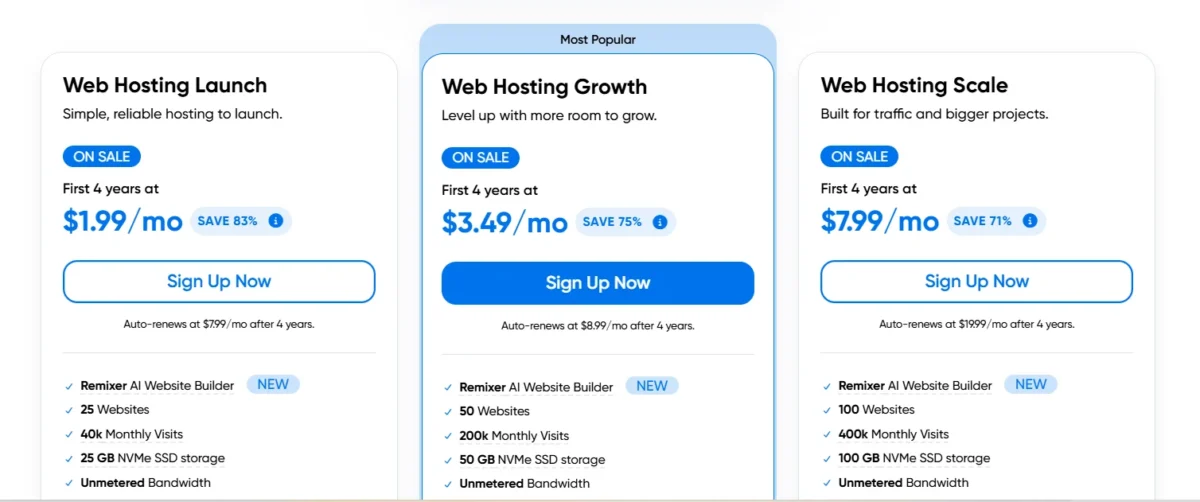
DreamHost offers a complete ladder of options. For most beginners, Shared Hosting is the best start. The WordPress Hosting (DreamPress) is a managed solution with extra speed and caching.
For growing sites, VPS Hosting provides dedicated resources, and Dedicated Servers are available for high-traffic enterprises.
Shared Hosting Pricing Plan
| Plan | Intro Price | Renewal | Sites | Storage |
|---|---|---|---|---|
| Starter | $2.89/mo | $10.99/mo | 1 | 25 GB SSD |
| Growth | $3.99/mo | $12.99/mo | 50 | 50 GB SSD |
| Scale | $9.99/mo | $25.99/mo | 100 | 100 GB SSD |
Get Shared Hosting with DreamHost for under $1.99/month
WordPress Hosting Pricing Plan
| Plan | Starting Price | Renewal | Use Case |
|---|---|---|---|
| WP Starter | $2.89/mo | $10.99/mo | Basic sites |
| DreamPress | $2.89/mo | $10.99/mo | Small WP sites |
| DreamPress Plus | $3.99/mo | $12.99/mo | Growing sites |
| DreamPress Pro | $9.99/mo | $25.99/mo | High traffic |
Launch your WordPress site with DreamHost for under $1.99/month
VPS Hosting Pricing Plan
| Plan Level | Price Range | Renewal Range | Resources |
|---|---|---|---|
| Entry VPS | $10 | $24.99+/mo | 1 GB RAM |
| Mid VPS | $20/mo | $46.99+/mo | 2–4 GB RAM |
| Advanced VPS | $40/mo | $92.99+/mo | 4–8 GB RAM |
| High VPS | $60/mo | $114.99+/mo | 8 GB+ RAM |
Get high-performance VPS Hosting with DreamHost
Dedicated Hosting Pricing Plan
| Type | Monthly Cost | Ideal For |
|---|---|---|
| Standard Server | ~$165/mo | Large sites |
| Premium Server | $229+/mo | Enterprise |
Get Dedicated Hosting with DreamHost for maximum performance
DreamHost’s shared hosting plans are designed to be affordable initially, with steep increases for renewals.
- High Renewal Rates: Shared plans can see renewal rates jump by nearly 200–300%.
- VPS & Dedicated Costs: Compared to initial pricing, VPS renewals may be substantially more expensive.
- No Free Domain on Renewals: Only the first year of a new plan is eligible for the free domain registration.
- Impact of Billing Cycle: After the first term, annual or four-year plans will revert to the higher normal rate, but they will get the lowest promotional prices.
Tips to Manage DreamHost Costs
- Choose Longer Terms: Guarantee the lowest starting price for the longest time, lock in three years in advance.
- Verify the dates of renewal: DreamHost automatically renews at the higher, non-discounted cost, so keep an eye on your renewal date.
- Domain Privacy Costs: DreamHost offers free domain privacy protection, so there are no additional, unstated, ongoing costs.
- Think About Alternatives: Shared hosting packages at Hostinger or Namecheap are an option if the renewal rate is too high.
97-Day Money-Back Guarantee & Refund Policy
This is DreamHost’s standout feature. You have 97 days from the date of purchase to cancel your shared hosting plan for a full refund.
This is almost three times longer than the standard 30-day guarantee. Note that this applies to hosting fees, not domain name registrations, which are non-refundable.
DreamHost Key Features That Impact Your Site
DreamHost offers essential features that directly improve your website’s performance and reliability. It includes SSD storage for faster loading, a free SSL certificate for security, and unmetered bandwidth for smooth traffic handling.
With a custom control panel and built-in tools, it keeps site management simple while maintaining stable uptime.
Ease of Use & Control Panel Experience
DreamHost uses a proprietary custom panel rather than the industry-standard cPanel. While it is functional and clean, it requires a learning curve if you are migrating from another host.
However, it integrates billing, domains, and hosting into one seamless interface without the clutter of third-party ads.
Security Features: SSL, Privacy & Protection
All DreamHost plans include free SSL certificates via Let’s Encrypt to secure your site data. They also provide automatic malware scanning and a web application firewall (WAF) to block threats.
Unlike some competitors, DreamHost has a strong stance on privacy, offering free domain WHOIS privacy to keep your personal contact information hidden from the public database.
Backups & Data Safety Measures
DreamHost provides daily backups on all plans, which is a critical safety net for recovering lost data. However, restoration might incur a fee depending on your plan.
For higher-tier users, on-demand backups and one-click restore features are available, offering more control over your disaster recovery.
WordPress Performance & Optimization
DreamHost is built for WordPress speed. The infrastructure includes SSD storage and server-level caching.
For high-traffic sites, the DreamPress managed plan includes features like built-in caching and a staging environment where you can test changes before pushing them live.
Advanced Features for Developers
Developers will find support for unlimited FTP accounts, WP-CLI for managing WordPress from the command line, and access to the latest PHP versions.
DreamHost also offers DreamCompute (cloud compute) and DreamObjects (object storage) for those needing to run custom applications or store large datasets outside of traditional web hosting.
DreamHost Performance Test: Speed, Uptime & Server Response
Uptime Reliability Results
DreamHost is one of the few hosts that offers a 99.99% uptime guarantee. While no physical server can literally never fail, independent tests consistently show DreamHost achieving 99.9%+ uptime, meaning your site remains accessible to visitors almost all the time, which is crucial for maintaining SEO rankings and sales.
Speed & Core Web Vitals Analysis
Speed tests show DreamHost performs reliably, though not always the fastest out of the box compared to hosts using LiteSpeed servers (like Hostinger). However, for most small to medium blogs and business sites, the load times are more than sufficient.
Optimizing images and using a CDN (like Cloudflare) will easily bring your Core Web Vitals into passing range.
Server Response Time (TTFB) Performance
Time To First Byte (TTFB) measures server responsiveness. DreamHost generally scores “good” to “average” in this metric.
It doesn’t have the raw processing power of top-tier dedicated VPS providers, but its consistent performance is stable. You won’t see massive spikes in lag, even during peak traffic hours.
DreamHost Ease of Use: Setup & Dashboard Experience
Account Creation & Setup Process
Getting started is straightforward. After signing up, the custom panel guides you through domain registration or connection.
The WordPress installation is truly “one-click,” and DreamHost even pre-installs WordPress on many plans to save you a step.
Dashboard & Website Management Tools
The dashboard is minimalistic and focuses on text-based links rather than flashy graphics. It manages email (if you bought it), domains, and billing in one place. While it lacks the visual polish of cPanel, it is logically organized and faster to load.
DreamHost Customer Support Review
Support Quality & Responsiveness
DreamHost offers 24/7 support via live chat and a ticket system. Phone support is available but requires a scheduled callback (or is reserved for higher-tier plans) rather than an instant hotline.
Live chat responses can sometimes have a wait time, but the agents are generally knowledgeable. The company has a mixed record on formal complaints, with some users reporting billing disputes, though the majority of users report satisfactory experiences.
DreamHost Pros and Cons
Pros of Using DreamHost
- 97-day money-back guarantee: Industry-leading risk-free trial.
- WordPress.org recommended: Guaranteed compatibility and performance.
- Free daily backups & SSL: Essential security included by default.
- High site limits: Starter plans allow up to 25 websites.
Cons of Using DreamHost
- No cPanel: The custom interface can be confusing for beginners used to standard panels.
- No free email: Basic plans require a separate email hosting purchase.
- Phone support is not instant: Requires scheduling a callback.
DreamHost vs Competitors
| Feature | DreamHost | Hostinger | SiteGround | Bluehost |
|---|---|---|---|---|
| Best For | Privacy & Devs | Budget & Beginners | Support & Speed | WordPress Beginners |
| Starting Price | Moderate ($2.98 | Low ($1.99–$2.99/mo) | High ($3.99–$4.99/mo) | Moderate ($2.95–$4.95/mo) |
| Control Panel | Custom Panel | hPanel | Site Tools (Custom) | cPanel / Custom |
| Storage | SSD | SSD / NVMe | SSD | SSD |
| Free Domain | Yes | Yes | Yes (limited) | Yes |
| Support | Basic Live Chat | 24/7 Chat | 24/7 Expert Support | 24/7 Chat & Phone |
| Key Strength | Long guarantee | Low cost + speed | Strong support | Easy to use |
| Weakness | Old interface | Limited resources | High renewal cost | Expensive renewals |
- DreamHost: Best for users who want stable pricing and strong privacy. Good for long-term projects, but the interface feels outdated.
- Hostinger: Ideal for beginners on a budget. Offers fast performance and low pricing, but resources can be limited on cheaper plans.
- SiteGround: Known for top-level support and performance. A strong choice for WordPress, but renewal pricing is higher.
- Bluehost: Very beginner-friendly with easy WordPress setup. However, higher renewal costs can be a downside.
- Cloudways: Better for scaling and high-traffic sites. Delivers strong performance but is less beginner-friendly.
- HostArmada: Focuses on speed and security with cloud-based hosting. A solid alternative with better performance than basic shared hosting.
Best Alternatives Based on Your Needs
- For raw speed: Hostinger (LiteSpeed servers) or SiteGround.
- For predictable pricing: InterServer (locks in your renewal rate).
- For managed Elementor: Elementor Hosting (built specifically for that builder).
Expert Insight: Real Experience with DreamHost
It is a reliable web hosting provider known for consistent performance, beginner-friendly setup, and strong uptime. In real use, it works well for small to medium websites with smooth WordPress integration and easy management tools.
From an expert perspective, it offers solid value for money, especially for users who prefer simple hosting without technical complexity. However, advanced users may find fewer high-end customization options, making it more suitable for everyday website needs.
When DreamHost Performs Best
DreamHost excels for portfolio sites, personal blogs, and small business brochures where reliability is key. It is also excellent for developers managing multiple client sites on a budget, thanks to the high “unlimited site” capacity.
When DreamHost Falls Short
DreamHost falls short if you need enterprise-level speed or immediate hand-holding via phone. The lack of a free dedicated IP on shared plans can be a dealbreaker for specific email configurations or SSL needs that require a static, isolated address.
Final Verdict
Yes, DreamHost is worth your money if you are a value-focused user who doesn’t mind a slight learning curve. You cannot beat the 97-day guarantee, and the fact that it is officially recommended by WordPress.org speaks volumes about its technical quality.
While the lack of instant phone support and email hosting on basic plans is an annoyance, the affordable pricing, strong privacy stance, and reliable uptime make it a top 3 recommendation.
DreamHost Review FAQs
Does DreamHost Allow NSFW Content?
Yes, DreamHost generally allows legal adult content as long as it complies with US laws and its acceptable use policy (no illegal or non-consensual material).
How Much Does DreamHost Cost?
Shared hosting starts as low as $1.99 to $2.89 per month (introductory rate, usually requires a 1-to-4-year commitment). Month-to-month plans are more expensive.
Does DreamHost Include Free SSL & Backups?
Yes. All plans include a free Let’s Encrypt SSL certificate and daily automated backups.
How Is DreamHost’s Performance & Uptime?
DreamHost offers a 100% uptime guarantee and generally scores excellent in reliability, though its raw page load speed is average compared to premium LiteSpeed hosts.
What Is the Money-Back Guarantee?
DreamHost offers an industry-leading 97-day money-back guarantee on shared hosting plans.

Nitin Alin is the founder of SaaShostly.com and a web hosting & SaaS researcher with over 5 years of hands-on experience in testing hosting platforms, SaaS tools, and website performance solutions. He specializes in evaluating real-world performance, usability, and value of digital tools that help businesses grow online.
Through SaaShostly.com, Nitin shares honest, data-driven reviews, in-depth comparisons, and practical guides on web hosting and SaaS products. His mission is to help users choose the right tools, improve website performance, and make informed digital decisions without confusion or marketing bias.