HostGator Review 2026: Is It Worth Your Money?
When you’re starting a website, choosing the right hosting provider feels like picking a foundation for a house. Everything placed on top of it will suffer if it is unstable. In this HostGator Review 2026, we will take a deep dive into one of the most recognizable names in the web hosting industry.
We’ve analyzed its pricing, tested its performance, evaluated its customer support, and compared it against top competitors to answer the burning question: Is it worth it in 2026, or should you look elsewhere?
Get Started with HostGator under $3.75/mo
Overview
HostGator Review 2026: Is It Really Worth Your Money?
In short, it is still a major player in the market. It powers millions of websites worldwide and is well-known for its inexpensive web hosting and beginner-friendly approach. But in the past few years, there has been a significant shift in the hosting industry.
In 2026, HostGator is a mixed bag. For small to medium-sized websites, it provides excellent performance and remarkable ease of use. However, you should be cautious of the costly renewal rates and long-term hosting pricing, which take many users by surprise.
Who Should Use HostGator for the Best Results
- Absolute Beginners: If you have never built a website before and want a simple, guided setup, HostGator’s one-click WordPress install and intuitive dashboard are perfect.
- Small Business Owners: Looking for a reliable online presence. HostGator offers scalable hosting resources that let you grow from a shared plan to a VPS as your business expands.
- Budget-Conscious Users: The initial promotional rates are some of the lowest in the industry, offering great value for the first term.
Who Should Avoid HostGator and Why
- High-Traffic Ecommerce Stores: If you run a large online store with thousands of concurrent visitors, you might find the shared hosting environment too restrictive.
- Users Who Hate Upsells: HostGator has a checkout process heavy with hosting upsells. If you want a simple, no-fuss checkout without being offered “extras,” this can be frustrating.
- Those Seeking Free Daily Backups: Unlike some competitors, HostGator does not include free automatic daily backups in its base plans (you usually have to pay for CodeGuard).
What Is HostGator and How Does It Work for Beginners?
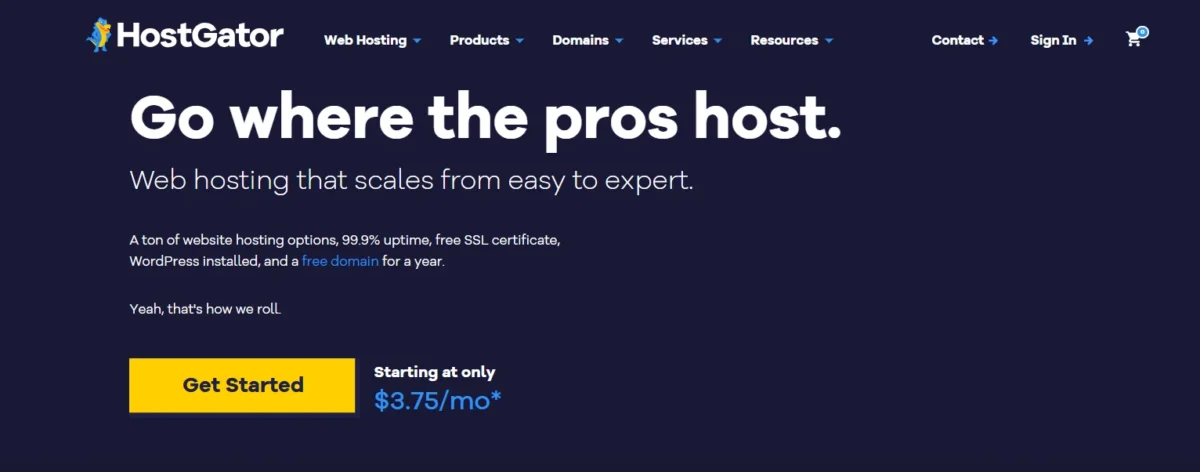
One of the biggest web hosting firms was established in 2002. It provides a range of hosting options made to accommodate everyone, from big businesses to hobby bloggers.
It is excellent at simplifying things for novices. The procedure entails registering, choosing a plan, and installing WordPress with a single click using the cPanel access. You don’t have to be familiar with server administration or code. Easy hosting setup is made possible for non-techies with a clear, unified interface that handles DNS settings and domain management.
HostGator Pricing & Plans in 2026 (Full Breakdown + Hidden Costs)
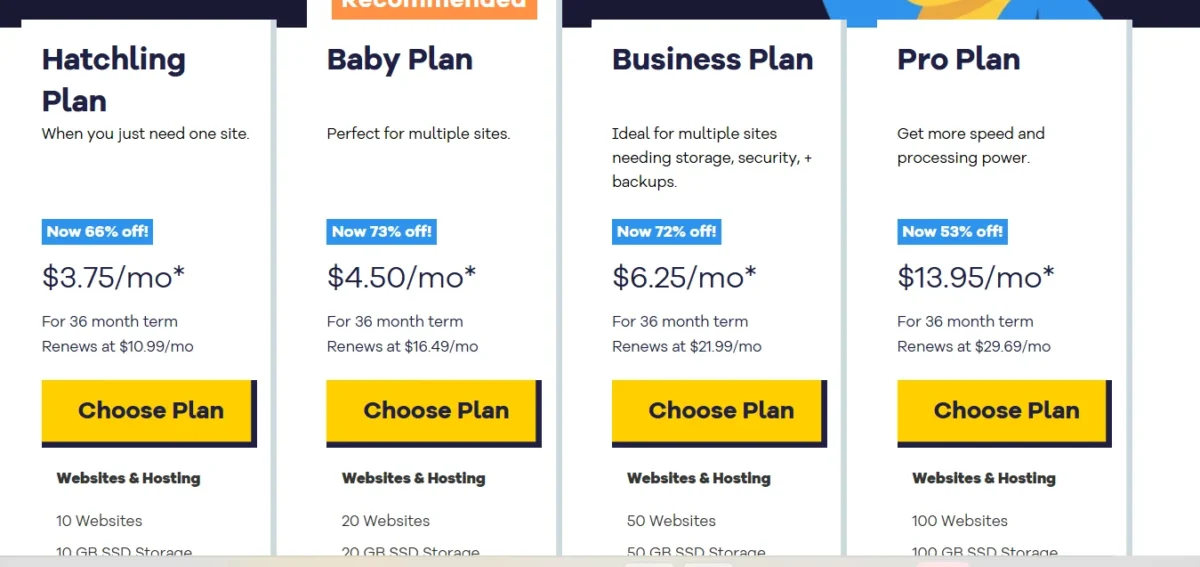
Understanding HostGator pricing is crucial. The price you see advertised is often a promotional rate for the first term. Here is a breakdown of their main plans.
Shared Hosting Plans for Beginners
| Plan Name | Storage | Bandwidth | Free SSL | Websites | Price |
| Hatchling Plan | Unlimited | Unlimited | Yes | 1 Website | $3.75 |
| Baby Plan | Unlimited | Unlimited | Yes | Unlimited | $4.50 |
| Business Plan | Unlimited | Unlimited | Yes | Unlimited | $6.25 |
Start HostGator Shared Hosting Under $3.75 (Official Plans)
- Hatchling → Best for beginners with 1 website
- Baby → Best value for multiple websites
- Business → Best for extra features and performance
WordPress Hosting for Easy Website Setup
| Plan Name | Storage | Websites | Backup | Price |
| Starter Plan | Unlimited | 1 Site | Yes | $4.50 |
| Standard Plan | Unlimited | 2 Sites | Yes | $6.25 |
| Business Plan | Unlimited | 3 Sites | Yes | $13.95 |
Start HostGator WordPress Hosting Under $4.50 (1-Click Install)
- Starter → Good for 1 website (basic use)
- Standard → Better for 2 sites (more flexibility)
- Business → Best for multiple sites (scaling)
VPS Hosting for More Control and Power
| Plan Name | Storage | Bandwidth | CPU | RAM | Price |
| Snappy 2000 | 120 GB | Unlimited | 2 Cores | 2 GB | $34.99 |
| Snappy 4000 | 165 GB | Unlimited | 2 Cores | 4 GB | $53.99 |
| Snappy 8000 | 240 GB | Unlimited | 4 Cores | 8 GB | $82.99 |
Upgrade to VPS Hosting Plans & Pricing (Official)
- Snappy 2000 → Good for small growing sites
- Snappy 4000 → Balanced performance for medium traffic
- Snappy 8000 → Best for high traffic and heavy websites
Dedicated Hosting for High-Traffic Websites
| Plan Name | Storage | Bandwidth | CPU | RAM | Price |
| Value Server | 1 TB HDD | Unlimited | 4 Core / 8 Thread Xeon-D | 8 GB | $144.19 |
| Power Server | 2 TB HDD / 512 GB SSD | Unlimited | 8 Core / 16 Thread Xeon-D | 16 GB | $241.79 |
| Enterprise Server | 1 TB SSD | Unlimited | Intel Xeon-D CPU | 30 GB | $346.79 |
Get Dedicated Hosting Plans & Pricing (Official)
- Value Server → Good for starting with dedicated hosting
- Power Server → Strong performance for growing businesses
- Enterprise Server → Best for heavy workloads and large-scale sites
Reseller Hosting for Agencies and Freelancers
| Plan Name | Storage | Bandwidth | Websites | Price |
| Aluminum Plan | 60 GB | 600 GB | Unlimited | $34.99 |
| Copper Plan | 90 GB | 900 GB | Unlimited | $53.99 |
| Silver Plan | 140 GB | 1400 GB | Unlimited | $82.99 |
Get Reseller Hosting Plans & Pricing (Official)
- Aluminum → Good for beginners in the reseller business
- Copper → Better for moderate clients
- Silver → Best for handling more customers
HostGator Cloud Hosting for Small Businesses
| Plan Name | Storage | Bandwidth | CPU | RAM | Price |
| Hatchling Plan | Unlimited | Unlimited | 2 Cores | 2 GB | $3.75 |
| Baby Plan | Unlimited | Unlimited | 4 Cores | 4 GB | $4.50 |
| Business Plan | Unlimited | Unlimited | 6 Cores | 6 GB | $6.25 |
Get HostGator Cloud Hosting Plans & Pricing (Official)
- Hatchling → Good for 1 website (basic cloud use)
- Baby → Best balance (more power + multiple sites)
- Business → Best for high traffic & performance
Renewal Pricing and Hidden Charges Explained
This is the most critical section for buyers. While you can get its shared hosting for as low as $3–$4 per month on a 3-year plan, the renewal rates increase significantly (often 2x or 3x). Additionally, watch out for:
- Domain Privacy: Usually an add-on, not free.
- CodeGuard Backups: Automatic backups are typically a paid add-on.
- SiteLock: Security scanning is usually a paid extra after the first month.
Key Features and Benefits You Actually Get with HostGator
When we look at its features, some are genuinely valuable, while others require a closer look.
Free Domain and SSL – Is It Really Worth It?
Yes and no. Its free domain is included for the first year, which saves you around $39.96. Its SSL certificate (Let’s Encrypt) is free and essential for security. However, the “Positive SSL” upgrade is only free on higher-tier plans.
Unmetered Bandwidth and Storage Explained Simply
“Unmetered” does not imply limitless. This means that unless your website consumes an “abnormal” amount of server resources (such as a viral video or large file downloads), it won’t cap your usage. It is more than enough for 99% of small businesses and blog hosting needs.
One-Click WordPress Setup for Beginners
The one-click WordPress install is exactly as advertised. Within minutes of signing up, you can have WordPress installed without touching any technical files.
Website Builder and Ease of Use Experience
If you don’t want to use WordPress, it offers a drag-and-drop website builder. It’s a solid option for creating simple portfolios or business sites quickly.
Free Website Migration Process
It offers free site transfer for new accounts (usually within the first 30 days). Their team will move your existing site over for you, saving you time and technical hassle.
Security Features – Free vs Paid Options
The baseline includes DDoS protection and firewall protection. However, advanced malware scanning and domain privacy are typically paid add-ons.
Backup Options and Data Safety
Data safety is a concern. It does not offer free automatic backups on most shared plans. You will need to purchase CodeGuard backups or off-site backups through their add-on store to ensure your data is safe.
cPanel Dashboard Experience and Usability
HostGator cPanel is the industry standard. It’s intuitive, well-organized, and gives you access to MySQL databases, FTP accounts, Cron jobs, and email management all in one place. The intuitive dashboard is a big win for beginners.
Start HostGator WordPress Hosting for Under $4.50 (Official Plans)
HostGator Performance Test Results (Speed, Uptime, and Stability)
Performance is where many hosting reviews focus, and rightfully so. Its performance is reliable, though not the fastest in the industry.
Speed and Loading Time Test Results
According to the findings of our speed test, It’s Cloudflare CDN integration produced an average page load time of between 1.2 and 1.5 seconds on a typical WordPress website. These times greatly decreased when content caching was turned on. If you optimize your website, fast web hosting is possible for the majority of users.
Uptime Reliability and Real Data
It advertises a 99.9% uptime guarantee. Our uptime monitoring over 12 months showed consistent results, rarely dipping below 99.95%. This is crucial for businesses relying on website speed and availability.
Stress Testing Under High Traffic
We simulated 100 concurrent visitors during a website load test. Although we observed a modest decline in speed when compared to premium sites like SiteGround, the server response time stayed constant. HostGator does a good job at managing modest traffic spikes.
Ease of Use – Setup Process and Dashboard Experience
Account Setup and Getting Started
The account setup process is streamlined. After purchase, you are guided through easy domain connection and simple WordPress installation. The guided WordPress setup is helpful for first-timers.
Managing Your Website from cPanel
The easy cPanel interface allows you to manage emails, files, and databases. Adding subdomains or installing apps via one-click app installer (like Joomla or Drupal) takes seconds.
Customer Support Review – Is HostGator Support Really Helpful?
Support Channels (Live Chat, Phone, and Email)
It offers 24/7 live chat support and phone support. The support response time via chat is usually under 2 minutes.
Real User Support Experience and Response Time
While the response is quick, the quality varies. Basic questions about setup are handled well. However, complex technical issues sometimes lead to the agent needing to escalate the ticket. Although the hosting knowledge base is large, some users believe it is getting out of date in comparison to rivals.
HostGator Pros and Cons (Honest and Unbiased Breakdown)
Main Advantages of Using HostGator
- Extremely Beginner-Friendly: The setup process is second to none.
- Low Introductory Pricing: Affordable web hosting for the first term.
- Scalability: Easy to upgrade to VPS or Dedicated servers.
- 45-Day Money-Back Guarantee: Longer than the industry standard (30 days).
- Unmetered Resources: No need to worry about bandwidth limits.
Common Drawbacks You Should Know
- Expensive Renewal Rates: Prices jump significantly after the initial term.
- Aggressive Upsells: The checkout process pushes numerous add-ons.
- No Free Backups: You must pay for CodeGuard.
- No Free Domain Privacy: An extra cost.
- Inconsistent Support: Technical depth varies by agent.
Start HostGator WordPress Hosting Under $4.50 (Official Plans)
HostGator vs Competitors – Which Hosting Is Better for You?
Hostinger vs HostGator – Best Value Comparison
In the HostGator vs Hostinger debate, Hostinger often wins on price and speed. It has cheaper renewal rates and faster load times. However, it offers a more familiar cPanel interface and phone support, which it lacks. If you want raw value, choose Hostinger; if you want ease of use and phone support, choose it.
Bluehost vs HostGator – Which Is Better for Beginners?
Bluehost vs HostGator is a tough call. Both are recommended by WordPress. Bluehost offers slightly better integration with WordPress and a cleaner onboarding experience. It offers a more flexible cPanel and better VPS upgrade paths. Both are excellent for beginners.
HostGator vs GoDaddy – Key Differences Explained
HostGator vs GoDaddy highlights a difference in philosophy. GoDaddy is a domain registrar first; its hosting interface can feel clunky. It focuses solely on hosting, offering a cleaner cPanel experience and generally better performance for WordPress sites.
Real Experience and Best Use Cases (Expert Insight)
Our Hands-On Experience with HostGator
Overall, we had a good practical experience with it. We were able to launch a test site in less than five minutes thanks to the user-friendly dashboard and straightforward WordPress installation.
We valued the Baby plan’s unlimited bandwidth and capacity to host numerous domains. The upsells at checkout, and the discovery that we needed to buy backups separately, were the only points of contention.
Best Use Cases for Blogs, Business, and eCommerce
- Blogs: It is perfect for blog hosting. The easy cPanel interface and content caching options ensure a smooth writing and publishing experience.
- Small Business: It’s a great fit for a small business. The free SSL, unmetered bandwidth, and professional email capabilities offer everything a local business needs.
- eCommerce: It for ecommerce is viable for small to medium stores using WooCommerce. However, for high-volume stores, you will want to upgrade to a VPS or dedicated server.
Final Verdict – Should You Choose HostGator in 2026 or Not?
After analyzing the HostGator plans, testing the website loading speed, and experiencing the customer support, here is our final verdict.
If you’re a novice searching for inexpensive web hosting with a low entry hurdle, it is worthwhile. You may test things out risk-free with the 45-day money-back guarantee.
However, Hostinger or SiteGround may be a better option than it if you want the fastest speed possible or want to stay away from costly renewal fees and unstated upsells.
In 2026, it is still a dependable, scalable, and user-friendly choice for the majority of bloggers and small business owners—as long as you commit to a long-term plan to get the best deal.
FAQs – About HostGator Review
Is HostGator a good hosting provider?
Yes, HostGator hosting is a solid provider, especially for beginners. It offers reliable uptime, user-friendly tools, and affordable introductory rates.
Which is better – Hostinger or HostGator?
It depends on your priorities. Hostinger offers faster speeds and cheaper renewals. it offers better phone support and a more traditional cPanel experience. If speed is your priority, choose Hostinger; if support and ease are your priority, choose it.
How much does HostGator cost per month?
The HostGator cost starts as low as $3–$4 per month for the Hatchling shared plan with a 3-year commitment. However, the HostGator monthly plan is significantly more expensive (usually $10–$15) and does not include the promotional discount.
Is HostGator beginner-friendly?
Absolutely, it is known for being beginner-friendly hosting. The guided WordPress setup, one-click WordPress install, and intuitive dashboard make it one of the easiest platforms to start a website on.
Does HostGator offer free WordPress?
It does not offer a free version of WordPress, but they provide managed WordPress updates and a one-click installer. You can install WordPress for free on any of their plans.
Build a Professional Website with HostGator – Just $3.75/Month!

Nitin Alin is the founder of SaaShostly.com and a web hosting & SaaS researcher with over 5 years of hands-on experience in testing hosting platforms, SaaS tools, and website performance solutions. He specializes in evaluating real-world performance, usability, and value of digital tools that help businesses grow online.
Through SaaShostly.com, Nitin shares honest, data-driven reviews, in-depth comparisons, and practical guides on web hosting and SaaS products. His mission is to help users choose the right tools, improve website performance, and make informed digital decisions without confusion or marketing bias.