Teamwork Review: A Highly Customizable Project Management Powerhouse
If you manage client work for a living, you already know the pain. Deadlines pile up, budgets slip, and half your day disappears into status updates. This Teamwork review looks at whether Teamwork.com actually fixes that problem, or just adds another tab to your browser.
Teamwork.com has spent years building itself around one specific job: helping agencies, consultancies, and other client-facing teams plan, track, and bill their work without losing their minds. In this Teamwork review, we’ll walk through what it does well, where it stumbles, and who should (and shouldn’t) sign up.
Teamwork review: A Quick Overview
| Category | Details |
| Best for | Agencies, consultancies, and client-facing service teams |
| Starting price | Free (up to 5 users); paid plans from $9.99/user/month, billed yearly |
| Free plan | Yes — up to 5 users, 5 active projects |
| Free trial | Yes — 30 days, no credit card required |
| Standout features | Time tracking, billing & invoicing, resource management, client permissions |
| Views available | List, Board (Kanban), Gantt, Table, Calendar |
| Mobile apps | iOS and Android |
| Integrations | 150+, including Slack, HubSpot, QuickBooks, Salesforce, Google Drive |
| G2 rating | 4.5 out of 5 |
| Capterra rating | 4.4 out of 5 |
| Overall verdict | A deep, flexible project management platform built specifically for teams that bill clients for their time |
Teamwork.com Evaluation Summary
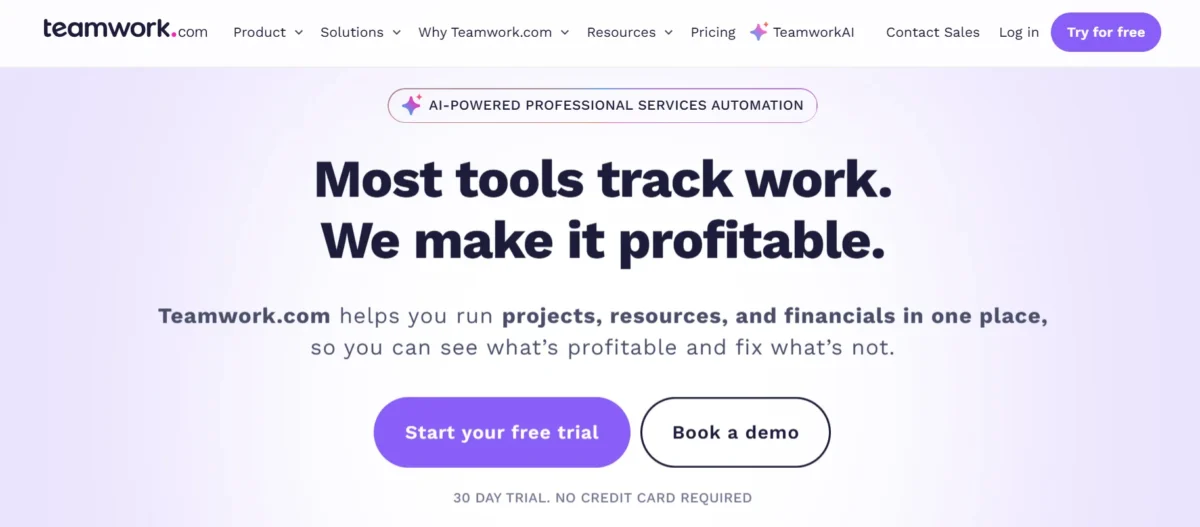
Teamwork sits in an interesting spot in the project management market. It isn’t the simplest tool out there, and it doesn’t pretend to be. Instead, it leans hard into the needs of service-based businesses: budgets, billable hours, client visibility, and resourcing all get first-class treatment instead of feeling bolted on.
That focus shows up throughout this Teamwork review. Where a tool like Trello keeps things light and visual, Teamwork gives you Gantt charts, financial dashboards, and workload planners in the same breath. It’s not the right fit for every team, but for the audience it’s built for, it’s hard to beat on depth.
Pros & Cons
Pros:
- Genuinely deep feature set for project planning, budgeting, and reporting
- The free forever plan actually includes Gantt, board, and table views
- Time tracking and invoicing are built in, not an afterthought
- Resource and workload management stand out against most competitors
- 150+ integrations cover most of the tools agencies already use
- TeamworkAI now ships a set of named AI teammates across paid plans
Cons:
- The learning curve is real, especially for teams new to structured task management
- Advanced reporting and resource tools are locked behind higher-priced plans
- Per-user pricing can climb quickly once a team grows past a handful of seats
- Mobile app performance can lag on larger projects
- Some users report that the interface feels cluttered once every feature is switched on
Teamwork Specs
| Spec | Detail |
| Deployment | Cloud-based (SaaS) |
| Data hosting | US or EU, selectable |
| Security | Two-factor authentication, SOC 2 compliance, SSO on higher plans |
| Task views | List, Board, Gantt, Table, Calendar |
| Time tracking | Native, with timesheets and approvals |
| Billing | Invoicing, budgets, retainers, multi-currency support |
| Automations | 100 to 100,000 depending on the plan |
| API access | 150–500 requests per minute depending on the plan |
| Support | Live chat, help center, dedicated success manager on Enterprise |
Features Of Teamwork.com
Any solid Teamwork review has to reckon with just how much this platform packs in. Rather than a handful of headline features, Teamwork spreads its strengths across planning, time, money, and reporting. Here’s the fuller list of what you’re working with:
- Task, subtask, and dependency management
- Gantt, Board, List, Table, and Calendar views
- Unlimited project and task templates on paid plans
- Milestone tracking
- Custom fields and formula fields
- Bulk task editing
- Native time tracking with timesheets
- Client billing, invoicing, and multi-currency support
- Fixed-fee budgets and ongoing retainers
- Resource and capacity planning
- Workload and utilization reporting
- Intake forms for capturing client requests
- Proofing tools for file and design approval
- Project and portfolio health dashboards
- Automation triggers (rules-based workflows)
- TeamworkAI assistants for summaries, task creation, and forecasting
- 150+ integrations, including Slack, HubSpot, and QuickBooks
- Role-based permissions and client user access
- Mobile apps for iOS and Android
- Desktop app for Windows and Mac
That’s a wide net for a single platform to cast, and it’s part of why Teamwork tends to appeal more to operations-minded teams than to a five-person startup that just wants a simple to-do list.
Everything You Need for Managing Projects on Time and on Budget
Teamwork’s core pitch is that project management and financial management shouldn’t live in separate tools. Every task connects to time logged, and every hour logged connects back to a budget. That link is what lets project managers catch a budget overrun before it becomes a client conversation nobody wants to have.
Highly Customizable Project and Task Management
Custom fields, formula fields, and flexible task structures mean you can shape Teamwork around how your team actually works, rather than the other way around. Subtasks and dependencies keep complex projects from turning into a flat, unmanageable list. It takes some setup time, but the payoff is a system tailored to your workflow.
Multiple Views for Tracking Projects
Not everyone thinks in the same way. Some people want a Gantt chart, others want a Kanban board, and finance wants a table they can filter. Teamwork lets each person view the same project data in whichever format clicks for them, without duplicating the work behind the scenes.
Built-in Time Tracker
Time tracking sits at the center of Teamwork rather than off to the side. You can log hours against specific tasks, compare planned time to actual time, and route billable hours straight into an invoice. For agencies billing by the hour, that’s a meaningful time-saver.
Dashboards & Everything
Project and portfolio dashboards pull together health status, budget burn, and workload in one screen. My experience testing this: the dashboards took a little tuning to get right, but once set up, they gave a genuinely useful, at-a-glance read on which projects needed attention that week.
Extensive Product Suite and Integrations
Beyond the core project tool, Teamwork also offers Desk (helpdesk), Chat, Spaces, and CRM, plus 150+ third-party integrations. That range means a lot of agencies can consolidate several separate subscriptions into one connected system.
Interface and Ease of Use: Get Up and Running Quickly
Teamwork’s interface tries to strike a balance between depth and approachability, and for the most part, it succeeds. New users can find their way around the basics within a day, even if some of the more advanced reporting tools take longer to click into place.
That said, this Teamwork review would be incomplete without noting the learning curve reviewers consistently mention. With this many features on tap, it’s easy for a new team to feel a bit overwhelmed before things settle into a routine.
Teamwork Is About as Simple as It Gets
For a tool this feature-rich, the day-to-day experience of creating tasks, assigning owners, and updating statuses stays refreshingly straightforward. Most of the complexity lives in optional, deeper features you can ignore until you need them.
Getting Started with Teamwork
Signing up takes minutes, and the platform offers free expert training plus a 30-day trial with no credit card required. Teams migrating from Asana, Trello, Basecamp, ClickUp, or Monday can import existing projects with a single click, which removes a lot of the usual switching friction.
Intuitive Design With Many Smart Shortcuts
Keyboard shortcuts, bulk editing, and quick-add task fields all speed up repetitive work once you know they’re there. My experience: the shortcuts aren’t obvious at first glance, so it’s worth a quick look through the help docs early on rather than discovering them by accident months later.
Start Projects Fast with Project and Task Templates
Templates cover everything from client onboarding to website launches, and they cut setup time dramatically for recurring project types. The free plan includes two templates, while paid tiers unlock unlimited ones.
Generate Reports on Everything With a Click
Pre-built reports cover time, budgets, workload, and project progress, so you’re rarely stuck exporting raw data into a spreadsheet just to answer a simple question.
Managing Projects: Endlessly Customizable
Project management in Teamwork bends toward whatever structure your team already uses. You can plan tentative work before it’s confirmed, turn a CRM pipeline into an active project, and hold placeholder capacity for work that hasn’t landed yet.
That flexibility does mean more setup decisions upfront. But for agencies juggling dozens of concurrent client projects, having that much control tends to matter more than a simpler, more rigid alternative would.
Billing and Invoicing: Straightforward Tools
Billing is where Teamwork clearly shows its agency roots. You can track billable versus non-billable time, apply role-based or client-specific rates, and generate invoices directly from logged hours — no separate accounting tool required for the basics.
As of this writing, invoicing with margin, tax, and discount handling is available starting on the Accelerate plan at $24.99 per user, per month, billed yearly ($9.99 gets you basic invoicing on the Basics tier). Pricing is always worth double-checking on Teamwork’s site before you commit, since providers do adjust these figures periodically.
Dashboards and Reports: Monitor Every Detail
Shared dashboards give clients and stakeholders visibility without handing over full account access. You can track planned versus actual time, burndown progress, and profit by project or client, all without manually assembling a status deck every Friday.
For teams managing several accounts at once, this reporting layer often ends up being the feature that justifies the higher-tier pricing.
Automations: Eliminate Repetition With Ease
Automation limits scale with your plan, from 100 rules on the Free tier up to 100,000 on Optimize and Enterprise. Conditional logic (if/then, and eventually if/and/or/then on higher tiers) lets you build workflows that handle routine task routing, status changes, and notifications without manual babysitting.
Communication and Collaboration: Keep in Constant Contact
Real-time chat, comments on tasks, shared documentation spaces, and client collaboration tools keep conversations attached to the work itself instead of scattered across email threads. External collaborators and client users can be invited in with permission controls that limit what they see.
Apps and Integrations: Unlock Significant Functionality
With 150+ integrations — including Slack, HubSpot, QuickBooks, Salesforce, NetSuite, Google Drive, Microsoft Office, and Zapier — Teamwork slots into most existing tech stacks without forcing a team to abandon tools they already rely on.
TeamworkAI: Its Relevance Depends on You
TeamworkAI now includes a set of named AI assistants baked into different plans: Scout (a personal productivity assistant), Flo (project tracking and health), Remi (resource planning), Kash (budgets and profitability), and Jack (custom workflow building on Enterprise). Teamwork AI is currently included in all paid plans for an introductory period, with usage-based AI credits set to launch in September 2026.
Whether this matters to you depends heavily on how much your team already leans on AI for summarizing updates or forecasting profitability. For teams that do, it’s a genuine time-saver. For teams that don’t, it’s a feature you can safely ignore without losing much.
How We Test & Score Tools
Every Teamwork review we publish is built on a consistent, weighted scoring model so comparisons across tools stay fair.
Core Functionality (25% of final scoring)
We test whether the tool handles the basics — tasks, timelines, and collaboration — reliably and without friction.
Standout Features (25% of final scoring)
Here we weigh what sets a tool apart from its closest competitors, like Teamwork’s billing and resource management depth.
Ease of Use (10% of final scoring)
We look at how quickly a new user can become productive without extensive training.
Onboarding (10% of final scoring)
This covers how smooth the signup, setup, and data-migration process is for new teams.
Customer Support (10% of final scoring)
We evaluate response times, support channels, and the quality of documentation and training resources.
Customer Reviews (10% of final scoring)
We factor in aggregate third-party ratings from sources like G2 and Capterra to check our own experience against the wider user base.
Value for Money (10% of final scoring)
Finally, we weigh the feature set against the price tag to judge whether a plan earns its cost.
How Does Teamwork.com Pricing Plans?
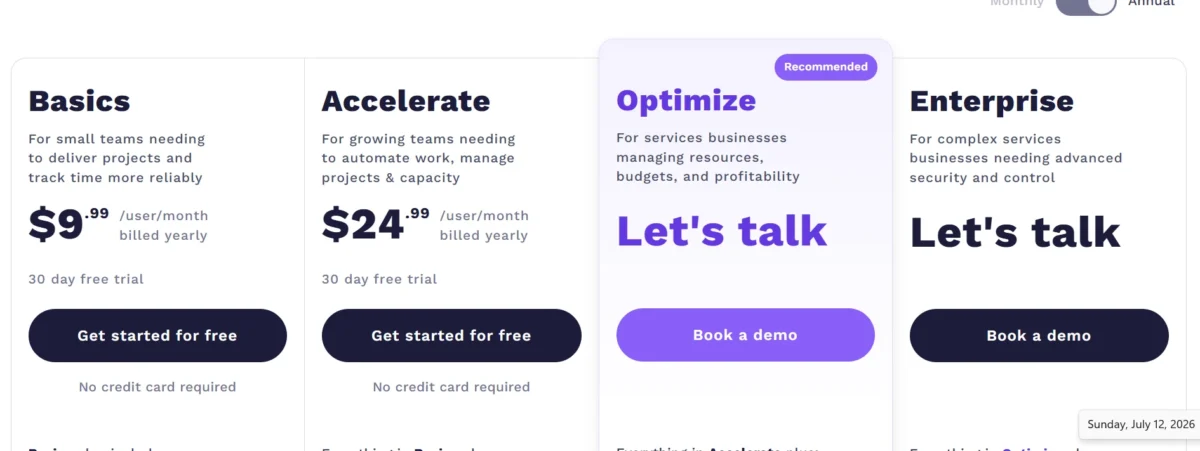
Teamwork’s current pricing (updated as of this month and this years) runs across five tiers:
| Plan | Price | Best for |
| Free | $0 | Small teams, up to 5 users and 5 projects |
| Basics | $9.99/user/month, billed yearly | Small teams tracking time and delivering projects |
| Accelerate | $24.99/user/month, billed yearly | Growing teams need automation, capacity planning, and invoicing |
| Optimize | Custom pricing | Services businesses managing budgets and profitability |
| Enterprise | Custom pricing | Large organizations needing advanced security and dedicated support |
Annual billing saves roughly 29% compared to paying monthly, and every plan — including Free — comes with role-based permissions, two-factor authentication, and SOC 2 compliance. Because providers update pricing periodically, it’s worth confirming current rates directly on Teamwork’s pricing page before budgeting.
Fair and Affordable With a Free Plan
The Free plan supports up to 5 users, 5 projects, and 100 automations, with full access to Gantt, table, list, and board views. It’s a genuinely usable starting point, not a stripped-down demo.
How does Teamwork match up to the competition?
Against Asana, Monday.com, and ClickUp, Teamwork’s starting price is competitive, and its billing and resource management tools go deeper than most alternatives offer out of the box. Where it falls behind is simplicity — tools like Trello or Basecamp win on ease of use for teams that don’t need financial tracking baked in.
How to Use Teamwork
Teamwork fits best for agencies, consultancies, and other client-facing teams that need to track billable hours, manage budgets, and report on project health across many concurrent accounts. If your team already thinks in terms of client profitability and resource utilization, Teamwork’s structure will feel like a natural home rather than extra overhead.
How Not to Use Teamwork
If you’re a small internal team that just needs a simple shared task list, Teamwork’s depth may work against you. Teams without billing or client-reporting needs will likely find lighter tools like Trello or Asana easier to adopt, with far less setup required to get moving.
Customer Support For Teamwork
Support is available through live chat, a searchable help center, and free expert training on every plan, with Enterprise customers getting a dedicated Customer Success Manager and priority support. Reviewers consistently describe the support team as responsive and genuinely helpful, though a handful mention inconsistent turnaround times during busier periods.
Conclusion
This Teamwork review comes down to a simple trade-off: depth versus simplicity. Teamwork asks a bit more of you upfront — more setup, more features to learn — but it pays that back with a level of financial and resource visibility that few competitors match at a similar price point.
If your business lives and dies by client budgets and billable hours, Teamwork earns its place on your shortlist. If you just need a clean task board and nothing more, you’ll likely be happier and get up to speed faster somewhere simpler.
FAQs
Does Teamwork have a free version?
Yes. The Free plan supports up to 5 users and 5 projects, with access to Gantt, table, list, and board views.
What is Teamwork best used for?
It’s best suited for agencies and client-facing service teams that need combined project management, time tracking, and billing.
Is Teamwork better than Monday.com?
Teamwork goes deeper on billing and resource management; Monday.com tends to win on visual simplicity and broader use-case flexibility
Does Teamwork have a mobile app?
Yes, Teamwork offers native apps for both iOS and Android.
How does Teamwork handle client billing?
It tracks billable and non-billable time, applies role-based rates, and generates invoices directly from logged hours.
What integrations does Teamwork support?
Over 150 integrations, including Slack, HubSpot, QuickBooks, Salesforce, Google Drive, and Zapier.
How much does Teamwork cost per month?
Paid plans start at $9.99 per user, per month, billed yearly, scaling up to $24.99 for the Accelerate plan, with custom pricing for Optimize and Enterprise.

Nitin Alin is the founder of SaaShostly.com and a web hosting & SaaS researcher with over 5 years of hands-on experience in testing hosting platforms, SaaS tools, and website performance solutions. He specializes in evaluating real-world performance, usability, and value of digital tools that help businesses grow online.
Through SaaShostly.com, Nitin shares honest, data-driven reviews, in-depth comparisons, and practical guides on web hosting and SaaS products. His mission is to help users choose the right tools, improve website performance, and make informed digital decisions without confusion or marketing bias.