Airtable Review: Is It Worth It? Pros, Cons & Pricing
Ever feel like your team’s work is scattered across ten different apps, sticky notes, and half-updated spreadsheets? You’re not alone. That messy feeling is exactly why so many people start searching for something better, and Airtable keeps popping up as the answer everyone’s talking about. But you want proof before you commit, not just marketing copy.
That’s exactly what this Airtable review is here to help with. We’ll walk through what Airtable does well, where it falls short, and who it’s really built for. No fluff, just a clear, honest breakdown to help you make the right call.

A Quick Overview
Before we dig into the details, here’s the short version in table form so you can scan it in ten seconds.
| Category | Summary |
| What it is | A no-code platform that blends a spreadsheet with a relational database |
| Best for | Project management, CRM, content calendars, inventory tracking |
| Free plan | Yes, up to 5 editors and 1,000 records per base |
| Starting paid price | $20/user/month (Team plan, billed annually) |
| Top plan | Enterprise Scale (custom pricing) |
| Learning curve | Moderate, easier for spreadsheet users, harder for total beginners |
| AI features | Yes, via the Omni AI assistant |
| Security | SOC 2 Type II, ISO 27001, HIPAA-eligible on Enterprise |
| Our rating | 4.3 out of 5 |
Quick verdict (TL;DR)
If you need something more powerful than a spreadsheet but don’t want the overhead of a full database team, Airtable hits a sweet spot. It gives you linked records, custom views, and automation without asking you to write a single line of code. That’s a rare combination, and it’s why so many small teams switch over once Excel starts creaking under pressure.
That said, Airtable isn’t cheap once you scale past a handful of editors, and per-seat billing adds up fast. If your team is under ten people and you need a flexible database, it’s likely worth the investment. If you just need simple task lists, a lighter tool might save you money.
What is Airtable?
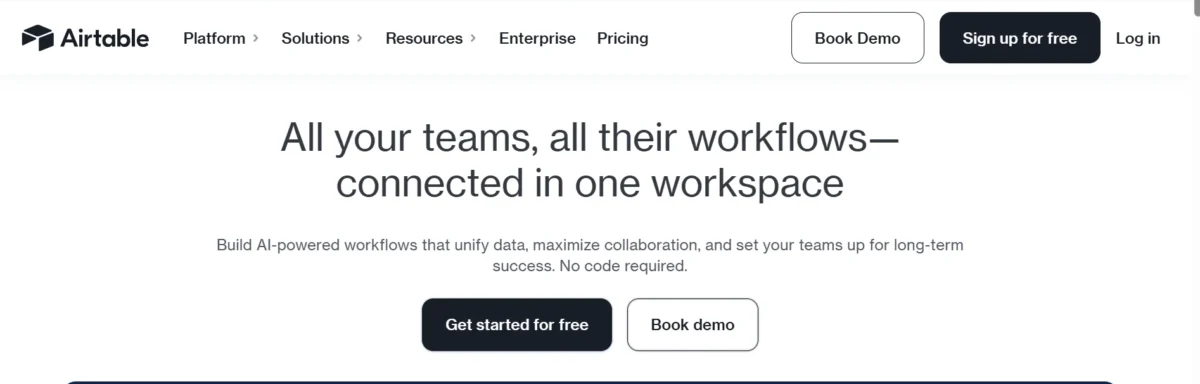
Airtable is a no-code platform that looks like a spreadsheet but behaves like a relational database underneath. Instead of flat rows and columns, you get tables that link to each other, so a “Projects” table can pull in related rows from a “Clients” table automatically. It’s often described as a spreadsheet alternative for people who’ve outgrown Google Sheets or Excel but don’t want to hire a developer.
Founded years ago and still growing, Airtable now positions itself as a broader app builder, not just a database tool. You can build custom interfaces, set up workflow automation, and even generate content with built-in AI. In short, it’s a database management tool wearing a friendly, visual costume.
Airtable reviews: What real users are saying
Across G2, Capterra, and TrustRadius, the pattern in Airtable reviews is pretty consistent. Users love the flexibility and the visual interface, and many say it replaced three or four separate tools they used to juggle. Teams running a CRM, an editorial calendar, or a bug tracker frequently mention how quickly they got up and running compared to a traditional database.
The complaints are just as consistent. People flag the learning curve for advanced formulas, the cost once a team grows past a few editors, and occasional slowness with very large bases. Reddit threads on Airtable tend to echo this too: people are fans of the product but frustrated by the pricing structure as their teams scale.
Pros
- Combines spreadsheet simplicity with real relational database power
- Strong template library for CRM, project tracking, and content calendars
- Flexible custom views: grid, kanban, calendar, gallery, timeline, and gantt
- Solid workflow automation without needing code
- Deep integrations with Slack, Google Workspace, and Zapier
- The free plan is genuinely usable for small projects
- Interface Designer lets non-developers build simple apps
- Omni AI assistant speeds up repetitive work
- Enterprise-grade security options (SOC 2, ISO 27001, SSO)
- The mobile app keeps most core functionality intact
Cons
- Per-seat pricing gets expensive as teams grow
- No built-in subtasks or native chat
- Steeper learning curve for formulas, rollups, and lookups
- Record limits force upgrades sooner than expected
- API rate limits can frustrate developers building custom integrations
- Automation runs are capped and reset monthly
Airtable Review
Setup & Operation
Getting started with Airtable feels familiar if you’ve ever used a spreadsheet. You create a workspace, add a base, and start building tables. The difference shows up fast, though, because those tables can talk to each other in ways Excel never could.
Once you understand bases, tables, and records, the rest builds naturally on top. Airtable doesn’t force you to learn database theory before you’re productive, which is exactly the point of a no-code platform.
Structure of Airtable
Airtable organizes everything into workspaces, which hold bases, which hold tables, which hold records. Think of a workspace as a filing cabinet, a base as a drawer for one project, and each table as a folder inside that drawer. Records are the individual entries, similar to rows in a spreadsheet, but each one can carry attachments, linked records, and formulas.
Airtable’s Bases: Your Project’s Interface
A base is where the real work happens. It’s the container for everything tied to one project, client, or department, and it can hold multiple linked tables at once. You can also layer an Interface Designer view over a base, so stakeholders who don’t need full editing access can still interact with the data in a clean, simplified layout.
Views in Airtable: Almost Everything Included
Airtable’s views are one of its strongest selling points. You get grid view for classic spreadsheet work, kanban view for task boards, calendar and timeline views for scheduling, gallery view for visual catalogs, and gantt view for project timelines. Switching between them doesn’t change your underlying data at all, it just changes how you look at it.
Airtable’s Smartphone App
The mobile app carries over most of the desktop experience, including grid, kanban, and calendar views. You can scan barcodes, snap photos directly into records, and fill out forms on the go. It’s not flawless; some users report lag on very large bases, but for quick updates in the field, it holds up well.
Database and Table Experts Have a Clear Advantage
If you already understand relational database concepts like linked records, lookups, and rollups, Airtable will feel intuitive almost immediately. Beginners can still get value fast, but people with a spreadsheet or database background tend to unlock the platform’s deeper features much sooner.
Key features
Here’s a broader list of what Airtable actually offers, in one place, so you can see the full picture before deciding.
- Relational database with linked records
- Custom field types, including formulas and rollups
- Grid, kanban, calendar, gallery, timeline, and gantt views
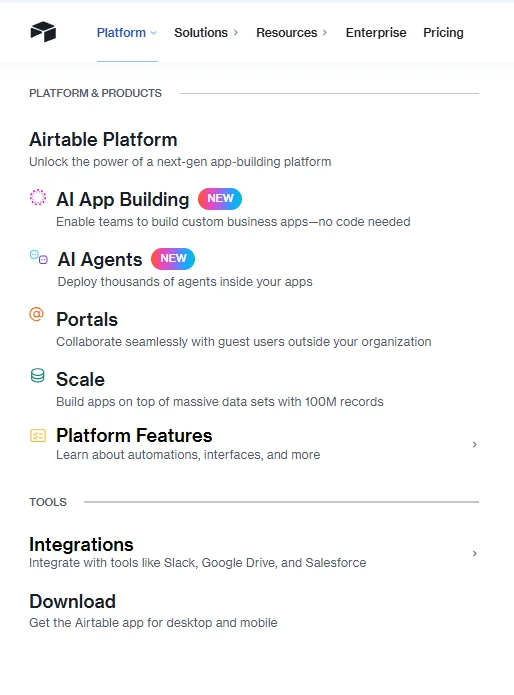
- Interface Designer for building lightweight internal apps
- Workflow automation with triggers and conditions
- Native integrations with Slack, Google Workspace, and Salesforce
- Zapier, Make, and API-based integrations
- Two-way data sync across bases (Business plan and up)
- Omni AI assistant for summaries and content generation
- AI-powered categorization and translation
- Custom forms for external data collection
- File attachments directly inside records
- Comments and activity history on records
- Role-based permissions and granular sharing controls
- Reporting dashboards and basic analytics
- Audit logs for enterprise accounts
- SSO and SCIM provisioning on higher tiers
- Templates for CRM, inventory, and editorial calendars
- Mobile app with offline-friendly features
- Guest portals for external collaborators
Relational database and custom views
At its core, Airtable is a relational database, not just a prettier spreadsheet. Linked records let you connect a task to a client, a client to an invoice, and an invoice to a project, all without duplicating data. Custom views then let every team member see that same information in the format that works best for them.
This combination is what separates Airtable from a plain spreadsheet vs database debate. You get the structure of a database with the visual comfort of a spreadsheet, which is why so many non-technical teams adopt it without needing a developer.
Automated workflows
Airtable’s automation builder lets you set up triggers, like a new form submission or a status change, that fire off actions automatically. You could send a Slack message, update a record, or kick off an email, all without writing code. It’s workflow automation built for people who think in “if this happens, do that” logic rather than scripts.
The catch is that automation runs are capped by plan, and heavy users burn through their monthly allowance quickly. Once you know your volume, though, it’s straightforward to plan around.
Integrations & data syncing
Airtable connects natively with tools like Slack, Google Drive, Google Calendar, and Salesforce, and it extends much further through Zapier, Make, and its own API. For teams already living in Google Workspace or Microsoft Outlook, the native sync options cut down on a lot of manual copy-pasting.
Two-way sync, available from the Business plan upward, is especially useful if you’re pulling data from multiple bases or external sources into one master view. It turns Airtable from a single database into more of a central hub for scattered information.
Omni AI assistant
Airtable’s Omni AI assistant handles tasks like summarizing long records, categorizing incoming data, and even translating content between languages. You can ask it questions about your base in plain language instead of writing formulas yourself, which lowers the barrier for less technical users.
AI credits are included with paid plans but are limited monthly, so heavy AI users may need to purchase additional credit packs. It’s a genuinely useful layer, just not an unlimited one.
Enterprise security
For larger organizations, Airtable offers SOC 2 Type II certification, ISO 27001 compliance, and HIPAA-eligible configurations on Enterprise Scale plans. Admins get audit logs, SAML-based SSO, and SCIM provisioning to manage access at scale.
This matters if you’re handling sensitive client data or operating in a regulated industry. It’s one of the reasons larger companies trust Airtable beyond the small-team use case it started with.
Airtable for Reporting and Analytics
Airtable’s built-in dashboards let you visualize records with charts and summary blocks pulled directly from your tables. It’s not a full business intelligence platform, but for quick reporting on project status or team workload, it does the job without exporting to a separate tool.
Forms in Airtable: Efficient Data Collection
The form view turns any table into a shareable form, perfect for collecting client intake details, event RSVPs, or internal requests. Submissions land directly in your base as new records, ready to trigger automations or update dashboards instantly.
Generative AI: Automating Workflows With AI
Beyond simple summaries, Airtable’s generative AI field type can draft content directly inside a record, like writing a first-pass product description or categorizing customer feedback. Paired with automation triggers, this turns manual busywork into a background process that runs on its own.
Automations in Airtable
Automations follow a simple trigger-condition-action structure. A new record appears, a condition checks a field value, and an action fires, whether that’s sending a notification or updating a linked table. It’s approachable for non-developers while still being flexible enough for fairly complex logic.
Advanced Features of Airtable, Compared
Compared to tools like Monday.com or Asana, Airtable leans further into database depth, offering things like rollups, lookups, and true linked records. Compared to Notion, Airtable’s relational model handles complex data structures more gracefully, though Notion often wins on documentation and wikis.
(Nearly) Unlimited Possibilities
Between custom fields, automations, integrations, and AI, most teams find Airtable can be shaped to fit their workflow rather than the other way around. That flexibility is the platform’s biggest strength, even if it takes a bit of exploring to find the right setup.
How Much Does Airtable Cost?
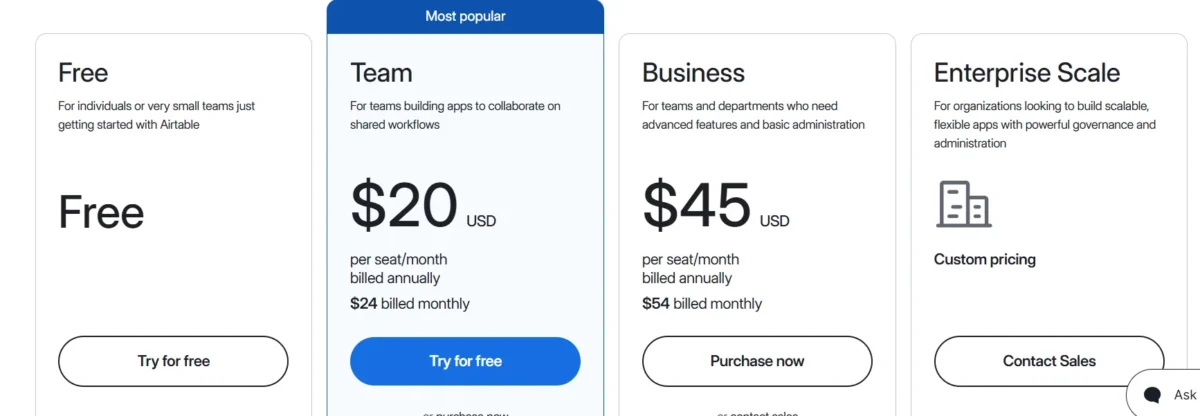
Airtable’s pricing runs on a per-editor model, and it’s been updated for 2026. Here’s the current breakdown, verified against Airtable’s own pricing page:
| Plan | Price | Records per base | Best for |
| Free | $0 | 1,000 | Solo users, small tests |
| Team | $20/user/month billed annually ($24 monthly) | 50,000 | Small teams, growing workflows |
| Business | $45/user/month billed annually ($54 monthly) | 125,000 | Departments, client-service firms |
| Enterprise Scale | Custom pricing | 500,000+ | Large orgs needing admin controls, SSO, and audit logs |
Our Experience: In practice, the jump from Team to Business is the one that catches teams off guard, since it’s roughly double the per-seat cost. Budget for that upgrade early if your base is growing fast, rather than discovering it mid-project.
Only editors count toward your bill. Viewers, commenters on Team plans (though commenters are billable there), and people filling out forms don’t cost extra on most tiers. Add-ons like guest portals and extra AI credits sit on top of these base prices, so factor those in if your team relies heavily on external collaborators or AI features.
Comparing Airtable’s Costs
Against competitors, Airtable sits on the premium end. Notion’s team plan runs around $10/seat/month, and Monday.com’s standard tier is roughly $12/seat/month, both notably cheaper than Airtable’s $20 entry point. The tradeoff is depth: Airtable’s relational database and automation capacity go further than either of those tools out of the box, which is what you’re really paying for.
My personal take on Airtable
Honestly, Airtable earns its reputation. It’s rare to find a tool that lets non-technical teams build something close to a real database without touching code. The views alone save so much back-and-forth, since everyone can look at the same data in the format that makes sense to them.
Our Experience: Where it gets frustrating is cost creep. What starts as a simple $20-a-month experiment can quietly turn into a few hundred dollars a month once automations, guest portals, and extra seats stack up. If you go in with clear expectations about scaling costs, though, it’s hard to find a better all-around no-code database.
Is Airtable right for you?
Airtable makes the most sense for teams that need structured data but don’t want to hire a developer to build it. If you’re managing a CRM, tracking inventory, or running an editorial calendar with more than a handful of moving parts, it’s likely a strong fit.
It makes less sense if your needs are genuinely simple. A basic to-do list or a small shared spreadsheet doesn’t need linked records or automation runs, and paying per seat for that would be overkill.
You’ll love it if:
- You’ve outgrown spreadsheets but don’t need a full engineering team
- You want flexible views without duplicating your data
- Your workflow involves linked information, like clients tied to projects tied to invoices
- You need light automation without writing scripts
- You value integrations with tools you already use daily
Alternatives to Airtable
If Airtable doesn’t feel like the right fit, a few alternatives are worth comparing. Notion offers similar database features at a lower price, though its relational depth is lighter. Monday.com and Asana lean more toward classic project management than database work. Smartsheet appeals to teams that want a spreadsheet feel with more structure, while ClickUp tries to combine several of these categories into one tool.
The right choice really depends on whether you need database power or just better task tracking. If it’s the former, Airtable and Smartsheet are the closest comparisons. If it’s the latter, Asana or Monday.com might save you money without sacrificing much.
Getting Started With Airtable
Signing up is free and takes just a couple of minutes. Once inside, Airtable nudges you toward templates for common use cases like content calendars, CRMs, or event planning, which is the fastest way to get a feel for the platform. From there, you can import existing spreadsheets directly, so you’re not starting from a blank base.
Most new users spend their first week exploring views and linking a couple of tables together. That’s usually enough to decide whether Airtable’s structure clicks with how your team already thinks about its work.
Database Records
Records are the heart of every Airtable base, roughly equivalent to rows in a spreadsheet but far more capable. Each record can hold file attachments, comments, linked references to other tables, and formula-driven fields that update automatically. That flexibility is what lets a single table function as a task list, a contact card, and a mini project file all at once.
Managing records at scale is where plan limits start to matter. The Free plan caps you at 1,000 records per base, while Team and Business raise that ceiling considerably. Knowing your expected data volume ahead of time saves you from a surprise upgrade a few months in.
Collaboration Tools
Airtable’s permission system lets you assign roles ranging from full editor access down to read-only viewing, which keeps sensitive data protected while still letting stakeholders see progress. Comments on individual records make it easy to leave feedback without leaving the base itself, cutting down on scattered email threads.
For larger teams, guest portals let external collaborators, like clients or contractors, interact with specific views without needing a full paid seat. It’s a practical middle ground between locking data down completely and handing out expensive editor licenses to everyone.
Automations and the Apps Marketplace
Beyond Airtable’s native automation builder, the Apps Marketplace (formerly Blocks) adds extensions for things like advanced charting, PDF generation, and deeper integrations with tools like GitHub or Tableau. These extensions plug directly into your base, so you’re not stitching together separate tools manually.
Combined with Zapier and Make, the marketplace effectively extends what Airtable can automate far beyond its built-in triggers. Teams building complex workflows often lean on this combination rather than trying to force everything into native automations alone.
AI Features
Airtable’s AI capabilities, powered by Omni, cover summarization, categorization, translation, and content generation directly inside your records. You can also use plain-language prompts to query your base instead of writing formulas, which opens the platform up to less technical users.
These features run on a monthly AI credit system included with paid plans. Light users rarely notice the cap, but teams running AI-heavy workflows across large bases may need to purchase additional credits to avoid interruptions.
How Should I Use Airtable?
Airtable works best when you treat it as a flexible database rather than a rigid project management tool. Use it for CRM tracking, content calendars, inventory management, or any workflow where information needs to link together across multiple tables. Lean on views to give different team members the exact perspective they need, and use automations to handle repetitive updates in the background.
How Should You Not Use Airtable?
Avoid using Airtable as a simple replacement for a basic to-do list or a lightweight shared document. If your team’s needs stop at a handful of tasks with no relational data, the per-seat cost isn’t justified. It’s also not the right tool if you need a native chat feature, deep subtask nesting, or extremely high-frequency API access, since those gaps tend to frustrate teams that push past its intended use case.
Conclusion
Airtable earns its place among the best no-code database tools available today, blending spreadsheet familiarity with real relational power. For teams juggling structured data across projects, clients, or inventory, the combination of custom views, automation, and AI features genuinely saves time once you’re past the initial learning curve.
That said, it’s not the cheapest option once your team grows, and simpler use cases might be better served by a lighter tool. If your workflow actually needs linked data and flexible views, though, Airtable remains one of the strongest choices on the market in 2026.
FAQs
Is Airtable free to use?
Yes, the Free plan supports up to 5 editors and 1,000 records per base with no time limit.
Is Airtable better than Excel?
Airtable offers relational linking and automation that Excel doesn’t, though Excel remains stronger for complex offline calculations.
Can Airtable replace a CRM?
Yes, many teams build a fully functional CRM in Airtable using linked records, views, and automations.
What is the difference between Airtable bases and tables?
A base is a project container, while tables are individual data sets inside that base, similar to sheets within a workbook.
Does Airtable have a mobile app?
Yes, the mobile app supports most core views and features, including barcode scanning and photo attachments.
Is Airtable HIPAA-compliant?
HIPAA-eligible configurations are available on Enterprise Scale plans with the right setup.
What is Airtable Omni AI?
Omni AI is Airtable’s built-in assistant for summarizing data, generating content, categorizing records, and answering questions in plain language.

Nitin Alin is the founder of SaaShostly.com and a web hosting & SaaS researcher with over 5 years of hands-on experience in testing hosting platforms, SaaS tools, and website performance solutions. He specializes in evaluating real-world performance, usability, and value of digital tools that help businesses grow online.
Through SaaShostly.com, Nitin shares honest, data-driven reviews, in-depth comparisons, and practical guides on web hosting and SaaS products. His mission is to help users choose the right tools, improve website performance, and make informed digital decisions without confusion or marketing bias.