Scoro Review: Is It Worth the Cost and Learning Curve?
You’ve got fifteen browser tabs open, a trial account half set up, and one nagging question: is Scoro actually worth the switch, or just another tool promising to fix your chaos? Maybe you’re drowning in spreadsheets, juggling three different apps for projects and billing, and you’re tired of software that looks great in the demo but falls apart on day two. That’s exactly why you’re here, searching for an honest Scoro review instead of another sales pitch dressed up as an article.
Good news: that’s exactly what you’re getting. This post breaks down what Scoro actually does well, where it stumbles, and who it’s really built for, based on real features and real use cases, not marketing fluff. By the end, you’ll know whether it deserves a spot in your workflow or whether your search should keep going.
A Quick Overview
| Category | Details |
| Best for | Agencies, consultancies, IT firms, and professional services teams of 5+ people |
| Starting price | Around $19.90–$49.90/user/month (billed annually), 5-seat minimum |
| Free trial | 14 days, no credit card required |
| Standout features | Time tracking, billing and invoicing, resource planning, CRM, custom dashboards |
| Learning curve | Moderate to steep, several days to a few weeks to get fully comfortable |
| G2 rating | 4.5 out of 5 |
| Capterra rating | 4.5 out of 5 |
Scoro packs a genuinely wide feature set into one login, and that’s the whole point. It’s not chasing the “simple to-do list” crowd. It’s chasing teams that need projects, time, money, and clients tracked in a single place, without the usual app-hopping headache.
Why You Can Trust Us
We don’t just skim a landing page and call it a review. Every claim in this guide comes from publicly available pricing pages, verified user feedback on G2 and Capterra, and documented product updates from the vendor itself. We cross-check numbers across multiple sources before publishing them.
Our goal isn’t to sell you Scoro. It’s to give you a clear, balanced picture so you can decide for yourself. Where reviewers disagree, we say so. Where pricing gets confusing (and with Scoro, it sometimes does), we explain exactly why.
Scoro Overview

What Is Scoro?
Scoro is a professional services automation software built for agencies, consultancies, and other client-based businesses. It combines project management, CRM, time tracking, and financial reporting into one all-in-one business management platform. Founded in Tallinn, Estonia back in 2013, the company has grown into a genuine contender against monday.com, ClickUp, and Smartsheet in the PSA space.
How Scoro Works for Project Management
At its core, Scoro lets you plan projects, assign tasks, and track progress through Gantt charts and task boards. You can set milestones, map task dependencies, and monitor project timelines from a single dashboard. What sets it apart is the money layer sitting underneath: every hour logged and every task completed feeds directly into budgeting and profitability tracking, so you always know if a project is actually making you money.
Scoro Pros
- Unifies projects, time, and finances in one platform instead of three
- Strong resource allocation and workload visibility across teams
- Built-in billing and invoicing tied directly to logged work
- Solid native integrations with Xero and QuickBooks
- Frequent updates; the vendor ships roughly 13 releases a year
- Detailed, customizable dashboards and reporting tools
Scoro Cons
- Noticeable Scoro learning curve during the first few weeks
- Pricing enforces a 5-seat minimum on every plan, even Essential
- Mobile app experience trails behind the desktop platform
- The ELI AI assistant hasn’t impressed everyone; some call it underwhelming
- Can feel like overkill (and overpriced) for very small teams
Scoro Features
Scoro’s feature list runs deep. Here’s what you’ll actually get access to, tier-depending:
- Project planning and Gantt charts
- Task management with dependencies
- Milestone tracking
- Time tracking and timesheets
- Team workload management
- Resource allocation and capacity planning
- Quoting and estimating
- Billing and invoicing
- Expense tracking
- Revenue forecasting
- Profitability tracking per project or client
- CRM and contact management
- Sales pipeline management
- Custom dashboards
- Advanced reporting tools
- Workflow automation
- Document management
- API access and 50+ native integrations
- Role-based user permissions
- ELI, Scoro’s built-in AI assistant
Project Management
Beyond basic task boards, Scoro handles multi-project portfolios well. You can compare estimated versus actual costs on the fly, which is genuinely rare among general-purpose project management platforms. For agencies juggling ten client projects at once, that visibility matters more than flashy design.
Contact Management
Every client, vendor, and lead lives in one contact database, tied directly to projects, quotes, and invoices. Instead of digging through email threads, you can pull up a client’s entire history: past projects, outstanding invoices, and communication notes, in a few clicks.
Sales and CRM Tools
Scoro’s CRM handles the sales pipeline from first contact through to signed contract. It tracks deal stages, closing probability, and converts quotes directly into active projects. It’s not a dedicated CRM like Salesforce, but for teams that just need to manage client relationships alongside delivery work, it does the job well.
Time Tracking and Scheduling
You can log billable hours manually or with a built-in timer, and everything rolls up into timesheets automatically. Scheduling views show who’s overbooked and who has capacity, which helps prevent the classic agency problem of overservicing one client while another team member sits idle.
Financial Management and Reporting
This is arguably Scoro’s strongest area. Multi-currency invoicing, budgeting tools, and real-time profitability tracking sit side by side with project data. You can generate financial reports without exporting anything into a spreadsheet first, and integrations with Xero, QuickBooks, and Sage Intacct keep your books in sync.
Team Collaboration Tools
Shared calendars, file attachments, and a team dashboard keep everyone looking at the same information. It’s not built to replace Slack, but for project-specific communication and file sharing, it covers the basics without forcing you into a fourth app.
Dashboards and Custom Workspaces
Dashboards can be built per role, so a project manager sees timelines and workloads while a finance lead sees margins and outstanding invoices. Workspace customization goes deep enough that most teams find a layout that fits, though setting it up well takes a bit of trial and error.
Mobile App
Scoro’s mobile app, available on Android and iOS, covers time tracking, task updates, and quick project checks on the go. It’s functional but noticeably lighter than the browser version, and several reviewers flag it as the weakest part of the whole product.
Ease of Use
Getting Started with Scoro
Onboarding typically takes anywhere from a few days to a few weeks, depending on how much historical data you’re importing. Scoro’s onboarding specialists help with the setup process, and the vendor offers guided self-onboarding for smaller teams under fifteen people.
Learning Curve and User Experience
Here’s the honest part: the Scoro learning curve is real. New users often need a couple of days just to find where things live, and mastering advanced reporting or automation takes longer still. Once it clicks, though, most reviewers say the payoff in daily efficiency is worth the ramp-up time.
Customizing Your Workspace
You can hide unused modules, adjust permissions per role, and build custom fields to match your existing processes. This flexibility is a double-edged sword. It makes Scoro adaptable to almost any professional services business, but it also means a bit more upfront configuration than a simpler tool would require.
Collaboration Tools
Team Dashboard and Communication
The team dashboard gives a real-time snapshot of who’s working on what, which tasks are overdue, and where bottlenecks are forming. It’s less about chat and more about shared visibility, which suits project managers who need a bird’s-eye view without chasing status updates manually.
File Sharing
Documents attach directly to projects, tasks, or client records, so nothing gets buried in an inbox. Version control isn’t as robust as a dedicated tool like Google Drive, but for keeping project-related files organized, it works fine for most teams.
Remote Team Collaboration
Because everything lives in the cloud, distributed teams can log hours, update tasks, and check budgets without needing to be in the same office or even the same time zone. That said, the mobile app’s limitations mean remote workers relying solely on their phones may feel the gap more than desktop users do.
Scoro Customer Support
Support Options and Response Quality
Support comes through a searchable knowledge base, email or help desk tickets, and phone support for US and UK customers. Reviewer feedback is mixed but leans positive: several users praise quick, helpful responses, while a smaller group reports slower turnaround on more complex technical issues and friction around account cancellations.
Scoro Pricing
Scoro Plans and Pricing Structure
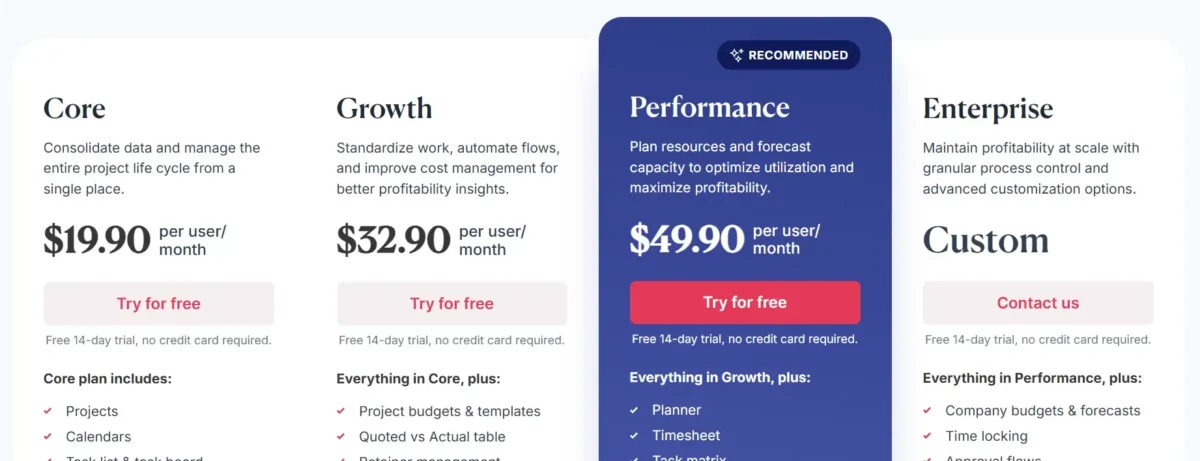
Pricing update: as, Scoro runs four paid tiers, each requiring a minimum of five user seats.
| Plan | Approx. Price (annual billing) | Best For |
| Core | ~$19.90user/month | Small teams needing core project and billing tools |
| Work Hub Standard | ~$32.90/user/month | Growing teams need deeper workflow automation |
| Work Hub Pro | ~$49.90/user/month | Teams needing resource forecasting and utilization data |
| Ultimate | Custom pricing | Enterprises needing SSO, unlimited custom fields, and multi-account reporting |
Because of the 5-seat floor, the real starting cost for most small teams lands closer to $19.90 a month rather than the headline per-user figure. That’s worth factoring in before you commit, especially if your team is closer to two or three people than five.
Is Scoro Worth the Cost?
For teams with five or more people managing multiple client projects, yes, generally. The consolidation of billing, time tracking, and reporting into one subscription often costs less than stitching together three separate tools. For smaller teams, the math gets tougher, and it’s fair to ask whether you’re paying for features you won’t fully use.
Is Scoro Right For Your Needs?
Who Would be a Good Fit for Scoro?
Marketing agencies
Agencies juggling multiple client budgets benefit heavily from Scoro’s profitability tracking and time-to-invoice pipeline, which keeps overservicing in check.
Consulting firms
Consultants billing by retainer or hourly rate get accurate, auditable time records tied directly to client invoices.
IT services
IT service companies managing recurring contracts appreciate the resource planning tools for balancing technician workloads.
Creative teams
Design and creative studios can track project stages visually while keeping an eye on billable hours per deliverable.
Project managers
PMs overseeing several concurrent projects get real-time dashboards instead of chasing spreadsheet updates.
Finance departments
Finance leads gain direct visibility into project margins without waiting on manual reports from delivery teams.
Who Would be a Bad Fit for Scoro?
Healthcare industry
Healthcare operations usually need specialized compliance tooling that general PSA software doesn’t cover natively.
Manufacturing sector
Manufacturing workflows revolve around inventory and production lines, areas outside Scoro’s core strength.
Small startups
Teams under five people absorb the seat minimum poorly, making the effective cost per active user disproportionately high.
Highly specialized teams
Teams needing industry-specific tools, like construction estimating software, may find Scoro’s generalist approach limiting.
Budget-conscious companies
If cost is the primary deciding factor, lighter tools like Avaza or Plutio deliver more value per dollar for very small teams.
Simple task management users
If you just need a to-do list and shared calendar, Scoro is significant overkill for that job.
Our Review Methodology
We built this review by pulling directly from Scoro’s own pricing and product pages, then cross-referencing that against independent, verified reviews on G2, Capterra, and TrustRadius. Wherever review platforms disagreed on ratings, we noted the discrepancy rather than picking whichever number looked best.
How We Test & Score Tools
Core Functionality (25% of final scoring)
We evaluate whether the software delivers on its core promise: in this case, unified project, time, and financial management, without requiring third-party add-ons to function properly.
Standout Features (25% of final scoring)
We look for capabilities that set a tool apart from generic competitors, like Scoro’s built-in profitability tracking and multi-currency invoicing.
Ease of Use (10% of final scoring)
We factor in onboarding time, interface clarity, and how steep the learning curve feels for a first-time user without technical training.
Onboarding (10% of final scoring)
We assess the quality of setup support, documentation, and how long it realistically takes teams to get fully operational.
Customer Support (10% of final scoring)
We weigh response times, support channel variety, and consistency of feedback across independent review platforms.
Customer Reviews (10% of final scoring)
We aggregate scores from G2, Capterra, and TrustRadius to capture a broader, less biased sentiment than any single source alone.
Value for Money (10% of final scoring)
We compare pricing against feature depth and against direct competitors serving the same team size and use case.
Scoro Specifications
Scoro Customers
Small professional services businesses make up the bulk of Scoro’s customer base, with marketing and advertising agencies representing the largest single segment. IT services, design firms, and architecture and engineering companies round out the rest of its core audience.
Data Security and Compliance
Scoro uses encryption, secure data centers, and regular backups to protect customer data, and its Ultimate plan adds single sign-on for enterprise-grade access control. The platform also supports role-based permissions, letting admins limit who sees financial or client data across the organization.
Scoro vs Competitors
How Does Scoro Match Up to the Competition?
| Tool | Strength vs Scoro | Weakness vs Scoro |
| monday.com | Cheaper per seat, more visual workflow builder | Weaker native billing and profitability reporting |
| ClickUp | Deeper task customization, stronger AI features | No native PSA financial depth or retainer billing |
| Smartsheet | Better for spreadsheet-style power users | Less built-in CRM and invoicing functionality |
| Teamwork | Closer price-to-feature match for small agencies | Less advanced resource forecasting |
If your priority is financial discipline across client projects, Scoro tends to win. If you mainly need flexible task boards and don’t care about built-in billing, a Scoro alternative like ClickUp or monday.com may actually serve you better and cost less.
New Product Updates from Scoro
AI-Powered Features and Recent Improvements
Scoro recently rolled out ELI, an AI assistant that lets users search project and financial data using plain language instead of digging through menus. It also launched a dedicated MCP server for deeper integration workflows, though some reviewers still find the AI features less mature than competitors’ offerings.
New Apps and Work Management Updates
The vendor ships roughly 13 version updates a year, and subtask functionality is scheduled for early 2026, aimed at making complex, multi-stage projects easier to manage from quote through to final invoice.
Scoro Company Overview & History
Scoro Software was founded in 2013 in Tallinn, Estonia, and has since grown into one of the more established players in the professional services automation space. The company has built its reputation on consolidating fragmented business tools, projects, time, billing, and CRM, into a single platform, and it continues to expand through frequent feature releases and a growing integration ecosystem.
Conclusion
So, is Scoro worth the cost and the learning curve? For teams of five or more people running multiple client projects, the answer leans firmly toward yes. The combination of project management, time tracking, and financial reporting in one subscription genuinely saves the app-switching headache that fragmented tool stacks create, and the profitability visibility alone can pay for itself for agencies watching margins closely.
For very small teams or anyone just wanting simple task management, though, the 5-seat minimum and the learning curve make Scoro a harder sell. Weigh your team size, your budget, and how deep your financial reporting needs really go. If those needs are substantial, Scoro earns its place. If they’re not, a lighter tool will likely serve you better without the added cost and setup time.
Scoro Review – FAQs
What is Scoro?
Scoro is an all-in-one business management platform combining project management, CRM, time tracking, and financial reporting for professional services companies.
Is Scoro Cloud-Based?
Yes. Scoro runs entirely in the cloud, accessible through any modern browser or its mobile apps.
Is Scoro Secure?
Scoro uses encryption, secure data centers, and regular backups, with single sign-on available on its Ultimate plan for stricter access control.
Does Scoro Have a Mobile App?
Yes, on both Android and iOS, though it offers a lighter feature set than the full browser experience.
How Does Scoro Help With Project Management?
It combines Gantt charts, task dependencies, and milestone tracking with real-time budget and profitability data tied to each project.
Can Scoro Support Remote Team Collaboration?
Yes. Since it’s fully cloud-based, distributed teams can track time, update tasks, and monitor budgets from anywhere.
Can Scoro Handle Multiple Projects Simultaneously?
Yes, it’s specifically built for teams juggling several concurrent client projects with separate budgets and timelines.
Is Scoro Customizable for Different Business Needs?
Very much so. Custom fields, permissions, and dashboard layouts let different industries adapt the platform to their own workflows.
Is Scoro good for small businesses?
It can work well for small professional services teams of five or more, but the seat minimum makes it costly for teams under that size.
How much does Scoro cost per month?
Plans start at around $19.90 to $49.90 per user per month on annual billing, with a required minimum of five seats.
Does Scoro integrate with QuickBooks and Xero?
Yes, both are native integrations, alongside Google Calendar, Outlook, BambooHR, and Zapier for broader connectivity.
How long does it take to learn Scoro?
Most users need a few days to get comfortable with basics, and a few weeks to master advanced reporting and automation.
What are the best Scoro alternatives?
monday.com, ClickUp, Teamwork, and Smartsheet are the most commonly compared alternatives, depending on your priorities.
Does Scoro offer a free trial?
Yes, a 14-day free trial is available with no credit card required.
Is Scoro suitable for enterprise teams?
Yes, through its Ultimate plan, which adds single sign-on, unlimited custom fields, and multi-account reporting for larger organizations.

Nitin Alin is the founder of SaaShostly.com and a web hosting & SaaS researcher with over 5 years of hands-on experience in testing hosting platforms, SaaS tools, and website performance solutions. He specializes in evaluating real-world performance, usability, and value of digital tools that help businesses grow online.
Through SaaShostly.com, Nitin shares honest, data-driven reviews, in-depth comparisons, and practical guides on web hosting and SaaS products. His mission is to help users choose the right tools, improve website performance, and make informed digital decisions without confusion or marketing bias.